

What is Chrome 68?

On May 29, 2018, the internet giant Google released a new version of their Chrome browser called Chrome 68. According to their Chromium blog, the browser will be available from the start of July, replacing the previous version.
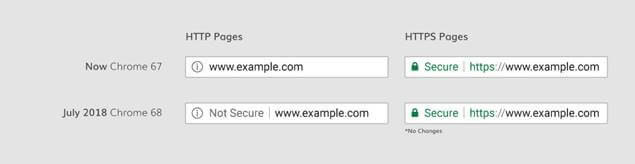
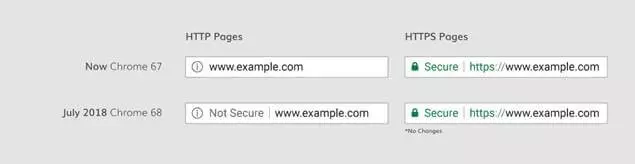
Among the changes that will be found in the new browser is a focus on website security, whereby all HTTP webpages will be marked as “not secure”. An HTTP page is a webpage that does not have a valid SSL certificate, therefore implying that the page is not end-to-end encrypted and may have lower security levels. Adding an SSL certificate to your website authenticates it by encrypting all information exchanged between a user and the site, protecting it from theft and misuse. Chrome is now the first major browser to explicitly mark websites without HTTPS as unsafe. Previous versions had only warned of missing SSL certificates on login pages or when entering banking/sensitive data.
Why is Chrome 68 making this change?
Chrome 68 is distrusting all HTTP websites in an effort to clean up website security on the internet. This change will be immediately visible in the browser’s address bar, where you will be able to see the words “not secure” to the left of the URL on any webpage that isn’t secured with a valid SSL certificate. The biggest change is that the “not secure” label will now be applied to any webpage missing an SSL certificate – not just form or login pages. This decision to distrust all unsecured pages, regardless of content is in keeping with their conduct over the last couple of years. They have been promoting the use of HTTPS encryption and gradually marking HTTP webpages as not secure. The reason for this is simple: a focus on internet safety and user trust. With each passing day there are more and more cyber criminals trying to take advantage of gaps in the knowledge of unsuspecting internet users, and making “safety a standard” means that people can have greater peace of mind when surfing the internet. As well as being easier targets for online criminals, websites only using HTTP are susceptible to annoying, unwanted ads popping up which effectively ruin user experience.
In the past, a small “i” symbol in the address bar was the only indication that a page being visited was unencrypted. Users would need to click on the symbol or be browsing in incognito mode to see the written security warning. However, after a specially conducted study, Google found that this minimal indicator was overlooked by most users. Since webpage URLs are now indented to the right quite obviously by the words “not secure”, the danger should be easy for any Chrome user to recognize.
Although Chrome 68 are ahead of the curve in distrusting all HTTP webpages, this trend towards internet safety is one that all the major browser vendors (Mozilla, Google, Apple) have been making with small changes to their browser that encourage HTTPS use and discourage having only HTTP.
Want to make your website more secure? Learn more about SSL certificates from IONOS and how they increase your site’s trustworthiness.
What are Google trying to achieve?
Google have long been trying to present themselves as advocates for Internet security. Chrome 56, released in January 2017, began applying warnings to websites that process sensitive data through an unencrypted connection. The new layer of protection afforded by Chrome 68 means that users will be informed on the topic of security and will have more protection from phishing methods and “man-in-the-browser” attacks.
Google are also looking out for themselves with this action. It is in their interests that users continue to feel safe and secure using the internet for transactions and browsing. Users need to keep spending more and more time online for the company’s growth to keep expanding. A large-scale campaign against thousands of insecure SSL certificates from Symantec has proven that Google are serious on the topic.
What does this mean for websites?
If you run a website secured with HTTPS, then nothing will change for you. However, if your website is not secured with an SSL certificate, or if some pages are but others aren’t, visitors will receive an “insecure connection” warning message when trying to access the affected pages on a Chrome 68 browser. While it might not be every page on your site, having any of your pages produce this warning sign will be an immediate red flag for most users. This will have a definite negative impact on website traffic which is a huge problem, particularly if you are running an e-commerce site. Sometimes websites will have their login or payment page secured with HTTPS but the rest of the website left without and that is no longer sufficient. In a November 2014 survey, the certification authority authority Globalsign found that 85 percent of online shoppers feel deterred by unencrypted websites. Thanks to this action from Google 68, all webpages will need to be secured with an SSL certificate to ensure a smoother, safer visitor experience.
However, it is still definitely worth it to provide a certificate for all webpages even if your website is not an e-commerce site. As well as affecting visitor traffic to your website, having unsecure pages in your website affects your SEO ranking. As part of Google’s actions to encourage HTTPS security, their algorithms actively promote HTTPS webpages in their search rank results, and lower those without the appropriate SSL certificate.
What are the advantages of encrypting a website?
The smoother the user experience, and the greater the level of trust from your visitors, the more your website will flourish. Website security is the key to this, and HTTP has been an outdated standard for years. In fact, its original function was not security based at all. Adding an SSL certificate to make your page secure means that you are adding a layer of encryption and page authenticity which will in turn protect your users’ data. This security layer also affords you protection as a site runner from invasions from third parties, including Wi-Fi hotspots or other unsecure connections. These external parties may slip extra advertisements into your website that will drastically slow it down, creating a negative experience for the visitor and potentially putting them at risk from harmful content. If you can guarantee a safe, authentic web experience for visitors, this will result in more transactions being carried through in their entirety, reduce bounce rates and gain a good reputation for your site.
There are also increasingly more web technologies and browser features/plugins that necessitate HTTPS to function. Continuing to run an HTTP website means that you are excluding your site from the latest features and updates.
Chrome will stop highlighting HTTPS sites as “secure”
In May 2018, Google announced the removal of the green padlock icon, which currently appears on HTTPS pages as a security indicator. Google believes that users should think of the internet as “safe by default”. For HTTP sites however, the red “not secure” alert will remain, making the pages even more recognizable. As stated on the Google Chromium Blog, this change should be rolled out in September 2018 with the release of Chrome 69.
How do I transition to HTTPS?
All you need to do to ensure your websites security (and that you won’t be condemned by Chrome 68) is to purchase an SSL (Secure Sockets Layer) protocol certificate or a TLS (Transport Layer Security) protocol certificate. There is no hardware requirement to do this. If your website already has certificates for some pages but not others, make sure you have every page of your website covered. You should also double check that any third party services you may employ (advertising, analytics services, etc.) are also compatible with HTTPS to avoid any issues. Thanks to the increasing sophistication of modern hacking methods, there is no justification for prioritizing certain webpages over others. In addition to a good Google SEO ranking and accelerated performance with HTTP/2, user confidence is the number one benefit from this transition.
In our guide we explain how to switch to HTTPS.
Whether Chrome 66 or Chrome 70, neither will trust Symantec
Google Chrome now only support HTTPS connections. However, some websites are still marked with a warning message despite their HTTPS certification – websites that use outdated certificates issued by Symantec. According to Google, Symantec has repeatedly issued incorrect certificates to thousands of domains, proving itself to be unsafe and unreliable on a number of occasions.
Google responded to these discrepancies by gradually distrusting Symantec issued certificates, concluding with Chrome 66. Since April 17th, 2018, websites that have TLS certificates that were issued by Symantec before June 6th, 2016, have been marked with a warning message stating that data on the website could be intercepted by third parties. Chrome 68 now displays a clear “Not Safe” warning. When the scheduled update from Chrome 68 to Chrome 70 takes place on October 23rd, 2018, this warning will become even more obvious for all Symantec certificates issued before December 1st, 2017. The “Not Secure” note will be displayed in red and highlighted as soon as users try to enter their data on an insecure website.
The number of domains that will be affected by this change was discovered by an Airbnb security technician working on their own initiative. 11,510 domains, or almost 10% of the most visited websites according to an Alexa ranking, will be marked as unsafe. The reason this number is so high is that Chrome 70 not only distrusts outdated certificates issued directly by Symantec, they will also blacklist certificates whose trust chain is based on their certifcates (including GeoTrust, RapidSSL and Thawte). All Symantec certificate users are therefore advised to check the date of issue and get their certificate replaced free of charge if necessary.
There is no time to lose. Find out how to replace an invalid SSL certificate from Symantec now, before it’s too late.