

What is natural language processing?

Natural language processing involves the reading and understanding of spoken or written language through the medium of a computer. This includes, for example, the automatic translation of one language into another, but also spoken word recognition, or the automatic answering of questions. Computers often have trouble understanding such tasks, because they usually try to understand the meaning of each individual word, rather than the sentence or phrase as a whole. So for a translation program, it can be difficult to understand the linguistic nuance in the word ‘Greek’ when it comes to the examples ‘My wife is Greek’ and ‘It’s all Greek to me’, for example. Through natural language processing, computers learn to accurately manage and apply overall linguistic meaning to text excerpts like phrases or sentences. But this isn’t just useful for translation or customer service chat bots: computers can also use it to process spoken commands or even generate audible responses that can be used in communication with the blind, for example. Summarizing long texts or targeting and extracting specific keywords and information within a large body of text also requires a deeper understanding of linguistic syntax than computers had previously been able to achieve.
How does natural language processing work?
It doesn’t matter whether it’s processing an automatic translation or a conversation with a chat bot: all natural language processing methods are the same in that they all involve understanding the hierarchies that dictate interplay between individual words. But this isn’t easy – many words have double meanings. ‘Pass’ for example can mean a physical handover of something, a decision not to partake in something, and a measure of success in an exam or another test format. It also operates in the same conjugation as both a verb and a noun. The difference in meaning comes from the words that surround ‘pass’ within the sentence or phrase (I passed the butter/on the opportunity/the exam). These difficulties are the main reason that natural language processing is seen as one of the most complicated topics in computer science. Language is often littered with double meanings, so understanding the differences requires an extensive knowledge of the content in which the different meanings are used. Many users have first-hand experience of failed communication with chat bots due to their continued use as replacements for live chat support in customer service. But despite these difficulties, computers are improving their understanding of human language and its intricacies. To help speed this process up, computer linguists rely on the knowledge of various traditional linguistic fields:
- The term morphology is concerned with the interplay between words and their relationship with other words
- Syntax defines how words and sentences are put together
- Semantics is the study of the meaning of words and groups of words
- Pragmatics is used to explain the content of spoken expressions
- And lastly, phonology covers the acoustic structure of spoken language and is essential for language recognition
Part-of-Speech-Tagging (PoS)
The first step in natural language processing involves the technique of morphology: It involves defining the functions of individual words. Most people will be familiar with a simplified form of this process from school, where we’re taught that words can be defined either as nouns, verbs, adverbs or adjectives. But determining a word’s function for a computer isn’t such a simple task, because – as we’ve seen with the example of ‘pass’ earlier – the classification of a word can depend on its role in a sentence and many words have changing functions.
There are various methods to help try and sort out the ambiguity of words with multiple functions and meanings: the oldest and most traditional method is based on the many text corpora like the Brown corpus or the British National corpus. These corpora consist of millions of words from prose texts that are tagged. Computers can learn rules for the way that different words have been tagged in these texts. For example, the Brown corpus has regularly been used to prove to computers that a verb no longer has a predicate function if there is an article before it.
More recently, modern tagging programs use self-learning algorithms. This means that they automatically derive rules from the text corpora as they read, using these to define further word functions. One of the best-known examples of a tagging method based on algorithms like this is the Brill tagger, which first determines the highest occurring word function in the sentence, in order to then use rules to define the other word functions around it. A rule could be something like: ‘If the first word of the sentence is a proper noun, then the second word is likely to be a verb’. This is a common theory, so in the sentence ‘Jason bought a book’, the word ‘bought’ can be defined as a verb.
Parse trees/tree diagrams
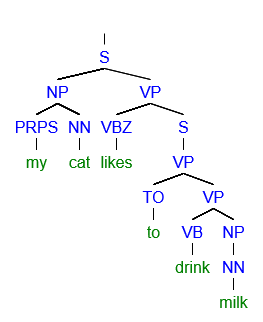
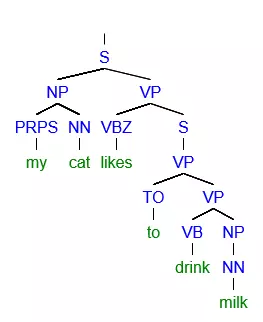
In the second step, knowledge derived from syntax is used to understand the structure of sentences. Here, the computer linguistics program uses tree diagrams to break a sentence down into phrases. Examples of phrases are nominal phrases, consisting of a proper noun or a noun and an article, or verbal phrases, which consist of a verb and a nominal phrase.
Dividing a sentence into phrases is known as ‘parsing’ and so the tree diagrams that result from it are known as parse trees. Each language has its own grammar rules, meaning that phrases are put together differently in each one and that the hierarchy of different phrases vary. Grammar rules for a given language can be programmed into a computer program by hand, or learned by using a text corpus to recognize and understand sentence structure.
Semantics
The third step in natural language processing takes development into the realm of semantics. If the word has the same tagging and syntactical function, it’s still possible that the word has a variety of different possible meanings. This is best illustrated with a simple example: Chop the carrots on the board She’s the chairman of the board Now somebody with a good enough understanding of the English language would be able to recognize straight away that the first example refers to a chopping board and the second to a board of directors or similar. But this isn’t so easy for a computer. In fact, it’s actually rather difficult for a computer to learn the necessary knowledge required to decipher when the noun ‘board’ refers to a board used to chop vegetables and other food on, and when it refers to a collection of people charged with making important decisions (or any of the other many uses of the noun ‘board’ for that matter). As a result, computers mostly attempt to define a word by using the words that appear before and after it. This means that a computer can learn that if the word ‘board’ is preceded or followed by the word ‘carrots’, then it probably refers to a chopping board, and if the word ‘board’ is preceded or followed by the word ‘chairman’, that it most likely refers to a board of directors. This learning process succeeds with the help of text corpora that show every possible meaning of the given word reproduced correctly through many different examples. All in all, natural language processing remains a complicated subject matter: computers have to process a huge amount of data on individual cases to get to grips with the language, and the introduction of words with a double meaning quickly increases the chance of a computer misinterpreting a given sentence. There’s lots of room for improvement, most notably in the area of pragmatics, because this concerns the context that surrounds a sentence. Most sentences conform to a context that requires a general understanding of the human world and human emotions, which can be difficult to teach a computer. Some of the greatest challenges lie in attempts to understand moods like irony, sarcasm, and humorous metaphors – although attempts have already been made to try and classify these.
Natural language processing tools
If you’re interested in trying out natural language processing yourself then there are plenty of practical tools and instructions online. Deciding which tool is best suited to your needs depends on which language and which natural language processing methods that you want to use. Here’s a rundown of some of the most famous open source tools:
- The Natural Language Toolkit is a collection of language processing tools in Python. The toolkit offers access to over 100 text corpora presented in many different languages including English, Portuguese, Polish, Dutch, Catalonian and Basque. The toolkit also offers different text editing techniques like Part-of-Speech tagging, parsing, tokenization (the determination of a root word; a popular preparation step for natural language processing), and the combining of texts (wrapping). The Natural Language Toolkit also features an introduction into programming and detailed documentation, making it suitable for students, faculty, and researchers.
- Stanford NLP Group Software: this tool is presented by one of the leading research groups in the world of natural language processing offers a variety of functions. It can be used to determine the basic forms of words (tokenization), the function of words (Parts-of-Speech tagging), and the structure of sentences (parsing). There are also additional tools for more complex processes like deep learning, which studies the context of sentences. The basic functions are available in the Stanford CoreNLP. All programs of the Stanford NLP Group are written in Java and available for English, Chinese, German, French, and Spanish.
- Visualtext is a toolkit that’s written in a specific programming language for natural language processing: NLP++. This scripting language was primarily developed to aid deep text analyzers who carry out analysis that is used to improve a computer’s global understanding (in other words information about environments and society). Visualtext’s main focus is to help extract targeted information out of huge quantities of text. So you could use Visualtext to summarize long texts, for example, but also to collect all information about particular topics from different web pages and to present them as an overview. Visualtext is free of charge if used for non-commercial purposes.