

Twitter Analytics: Twitter for businesses – Part 2

The first article in the series ‘Twitter for businesses’ gave us an introduction to the subject and offered tips about how to optimize your Twitter to gain a large following. In the second part of the series, we will present several Twitter analytics tools, which can support a company with its Twitter presence and allow you to evaluate its overall success. Twitter’s many business-orientated offerings make it particularly interesting from a social media marketing perspective. For example, the website features headings like ‘Business’ and ‘Marketing’, a blog for smaller businesses, as well as the eBook ‘#TweetSmarter’; the latter informing creative industry professionals how to best achieve more conversions via the social media platform. Furthermore, Twitter offers the analysis tool Twitter Analytics; a comprehensive analysis tool that can measure the reach of your tweets and the engagement rate of your Twitter followers. This tool has been designed specifically for strategical marketing use and was originally only available as a fee-based product. However, since 2014, it has been available free of charge and to this day remains a very useful tool for measuring the success of a company account. But it is not just for Twitter Analytics that tools exist – there are also other helpful Twitter features out there. These include tools for the likes of account administration, expanding your following, and the optimization of content. Nowadays it has become impossible to try and keep track of just how many of these tools exist. For this reason we have compiled a list of the most useful tools for successful Twitter marketing. Additionally, we will also explain the best and most optimal way to use Twitter Analytics for your business.
Twitter – improve your tweets and account administration
Simply by implementing the right tools enables you to make Twitter, as a marketing channel, so much easier. This is especially the case for smaller and medium-sized businesses, who need to integrate their Twitter activity into the day-to-day business, without the advantage of a large marketing department. More often than not, these will relieve the workload as well as immensely improve the potential for success of the chosen Twitter strategy.
Basics and account administration
Lengthy URLs, i.e. links, take up a lot of space in tweets and use up valuable characters that could and should be used for other purposes. For this reason, so-called URL shorteners are amongst the most indispensable tools for Twitter users. Tools like Google URL Shortener, Bitly, and TinyURL all serve the purpose of assisting with longer URLS. With these you can generate a shorter ‘URL alias’ which then forwards the reader further onto the desired URL. When it comes to account administration, tools like Hootsuite and TweetDeck can be very useful. Hootsuite belongs to the Twitter tool classics and, among other things, allows the administration of multiple accounts. Using a dashboard, the program displays all Twitter activities and evaluates them. A structured overview of account activities is offered by Tweetdeck, an equally popular Twitter tracking tool. This particular service is maintained by Twitter themselves, and displays your timeline, re-tweets, and direct messages across multiple columns. The clear interface allows you to easily monitor and maintain the activity of several different accounts. One of the biggest challenges posed by Twitter is that of timing. With Twuffer you can preemptively write tweets and then schedule them to be posted automatically. This makes it a particularly useful tool for business accounts as it means that you can easily send your tweet out at peak time, i.e. when the most amount of your followers are online, without having to interrupt your work or even free time. With Audiense it is possible, in advance, to identify the optimal time for publishing tweets. On top of this, the tool also helps to come up with target audience orientated tweets, and analyzes the activities and interests of your followers. With this range of functions, it is hardly any surprise that this tool does not come free of charge.
Reaching valuable followers
At the core of any success on Twitter are the followers. The tool Twellow helps you to find users that belong in your target group. It organizes Twitter users by names as well as by subject area and industry; this ‘yellow pages’ of sorts helps you to quickly find new and relevant followers. Users that have similar interests can also be found using the tool Tweepi. Users of Tweepi are filtered based on areas of interest, offering the possibility to access further information on followers and the following-status of individual users. If, above all, your priority is finding followers that have a large reach and influence, then Klout is the right tool for you. This particular tool generates rankings of influential persons reflective of the prominence of their online presence, and is particularly popular in the USA. These rankings allow you to quickly discover which person(s) are viewed as the experts of authority in certain branches and fields. It is unknown what the algorithm for the creation of these rankings is, but it does manage to evaluate the number of followers (or likes) of certain individuals within social media. There is also the option of the tool Grouptweet, which also allows you to send tweets aimed at pre-defined groups of followers, meaning that you can guarantee that the tweet reaches the right target.
Content optimization
Up until now, the tools we have mentioned have been to help with the organization of Twitter accounts. But is it also possible to get technical support for content and the content creation? The answer is yes. One such tool is Nuzzel with which, for example, you can carry out content research; Nuzzel lists the top notifications of one’s own followers and shows what is of interest to the overall community. Such an overview of follower’s current interests can provide valuable inspiration for your next successful tweet. The tool Trendistic is a good alternative if an account does not yet have sufficient followers for an analysis by Nuzzel. By contrast, the tool Twtpoll generates content that is particularly popular with companies because of its ability to get followers actively involved through the use of surveys. The tool makes it easy to quickly create surveys and integrate them into tweets, or online platforms, like blogs or websites.
Introduction to Twitter Analytics: measuring success on Twitter
For anyone out there who has their Twitter account for more than just personal reasons, but also for strategic marketing purposes, there are also some very useful tools out there which use statistics to measure the success of a Twitter account. Such Twitter metrics tools allow you to identify the strengths and weaknesses of your own Twitter strategy, and improve your overall activity as a result. Without a doubt, Twitter Analytics is among the most popular of these analysis tools. It is not even necessary to register – simply click on the drop-down menu of your Twitter account and you will suddenly find yourself amongst Twitter reports in the form of dashboards, diagrams, etc.
Which statistics are most important for Twitter?
To be able to precisely assess the statistics from Twitter Analytics, you first need to consider which successes you even want to measure. For that reason you should define the most important KPIs of the account – KPI stands for ‘Key Performance Indicator’. What is meant by this are numbers, which can be used to track progress towards the desired target. For example, some of the most important KPIs when it comes to social media are the growth of followers, the reach of the posts, and the amount of profile clicks. In this regard, Twitter is no exception, and these indicators of success can be viewed statistically through Twitter Analytics tools.
When determining the KPIs for measuring success, it is important that you are aware of your own target/objective. Is the most important thing to reach as many users as possible? Or should users actively interact with the content through engagements, i.e. by sharing or commenting? Or should the primary aim of the Twitter campaign be to achieve as many conversions as possible? Whatever the answer, different KPIs are decisive depending on the different targets.
For example, if your goal is to increase the business presence, then the decisive KPIs would be the number of new followers, profile clicks, and mentions. On the other hand, for companies in the service industry it is customer service that is decisive – and the most important Key Performance Indicator is a high interaction rate on the account. If it is the case that you wish to establish a reputation as a new, knowledgeable source, then it is above all the reach of the tweets and the number of re-tweets, or you evaluate the top tweets based on successful subjects.
Twitter Analytics measures the different KPIs and then displays them via clear and easy to read diagrams. But exactly which categories does Twitter Analytics cover? And how can you use these statistics to help you optimize your overall Twitter strategy?
Twitter Analytics – the most important components
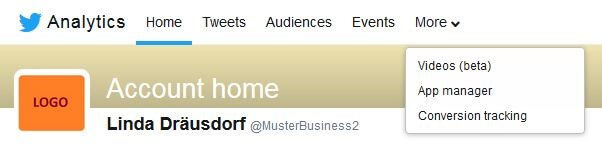
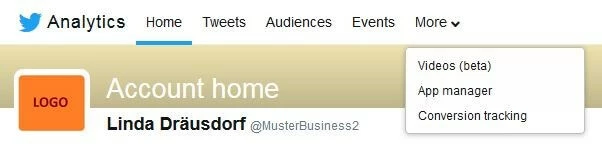
Twitter Analytics is composed of several different headings. The first three of which – titled Home, Tweets, and Audiences – prepare the account’s data statistically.
‘Home‘: KPIs and functions
The account homepage provides general information regarding the account’s activity. A brief summary of the most important results is displayed at the top of the page.
 macgyverhhshutterstock
The following is a list of all the KPI statistics displayed on the homepage:
- Tweet volume: the number of tweets sent
- Tweet impressions (all tweets): the frequency that users have seen the tweets in their timeline
- Number of profile visits
- Number of newly acquired followers
- Number of mentions of your username in other tweets
- The evaluation of a ‘tweet highlight’ featuring…
- Top tweet: the tweet with the largest amount of interactions
- Top follower: the follower with the highest number of followers themselves
- Top mention: the tweet, featuring your username, that generated the most impressions
- Best Twitter Card
‘Tweets’: KPIs and functions
The second heading, ‘Tweets’, assesses the relevant information for individual tweets. This information is available in the form of either an average value of total tweets or for each individual tweet.
 kenary820Shutterstock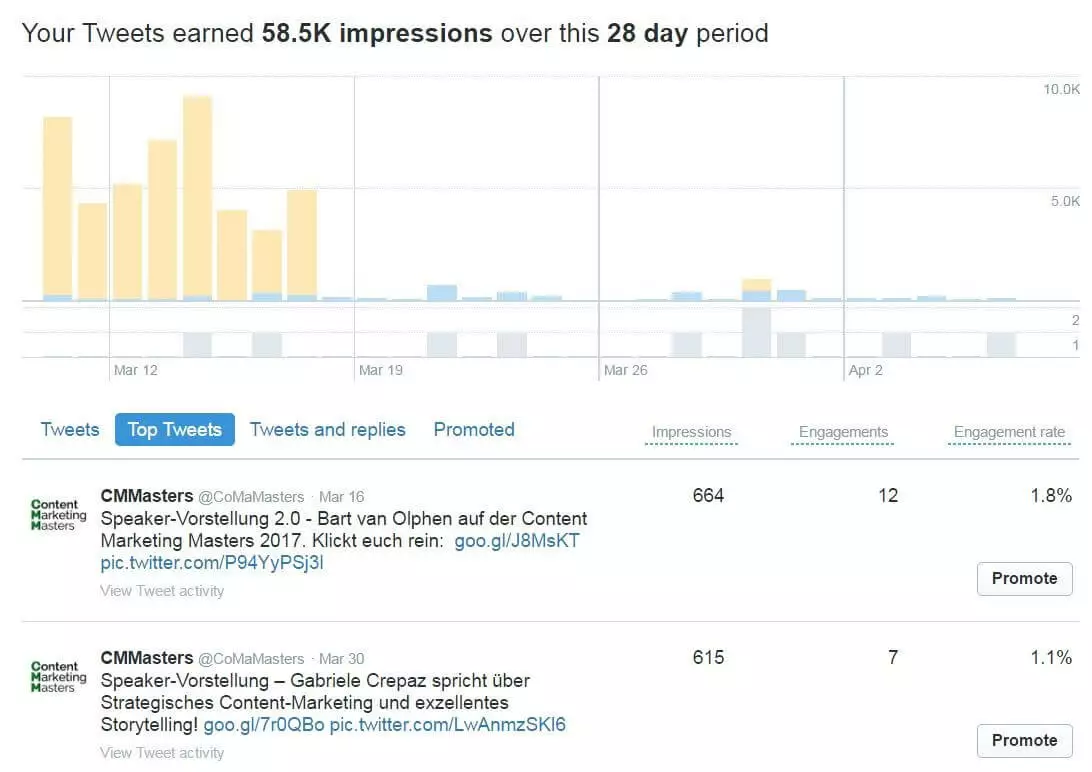
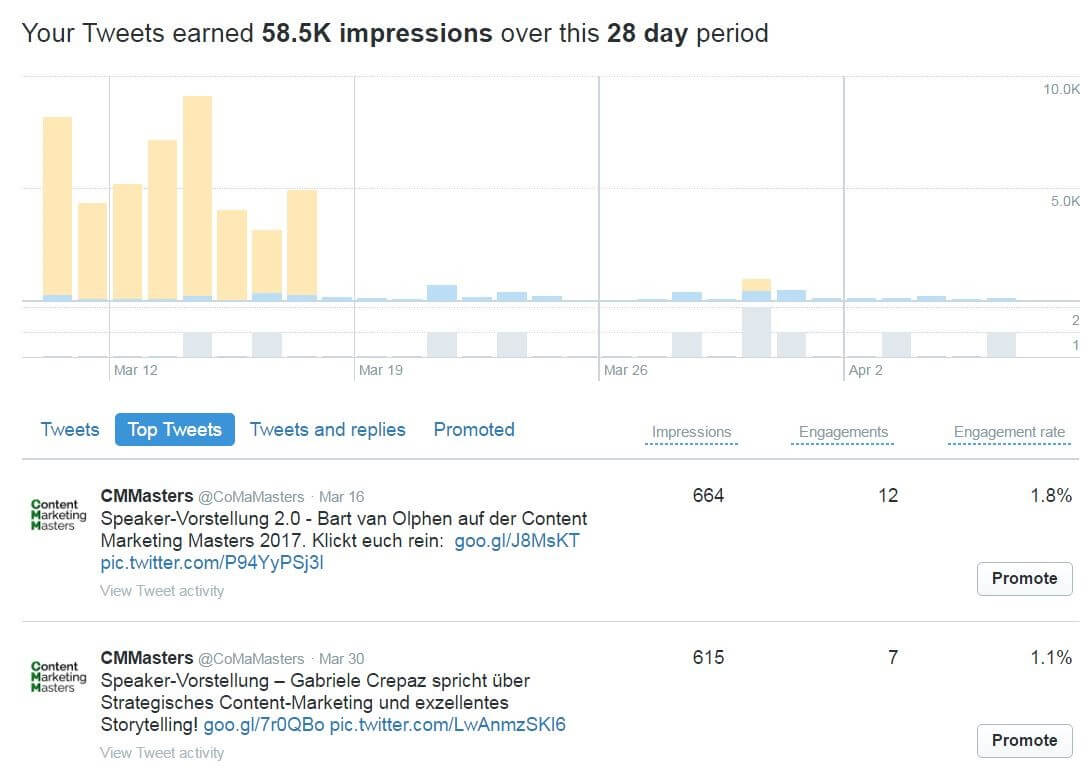
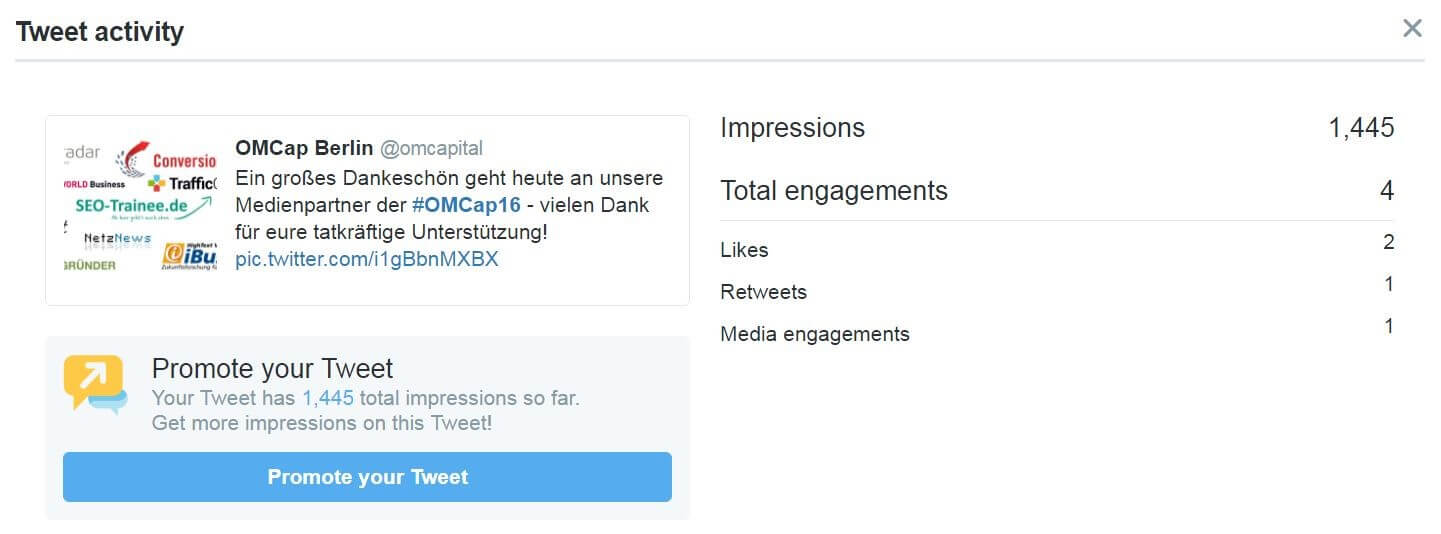
Towards the top of the dashboard we see a graphical timeline of tweet impressions from the last month. By clicking on the date range you can change the time of the statistics as you see fit. In the Impressions timeline, published tweets are listed in chronological order, with statistics for both impressions and engagements. Next to that you will find further graphs relating to click rates, re-tweets, and replies. Additionally, every tweet from the timeline has its own detailed overview – a separate information window summing up all the relevant details regarding the success of the individual tweet.
 macgyverhhshutterstock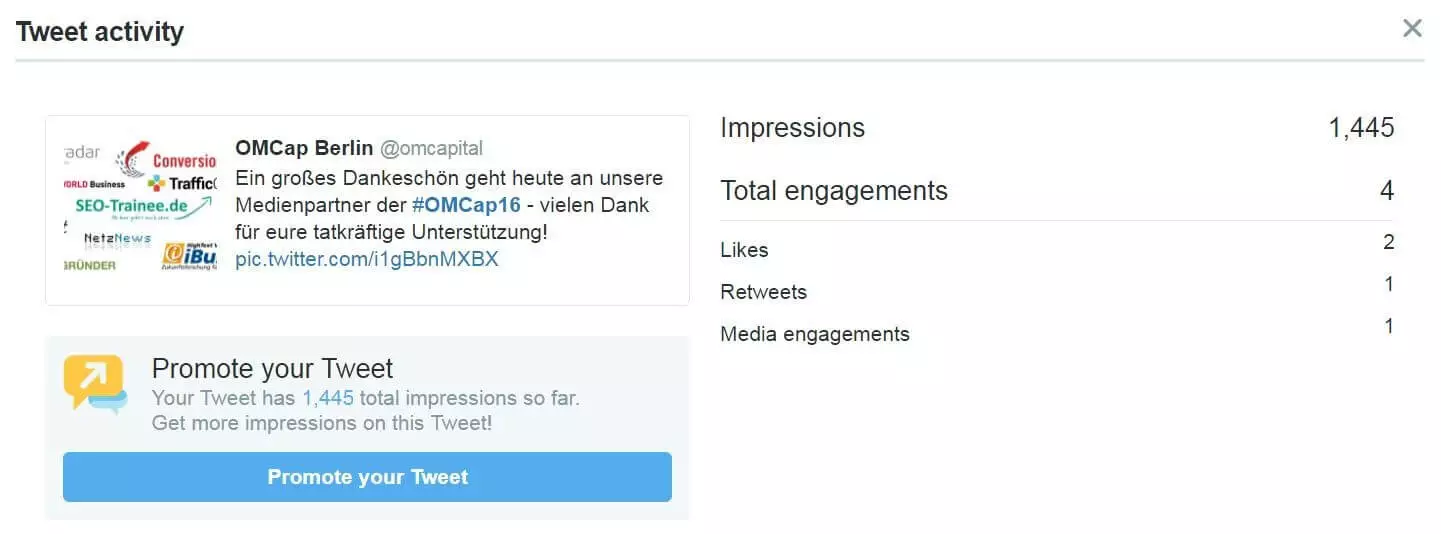
Here is a list of all KPIs included under the ‘Tweet’s category heading:
- Detailed information on the timeline of tweet impressions with a choice of time
- List of the top tweets
- A timeline of the Twitter engagement rate, which Twitter calculates by dividing the number of impressions by the number of engagements
- Information on individual engagements: graphs displaying the timeline of link clicks, views of photos and videos, replies, retweets, likes, and profile viewsDetailed information on each individual tweet: info relating to retweets, likes, link clicks, replies, media interactions (how often photos and videos are viewed), detail expands (clicks on the tweet to view more details), and profile views
The statistics for tweet Impressions only refer to the impressions made on Twitter itself – any impressions that may take place with Twitter users over third-party providers like Tweetbot and Twitterific are not counted.
‘Audiences‘: KPIs and functions
Arguably the most complex category is that of the ‘Audience’ – it is also undoubtedly the most sensitive when it comes to data protection and privacy. This is where information on the account’s followers is gathered and displayed via a dashboard.
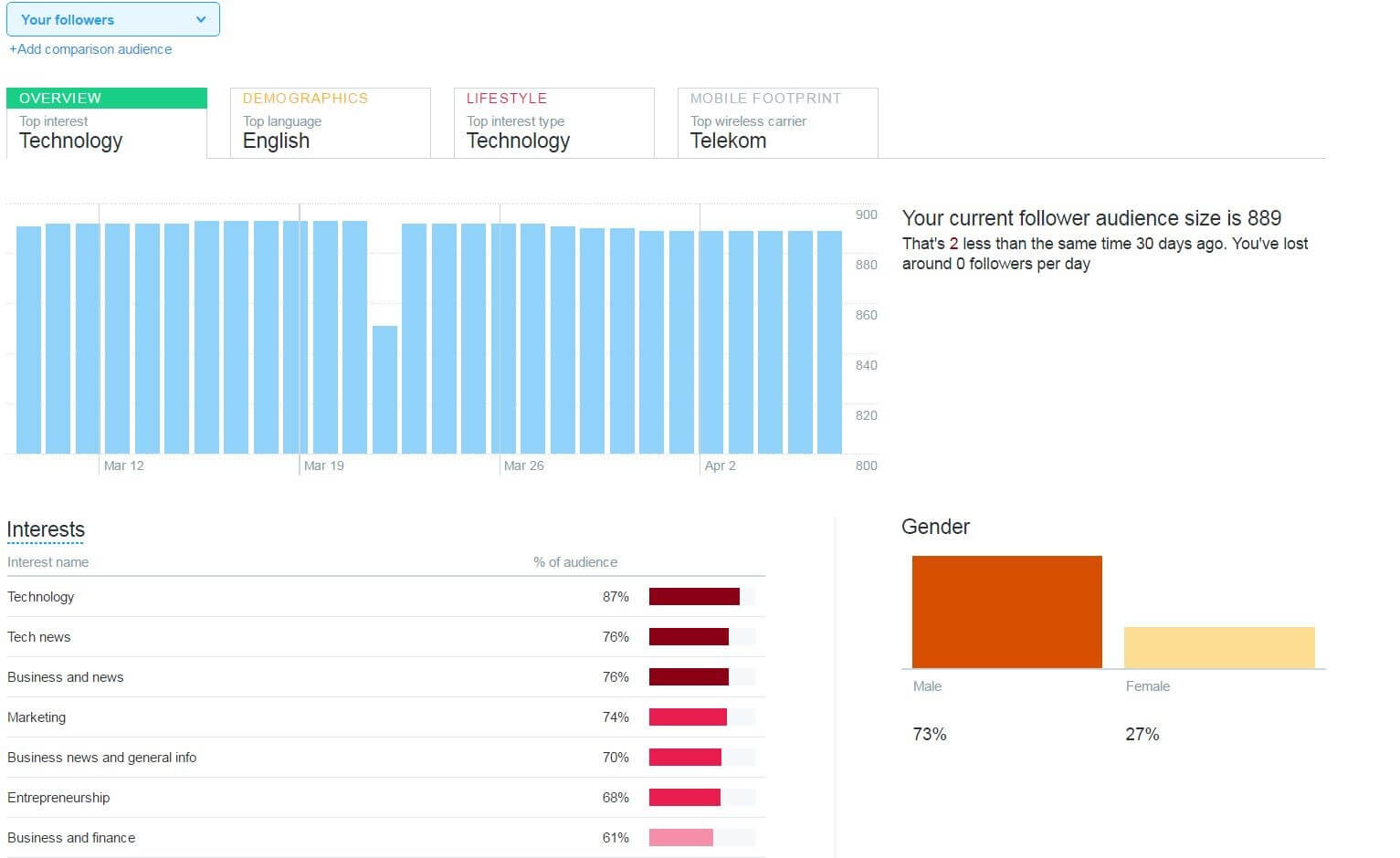
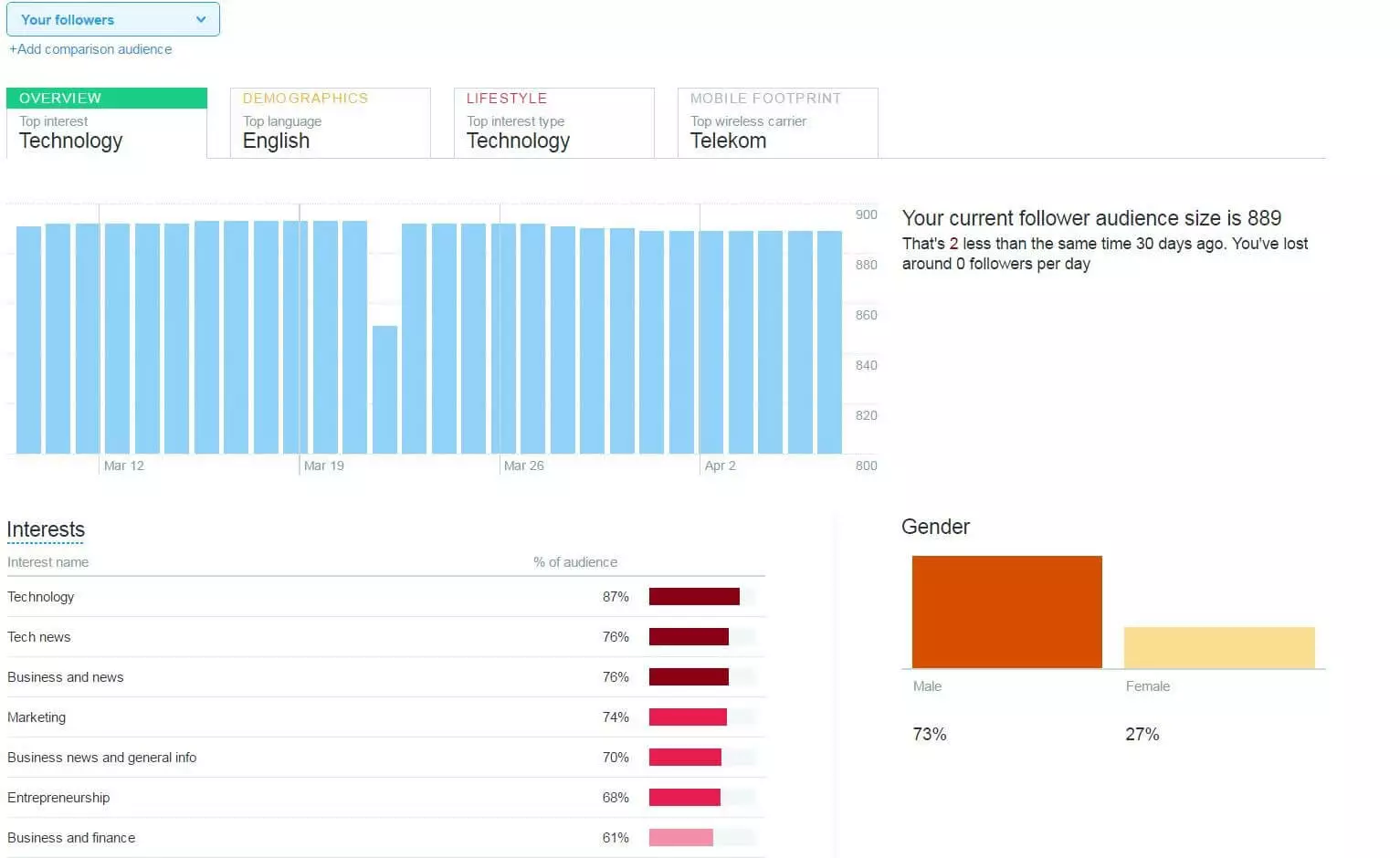
Along with a diagram depicting the growth of followers in the last 30 days, the dashboard also provides information on follower’s gender, their top interests, their location (both country and region), as well as what the ten most popular Twitter accounts are among all followers.
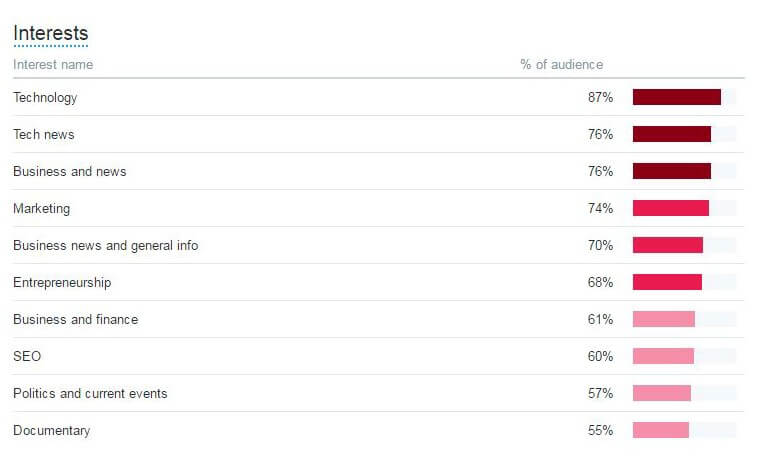
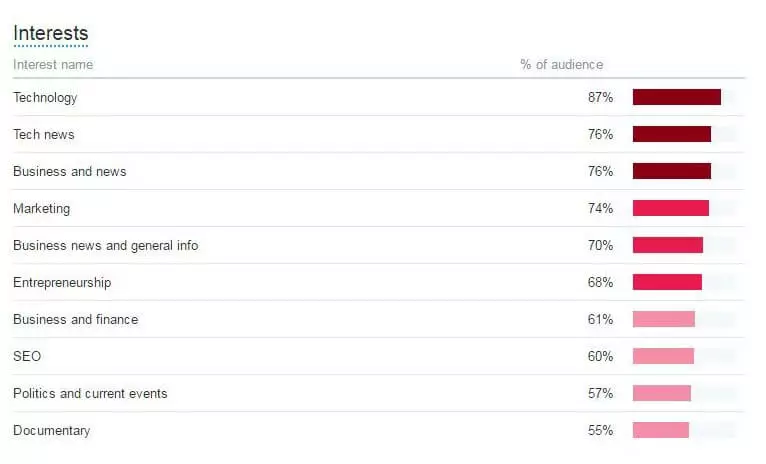
The ‘Audience’ dashboard serves less as a barometer for the success of an account, and instead provides information relating to content that is of particular interest to your audience. This provides useful insights for the creation of new marketing strategies, or even the optimization of already existing ones.
Some accounts also obtain additional information regarding demographic data on their followers (e.g. information on income, education, occupation, marital status, etc.) as well as on lifestyle trends and consumer behaviors. Up until now the Twitter website has remained silent when it comes to revealing the reasons why certain accounts acquire this information.
Advantages of using Twitter Analytics
The data provided by Twitter Analytics can certainly be used strategically by businesses. With the help of these analysis tools, you can continuously measure and optimize your success on Twitter. But how exactly do you put this acquired information to good use?
Optimize your own Twitter performance
The headings ‘Home’ and ‘Tweets’ are used to evaluate the performance of your current Twitter activity. On a whole, an analysis of the overall performance shows to what extent the selected strategy can be deemed a success. By contrast, the performance of individual actions provides insights into which activities and tweets are proving especially promising, and which are not.
For example, based on top tweets, you can quickly find out what, e.g. photos, surveys, hashtags, get the attention of your followers or resonates particularly well with them. By focusing on these features you can shape and dictate future tweets and increase the KPIs. Additionally, the ‘Top Follower’ – the one with the biggest reach, also offers interesting possibilities for future marketing cooperation.
The ‘Tweet Details’ section breaks down the impact of a tweet in its first 24 hours. Here you can find out the exact time when most of your followers read the tweet. This means you can quickly and easily discover what time your tweets reach the biggest number of followers, and thus keep this in mind for future tweets.
The ‘Export data’ button also gives you the possibility of exporting the timeline analysis as an Excel table. This means you can archive the data. A good and clear overview of your timeline is also useful if you wish to keep a content calendar for your account. This allows you to plan the publication of tweets based on specific topics to specifically planned times – ensuring that topics do not repeat themselves, while still allowing you to often return to subject areas that, in the past, were particularly relevant for your followers.
Sparking the interests of your followers
The more detailed the information on your followers is, the more exactly you can tailor your Twitter activity to appeal to them. The ‘Audience’ heading provides important information on which themes and issues capture the attention of your followers, and can therefore make the decisive difference when it comes to planning future tweets.
For example, the ‘Audience’ dashboard within Twitter Analytics lists information on the location of your followers. This way you can time and publish tweets based on the local time of your followers. Now you can take into account the various time zones when tweeting, and have the possibility of engaging with local events, sporting events, weather, or public holidays. Also useful is the ‘Events’ function, which can be found in the navigation bar. This section allows you to research public events – filtered by date, event type, and location. Searching for an event based on the location of followers offers the possibility of appealing to their everyday life more effectively – and through this achieving a higher Twitter engagement rate.
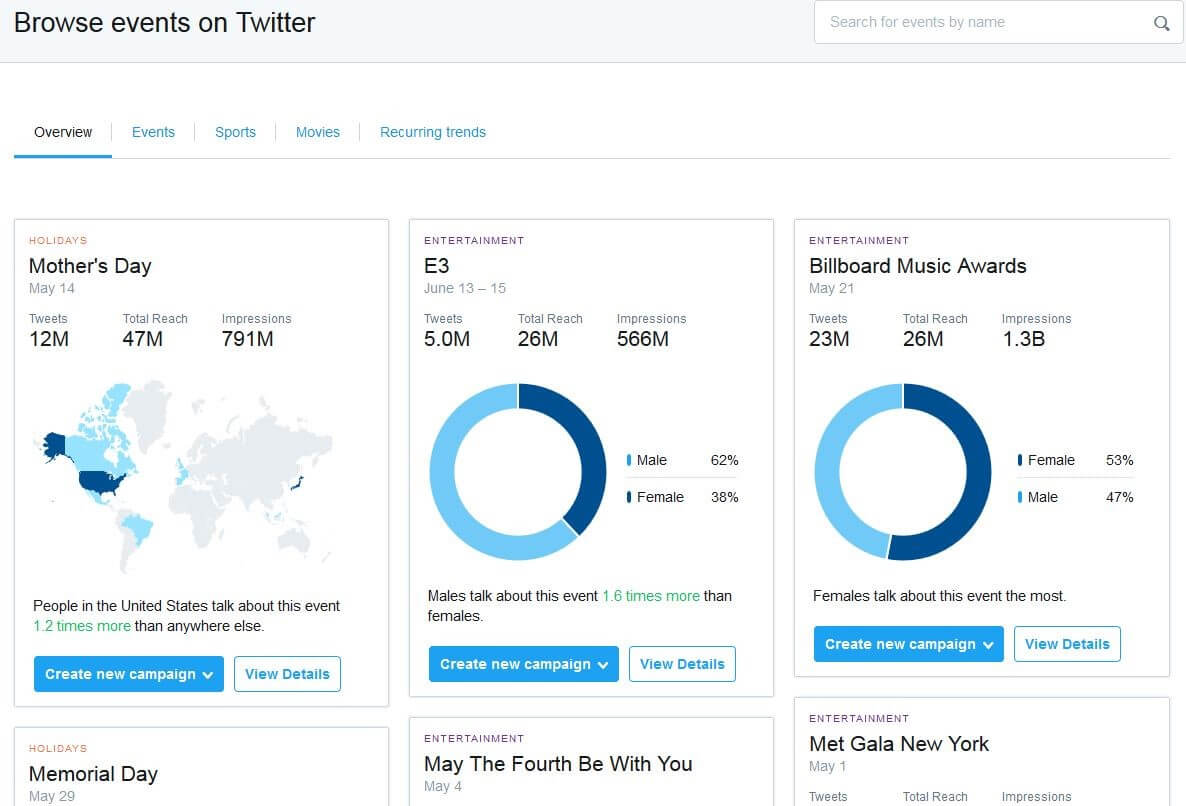
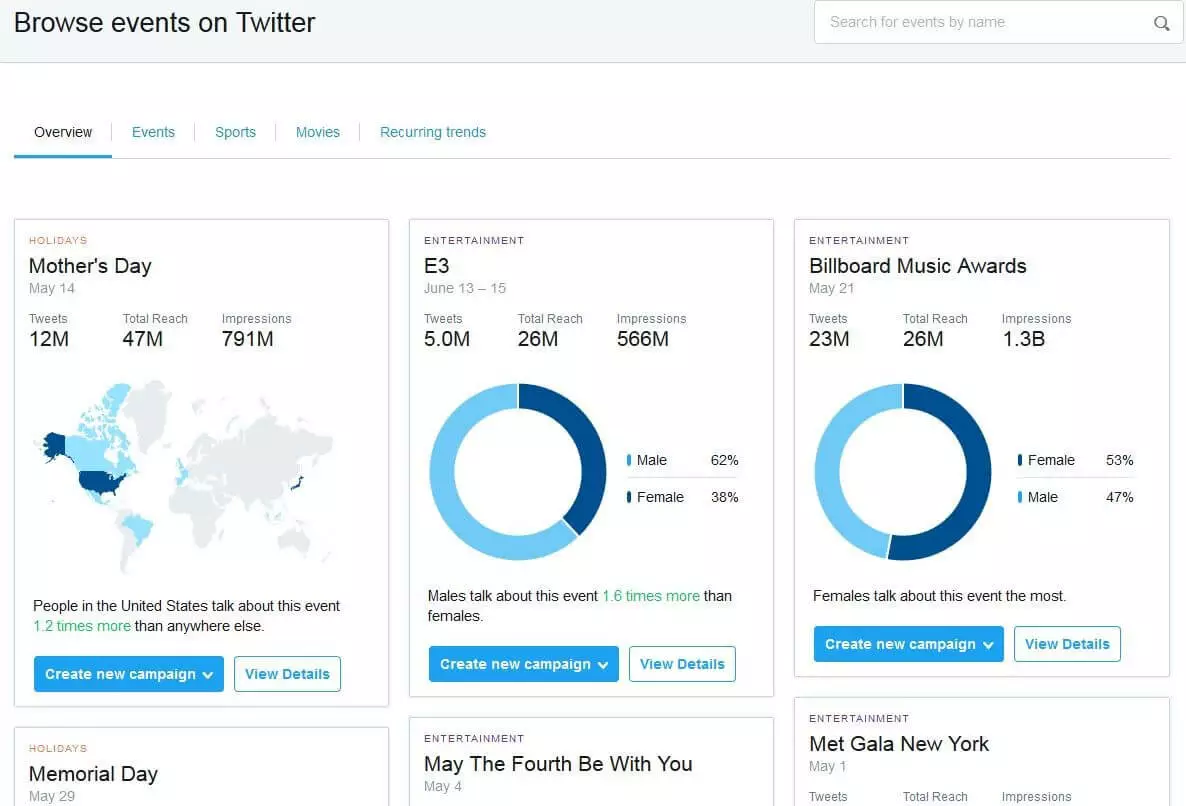
The ‘Audience’ category also contains information on your follower’s interests. This makes it optimal for the researching of new content that is relevant to your followers. When it comes to the researching of content, the ‘Events’ option supplement this very nicely as events can be filtered not just based on location, but also by theme.
Comparing audiences
The information available on your ‘Audience’ is limited. Due to data protection laws, Twitter cannot provide as much information on your followers as some social marketers might wish. However, there are further functions through which you can indirectly get to know your followers better. Alongside data on your own followers, Twitter Analytics also publishes data on all Twitter users. This is broken down across the same attributes as the information on your own followers, meaning that both sets of data can be easily compared. By comparing your own users with those on the rest of Twitter, you can gain a better understanding as to what makes your community of followers different, and through this find out what resonates with them.
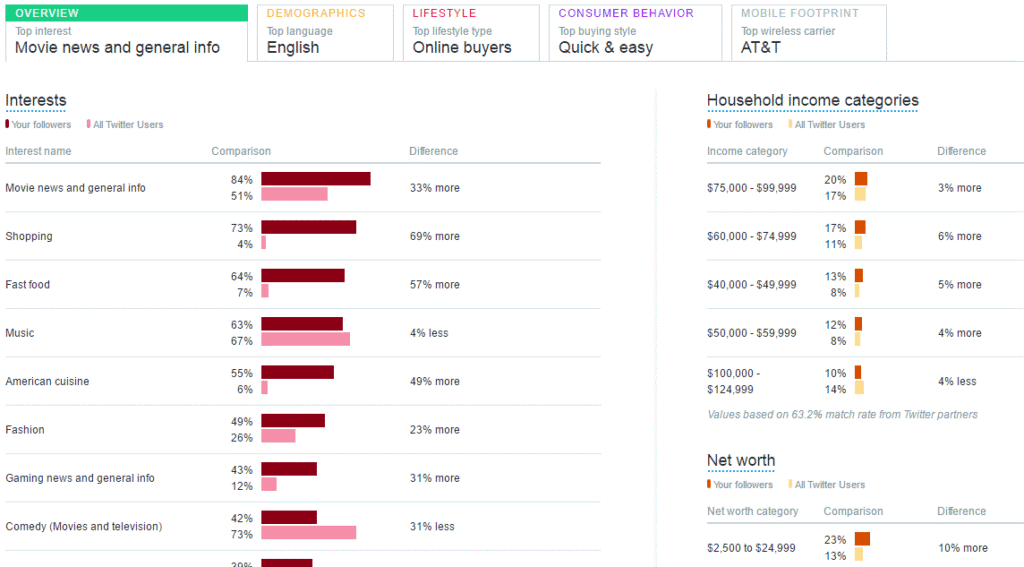
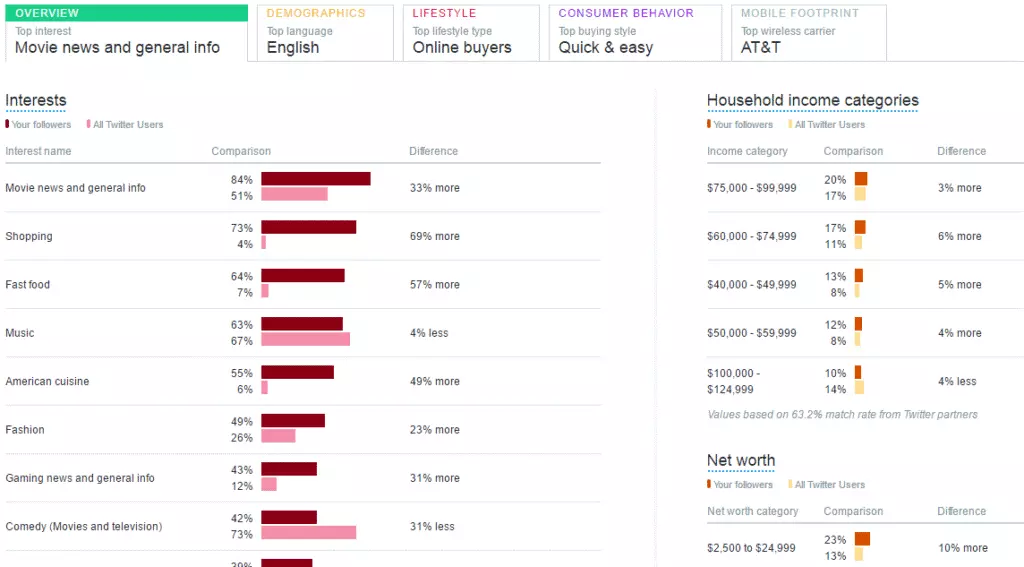
Even with the comparison of audiences, how much data Twitter discloses varies from one account to the next. Some information is available for comparison within each account: age, gender, and (always particularly helpful) interests. So, the more followers you have, the more extensive the information becomes. This includes demographic data and information relating to lifestyle and consumer behavior.
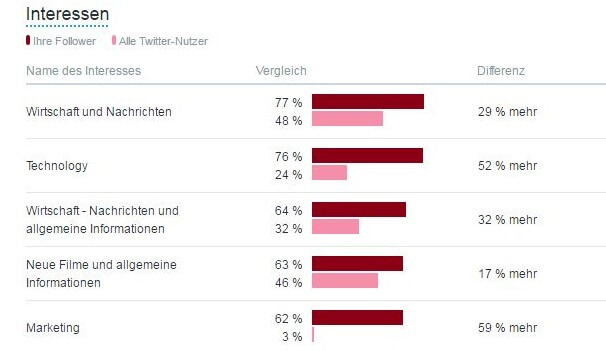
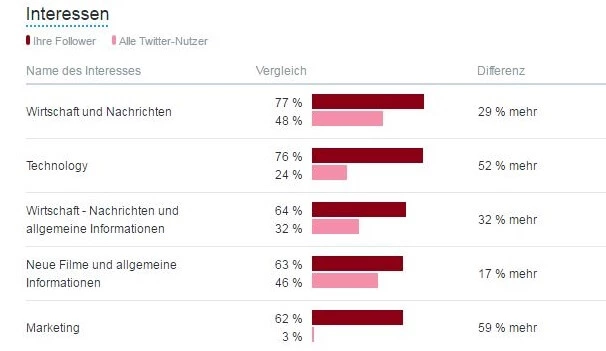
If you’re looking to get even more exact values for comparison, it is possible to further define the audience. Simply filter based on social roles, demographic factors, interests, and consumer preferences. This option allows you to design very different groups of users and then compare them with your own followers.
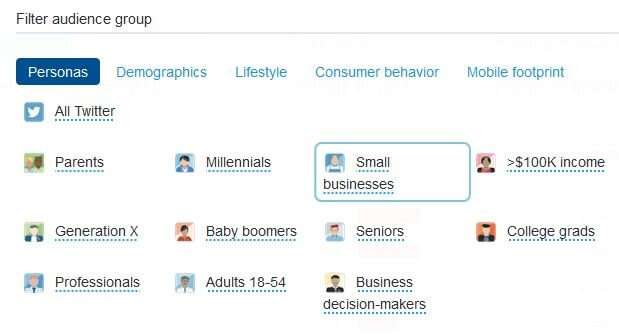
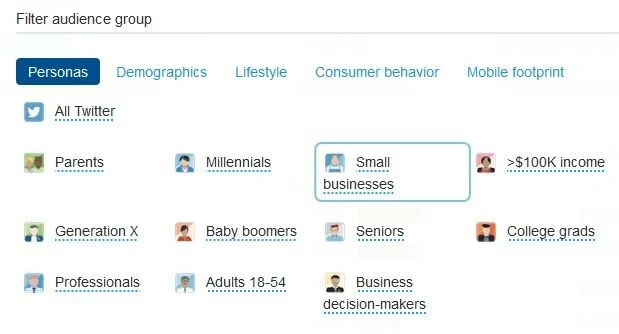
This audience group comparison from Twitter Analytics can be a very useful feature: by comparing one’s own followers with other user groups it becomes clear what is specific to your community of followers. Without disclosing any extra sensitive data, this option can be crucial for understanding the profile of one’s own followers.
Twitter Analytics for business – the path to success
If you wish to make a success of your business’ Twitter account, then Twitter tools can be enormously helpful. They allow for much more frequent and better quality tweeting, inspire optimized content, and more often than not, are useful tools for measuring success. Particularly useful is the Twitter Analytics tool, as it provides countless indicators for monitoring success, which without this tool would remain untouched.
In the next article in the series ‘Twitter for business’, we will explain how to go about utilizing Twitter Ads for marketing purposes.