

What are the best Docker tools? An overview

The comprehensive Docker ecosystem offers developers a number of possibilities to deploy applications, orchestrate containers and more. We’ll go over the most important Docker tools and give you an overview of the most popular third-party projects that develop open-source Docker tools.
- Stay online with 99.99% uptime and robust security
- Add performance with a click as traffic grows
- Includes free domain, SSL, email, and 24/7 support
What are the essential Docker tools/components?
Today, Docker is far more than just a sophisticated platform for managing software containers. Developers have created a range of diverse Docker tools to make deploying applications via distributed infrastructure and cloud environments easier, faster and more flexible. In addition to tools for clustering and orchestration, there is also a central app marketplace and a tool for managing cloud resources.
Docker Engine
When developers say “Docker”, they are usually referring to the open-source client-server applicationthat forms the basis of the container platform. This application is referred to as Docker Engine. Central components of Docker Engine are the Docker daemon, a REST API and a CLI (command line interface) that serves as the user interface.
With this design, you can talk to Docker Engine through command-line commands and manage Docker images, Docker files and Docker containers conveniently from the terminal.
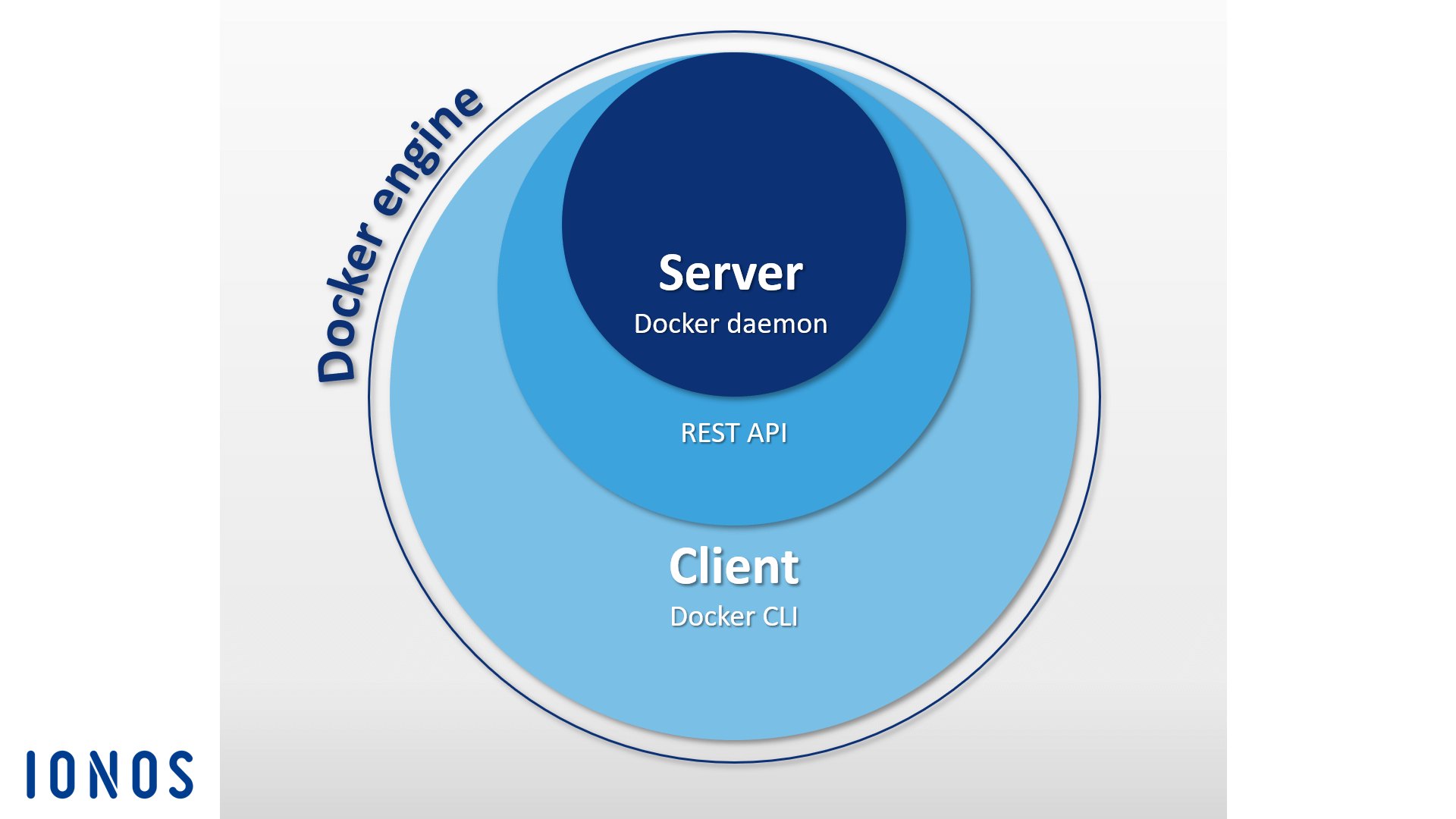
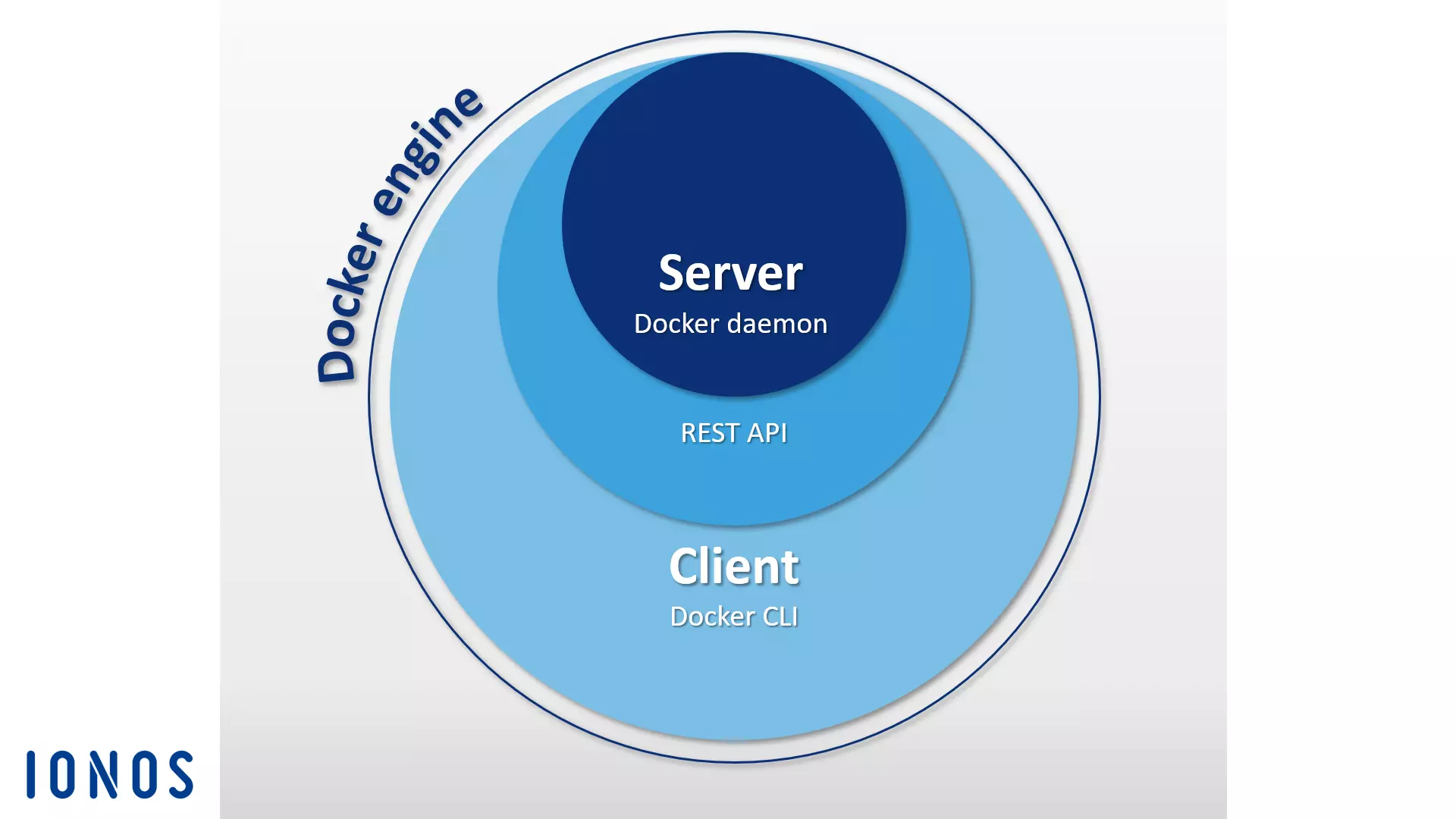
You can find a detailed description of Docker Engine in our Docker tutorial for beginners Docker tutorial: Installation and first steps.
Docker Hub
Docker Hub provides users with a cloud-based registry that allows Docker images to be downloaded, centrally managed and shared with other Docker users. Registered users can store Docker images publicly or in private repositories. Downloading a public image (known as pulling in Docker terminology) does not require a user account. An integrated tag mechanism enables the versioning of images.
In addition to the public repositories of other Docker users, there are also many resources from the Docker developer team and well-known open-source projects that can be found in the official repositories in Docker Hub. The most popular Docker images include the NGINX webserver, the Redis in-memory database, the BusyBox Unix tool kit and the Ubuntu Linux distribution.
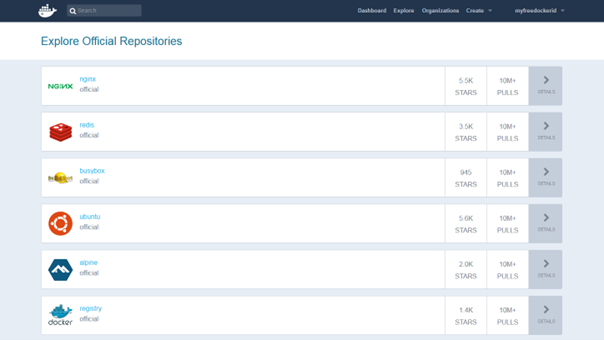
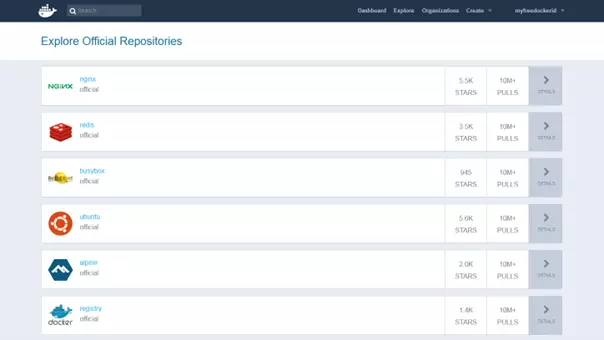
Organizations are another important Docker Hub feature, which allow Docker users to make private repositories that are exclusively available to a select group of people. Access rights are managed within an organization using teams and group memberships.
Docker Swarm
Docker Engine contains a native function that enables its users to manage Docker hosts in clusters called swarms. The cluster management and orchestration capabilities built into the Docker engine are based on the Swarmkit toolbox. If using an older version of the container platform, the Docker tool is available as a standalone application.
Clusters are made up of any number of Docker hosts and are hosted on the infrastructure of an external IaaS provider or in their own data center.
As a native Docker clustering tool, Swarm gathers a pool of Docker hosts into a single virtual host and serves the Docker REST API. Any Docker tool associated with the Docker daemon can access Swarm and scale across any number of Docker hosts. With the Docker Engine CLI, users can create swarms, distribute applications in the cluster, and manage the behavior of the swarm without needing to use additional orchestration software.
Docker engines that have been combined into clusters run in swarm mode. Select this if you want to create a new cluster or add a Docker host to an existing swarm. Individual Docker hosts in a cluster are referred to as “nodes”. The nodes of a cluster can run as virtual hosts on the same local system, but more often a cloud-based design is used, where the individual nodes of the Docker swarm are distributed across different systems and infrastructures.
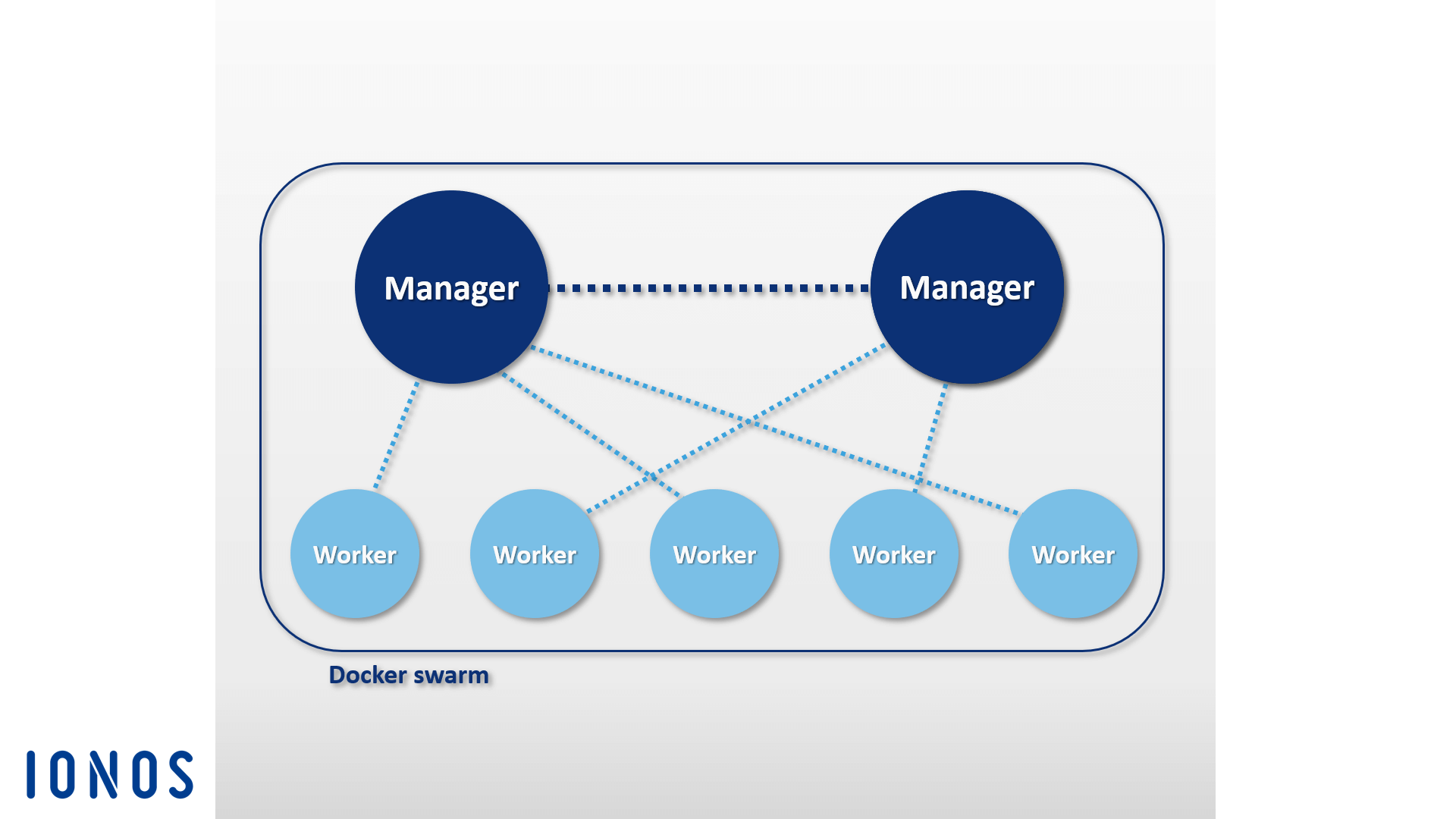
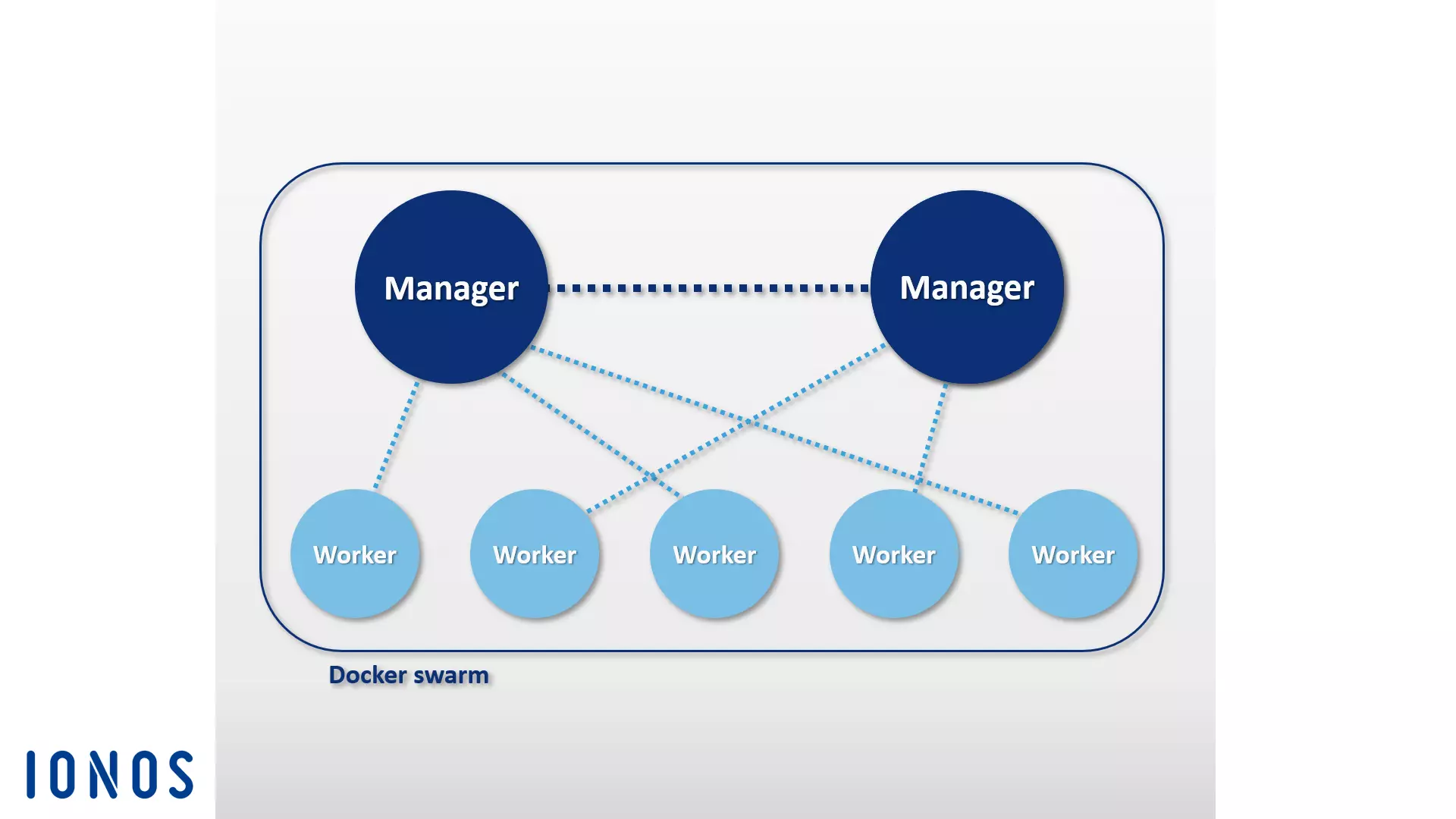
The software is based on a master-worker architecture. When tasks are to be distributed in the swarm, users pass a service to the manager node. The manager is then responsible for scheduling containers in the cluster and serves as a primary user interface for accessing swarm resources.
The manager node sends individual units, known as tasks, to worker nodes.
- Services: Services are central structures in Docker clusters. A service defines a task to be executed in a Docker cluster. A service pertains to a group of containers that are based on the same image. When creating a service, the user specifies which image and commands are used. In addition, services offer the possibility to scale applications. Users of the Docker platform simply define how many containers are to be started for a service.
- Tasks: To distribute services in the cluster, they are divided into individual work units (tasks) by the manager node. Each task includes a Docker container as well as the commands that are executed in it.
In addition to the management of cluster control and orchestration of containers, manager nodes by default can also carry out worker node functions – unless you restrict the tasks of these nodes strictly to management.
An agent program runs on every worker node. This accepts tasks and provides the respective principal node status reports on the progress of the transferred task. The following graphic shows a schematic representation of a Docker Swarm:
When implementing a Docker Swarm, users generally rely on the Docker machine.
Docker Compose
Docker Compose makes it possible to merge multiple containers and execute with a single command. The basic element of Compose is the central control file based on the award-winning language YAML. The syntax of this compose file is similar to that of the open-source software Vagrant, which is used when creating and provisioning virtual machines.
In the docker-compose.yml file, you can define any number of software containers, including all dependencies, as well as their relationships to each other. Such multi-container applications are controlled according to the same pattern as individual software containers. Use the docker-compose command in combination with the desired subcommand to manage the entire life cycle of the application.
This Docker tool can be easily integrated into a cluster based on Swarm. This way, you can run multi-container applications created with Compose on distributed systems just as easily as you would on a single Docker host.
Another feature of Docker Compose is an integrated scaling mechanism. With the orchestration tool, you can comfortably use the command-line program to define how many containers you would like to start for a particular service.
What third-party Docker tools are there?
In addition to the in-house development from Docker Inc., there are various software tools and platforms from external providers that provide interfaces for the Docker Engine or have been specially developed for the popular container platform. Within the Docker ecosystem, the most popular open-source projects include the orchestration tool Kubernetes, the cluster management tool Shipyard, the multi-container shipping solution Panamax, the continuous integration platform Drone, the cloud-based operating system OpenStack and the D2iQ DC/OS data center operating system, which is based on the cluster manager Mesos.
Kubernetes
It’s not always possible for Docker to come up with their own orchestration tools like Swarm and Compose. For this reason, various companies have been investing in their own development work for years into creating tailor-made tools designed to facilitate the operation of the container platform in large, distributed infrastructures. Among the most popular solutions of this type is the open-source project Kubernetes.
Kubernetes is a cluster manager for container-based applications. The goal of Kubernetes is to automate applications in a cluster. To do this, the orchestration tool uses a REST-API, a command line program and a graphical web interface as controls interfaces. With these interfaces, automations can be initiated, and status reports can be requested. You can use Kubernetes to:
- execute container-based photos on a cluster,
- install and manage applications in distributed systems,
- scale applications, and
- use hardware as best as possible.
To this end, Kubernetes combines containers into logical parts, which are referred to as pods. Pods represent the basic units of the cluster manager, which can be distributed in the cluster by scheduling.
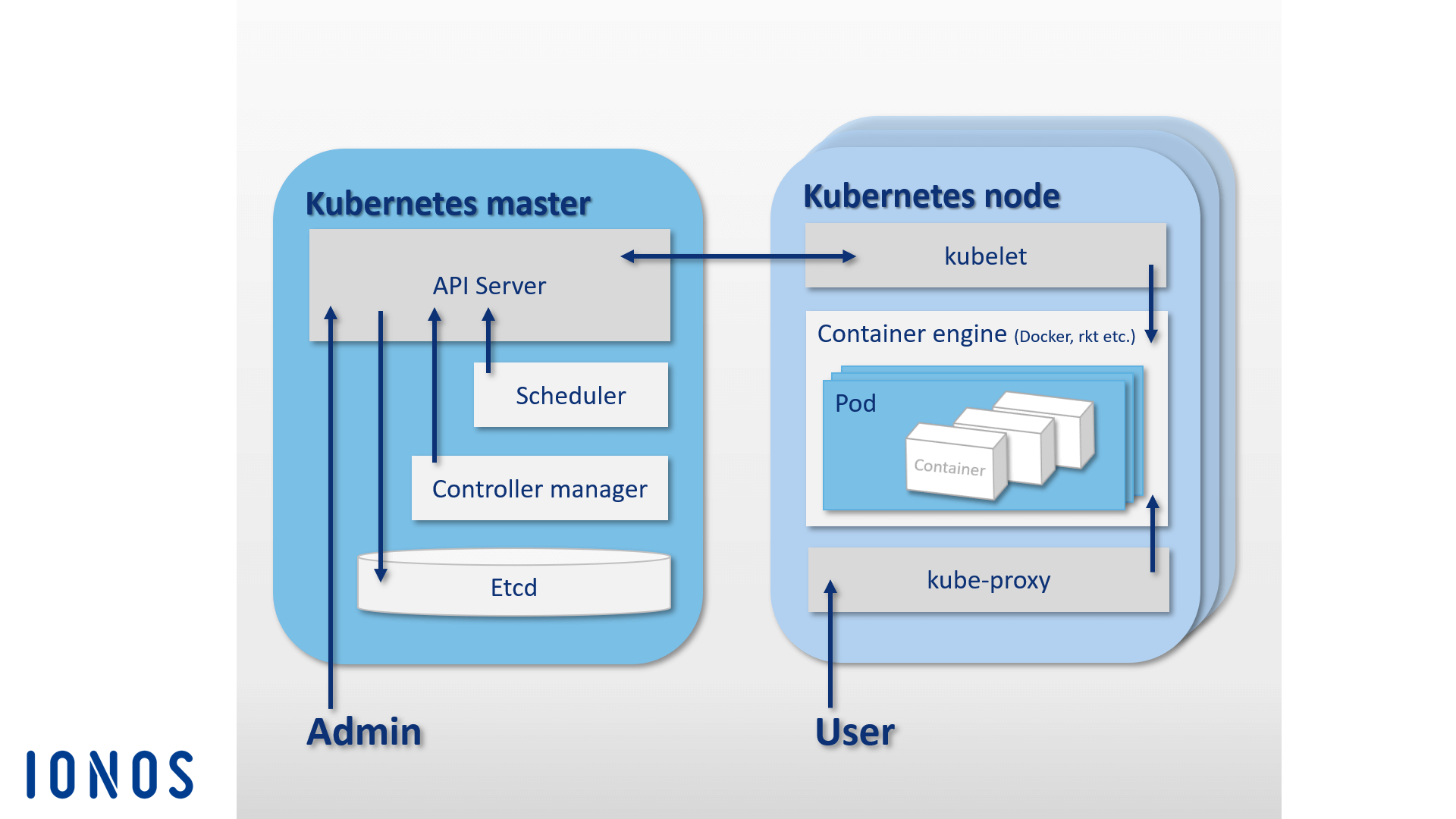
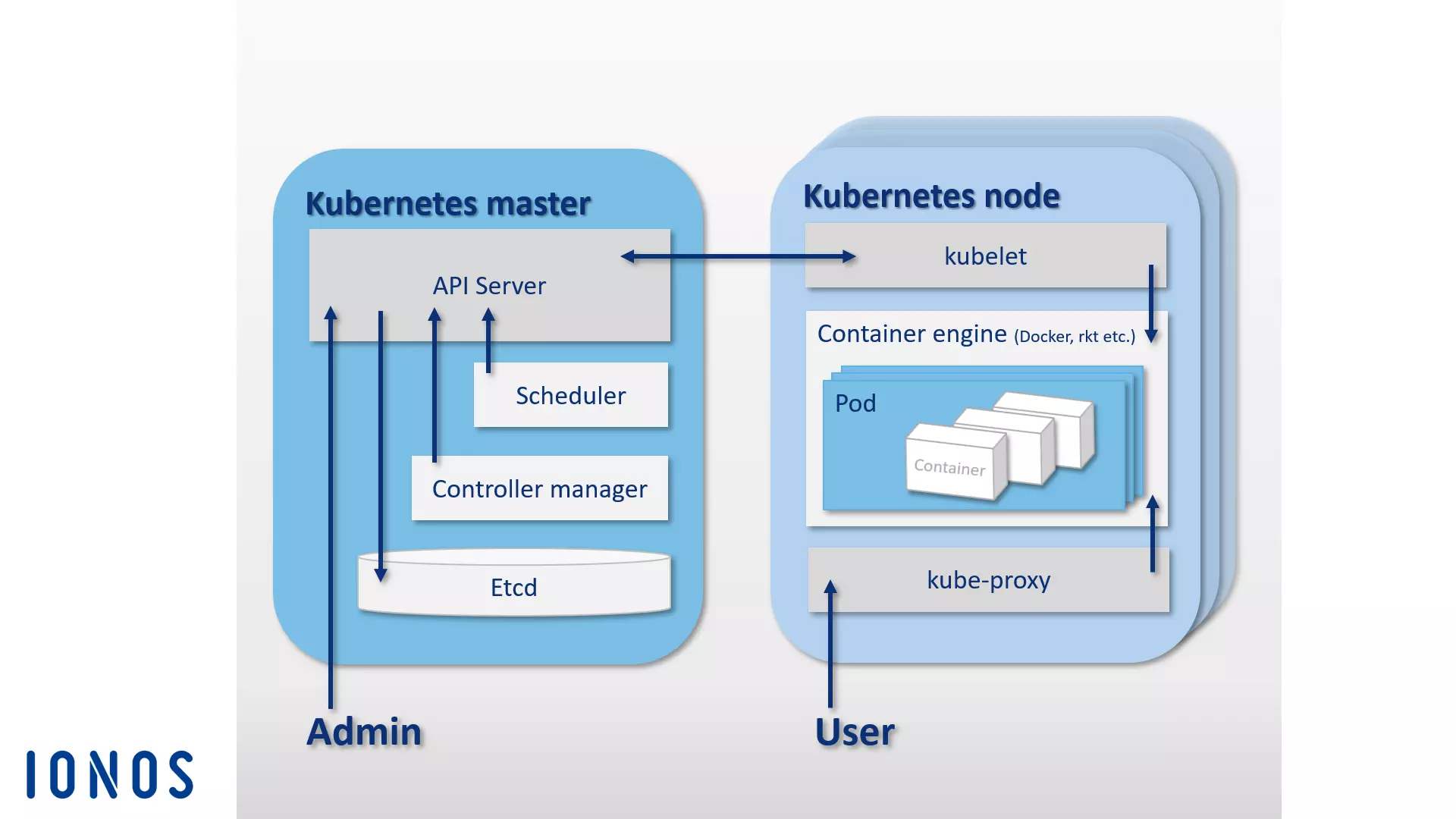
Like Docker’s Swarm, Kubernetes is also based on a master-worker architecture. A cluster is composed of a Kubernetes master and a variety of workers, which are also called Kubernetes nodes (or minions). The Kubernetes master functions as a central control plane in the cluster and is made up of four basic components, allowing for direct communication in the cluster and task distribution. A Kubernetes master consists of an API server, the configuration memory etcd, a scheduler and a controller manager.
- API server: All automations in the Kubernetes cluster are initiated with REST-API via an API server. This functions as the central administration interface in the cluster.
- etcd: You can think of the open-source configuration memory etcd as the memory of a Kubernetes cluster. The Key Value Store, which CoreOS developed specifically for distributed systems, stores configuration data and makes it available to every node in the cluster. The current state of a cluster can be managed at any time via etcd.
- Scheduler: The scheduler is responsible for distributing container groups (pods) in the cluster. It determines the resource requirements of a pod and then matches this with the available resources of the individual nodes in the cluster.
- Controller manager: The controller manager is a service of the Kubernetes master and controls orchestration by regulating the state of the cluster and performing routine tasks. The main task of the controller manager is to ensure that the state of the cluster corresponds to the defined target state.
The overall components of the Kubernetes master can be located on the same host or distributed over several master hosts within a high-availability cluster.
While the Kubernetes master is responsible for the orchestration, the pods distributed in the cluster are run on hosts, Kubernetes nodes, which are subordinate to the master. To do this, a container engine needs to run on each Kubernetes node. While Docker is the de facto standard, Kubernetes does not have to use a specific container engine.
In addition to the container engine, Kubernetes nodes cover the following components:
- kubelet: kubelet is an agent that runs on each Kubernetes node and is used to control and manage the node. As the central point of contact of each node, kubelet is connected to the Kubernetes master and ensures that information is passed on to and received from the control plane.
- kube-proxy: In addition, the proxy service kube-proxy runs on every Kubernetes node. This ensures that requests from the outside are forwarded to the respective containers and provides services to users of container-based applications. The kube-proxy also offers rudimentary load balancing.
The following graphic shows a schematic representation of the master-node architecture on which the orchestration platform Kubernetes is based:
In addition to the core project Kubernetes, there are also numerous tools and extensions that make it possible to add more functionality to the orchestration platform. The most popular are the monitoring and error diagnosis tools Prometheus, Weave Scope, and sysdig, as well as the package manager Helm. Plugins also exist for Apache Maven and Gradle, as well as a java API, which allows you to remotely control Kubernetes.
Shipyard
Shipyard is a community-developed management solution based on Swarm that allows users to maintain Docker resources like containers, images, hosts and private registries via a graphical user interface. It is available as a web application via the browser. In addition to the cluster management features that can be accessed via a central web interface, Shipyard also offers user authentication and role-based access control.
The software is 100% compatible with the Docker remote API and uses the open-source NoSQL database RethinkDB to store data for user accounts, addresses and occurrences. The software is based on the cluster management toolkit Citadel and is made up of three main components: controller, API and UI.
- Shipyard controller: The controller is the core component of the management tool Shipyard. The Shipyard controller interacts with RethinkDB to store data and makes it possible to address individual hosts in a Docker cluster and to control events.
- Shipyard API: The Shipyard API is based on REST. All functions of the management tool are controlled via the Shipyard API.
- Shipyard user interface (UI): The Shipyard UI is an AngularJS app, which presents users with a graphical user interface for the management of Docker clusters in the web browser. All interactions in the user interface take place via the Shipyard API.
Further information about the open-source project can be found on the official website of Shipyard.
Panamax
The developers of the open-source software project Panamax aim to simplify the deployment of multi-container apps. The free tool offers users a graphical user interface that allows complex applications based on Docker containers to be conveniently developed, deployed and distributed using drag-and-drop.
Panamax makes it possible to save complex multi-container applications as application templates and distribute them in cluster architectures with just one click. Using an integrated app marketplace hosted on GitHub, templates for self-created applications can be stored in Git repositories and made available to other users.
The basic components of the Panamax architecture can be divided into two groups: the Panamax Local Client and any number of remote deployment targets.
The Panamax local client is the core component of this Docker tool. It is executed on the local system and allows complex container-based applications to be created. The local client is comprised of the following components:
- CoreOS: Installation of the Panamax local client requires the Linux distribution CoreOS as its host system, which has been specifically designed for software containers. The Panamax client is then run as a Docker container in CoreOS. In addition to the Docker features, users have access to various CoreOS functions. These include Fleet and Journalctl, among others:
- Fleet: Instead of integrating directly with Docker, the Panamax Client uses the cluster manager Fleet to orchestrate its containers. Fleet is a cluster manager that controls the Linux daemon systemd in computer clusters.
- Journalctl: The Panamax client uses Journalctl to request log messages from the Linux system manager systemd from the journal.
- Local client installer: The local client installer contains all components necessary for installing the Panamax client on a local system.
- Panamax local agent: The central component of the local client is the local agent. This is linked to various other components and dependencies via the Panamax API. These include the local Docker host, the Panamax UI, external registries, and the remote agents of the deployment targets in the cluster. The local agent interacts with the following program interfaces on the local system via the Panamax API to exchange information about running applications:
- Docker remote API: Panamax searches for images on the local system via the Docker remote API and obtains information about running containers.
- etcd API: Files are transmitted to the CoreOS Fleet daemon via the etcd API.
- systemd-journal-gatewayd.services: Panamax obtains the journal output of running services via systemd-journal-gatewayd.services.
In addition, the Panamax API also enables interactions with various external APIs.
- Docker registry API: Panamax obtains image tags from the Docker registry via the Docker registry API.
- GitHub API: Panamax loads templates from the GitHub repository using the GitHub API.
- KissMetrics API: The KissMetrics API collects data about templates that users run.
- Panamax UI: The Panamax UI functions as a user interface on the local system and enables users to control the Docker tool via a graphical interface. User input is directly forwarded to the local agent via Panamax API. The Panamax UI is based on the CTL Base UI Kit, a library of UI components for web projects from CenturyLink.
In Panamax terminology, each node in a Docker cluster without management tasks is referred to as a remote deployment target. Deployment targets consist of a Docker host, which is configured to deploy Panamax templates with the help of the following components:
- Deployment target installer: The deployment target installer starts a Docker host, complete with a Panamax remote agent and orchestration adapter.
- Panamax remote agent: If a Panamax remote agent is installed, applications can be distributed over the local Panamax client to any desired endpoint in the cluster. The Panamax remote agent runs as a Docker container on every deployment target in the cluster.
- Panamax orchestration adapter: In the orchestration adapter, the program logic is provided for each orchestration tool available for Panamax in an independent adapter layer. Because of this, users have the option to always choose the exact orchestration technology to be supported by their target environment. Pre-configured adapters include Kubernetes and Fleet:
- Panamax Kubernetes adapter: In combination with the Panamax remote agent, the Panamax Kubernetes adapter enables the distribution of Panamax templates in Kubernetes clusters.
- Panamax Fleet adapter: In combination with the Panamax remote agent, the Panamax Fleet adapter enables the distribution of Panamax templates in clusters controlled with the help of the Fleet cluster manager.
The following graphic shows the interplay between the individual Panamax components in a Docker cluster:

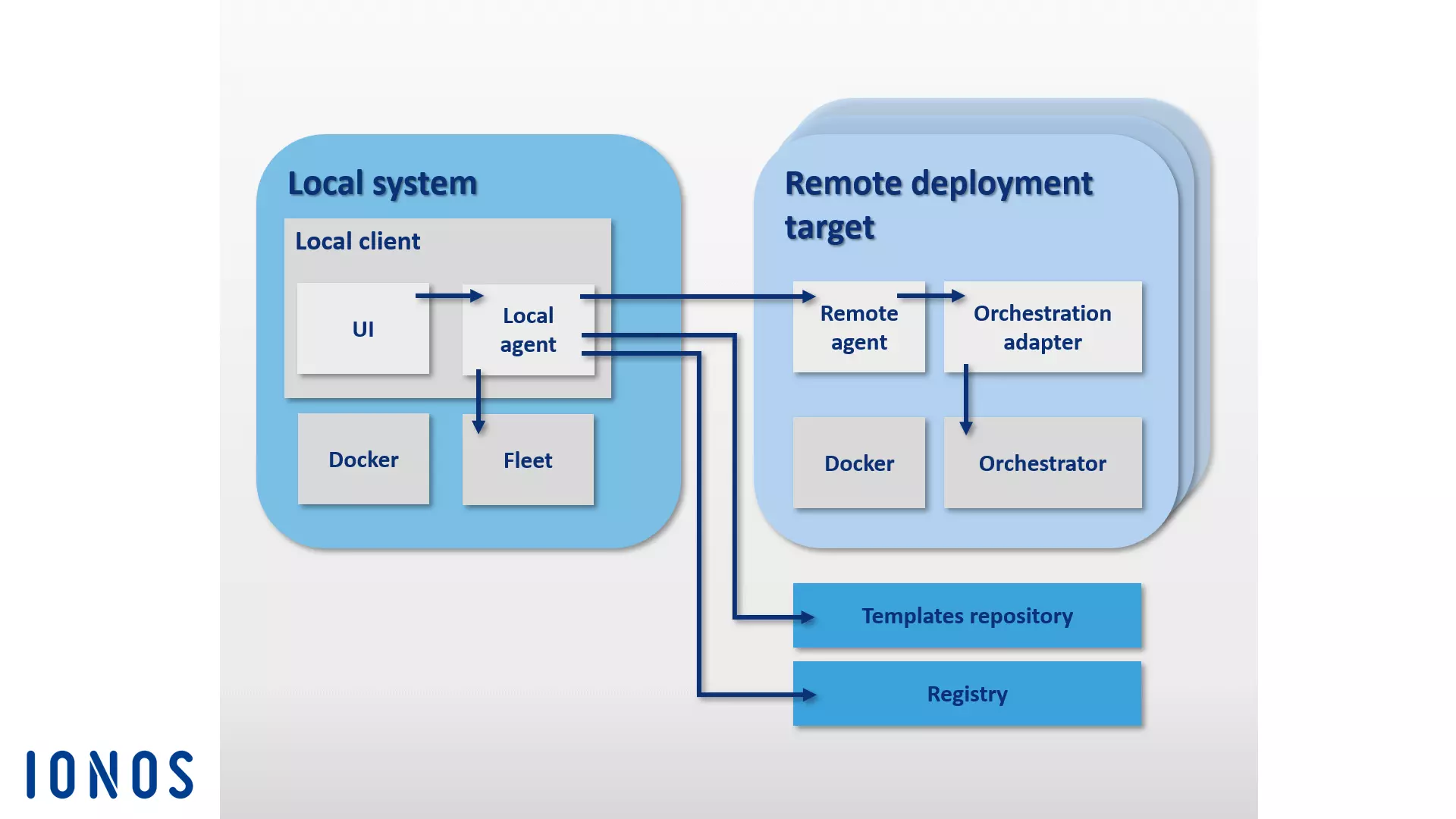
The CoreOS-based Panamax container management tool provides users with a variety of standard container orchestration technologies through a graphical user interface, as well as the option to conveniently manage complex multi-container applications in cluster architectures using any system (i.e., your own laptop).
With Panamax’s public template repository, Panamax users have access to a public template library with various resources via GitHub.
Drone
Drone is a lean continuous integration platform with minimal requirements. With this Docker tool, you can automatically load your newest build from a Git repository like GitHub and test it in isolated Docker containers. You can run any test suite and send reports and status messages via email. For every software test, a new container based on images from the public Docker registry is created. This means any publicly available Docker image can be used as the environment for testing the code.
Continuous Integration (CI) refers to a process in software development, in which newly developed software components—builds—are merged and run in test environments at regular intervals. CI is a strategy to efficiently recognize and resolve integration errors that can arise from collaboration between different developers.
Drone is integrated in Docker and supported by various programming languages, such as PHP, Node.js, Ruby, Go and Python. The container platform is the only true dependency. You can create your own personal continuous integration platform with Drone on any system that Docker can be installed on. Drone supports various version control repositories, and you can find a guide for the standard installation with GitHub integration on the open source project’s website under readme.drone.io.
Managing the continuous integration platform takes place via a web interface. Here you can load software builds from any Git repository, merge them into applications, and run the result in a pre-defined test environment. In order to do this, a .drone.yml file is defined that specifies how to create and run the application for each software test.
Drone users are provided with an open-source CI solution that combines the strengths of alternative products like Travis and Jenkins into a user-friendly application.
OpenStack
When it comes to building and operating open-source cloud structures, the open-source cloud operating system OpenStack is the software solution of choice.
With OpenStack you can manage computer, storage and network resources from a central dashboard and make them available to end users via a web interface.
The cloud operating system is based on a modular architecture that’s comprised of multiple components:
- Zun (container service): Zun is OpenStack’s container service and enables the easy deployment and management of containerized applications in the OpenStack cloud. The purpose of Zun is to allow users to manage containers through a REST API without having to manage servers or clusters. To operate Zun, you’ll need to have three other OpenStack services, which are Keystone, Neutorn, and kryr-libnetwork. The functionality of Zun can also be expanded through additional OpenStack services such as Cinder and Glance.
- Neutron (network component): Neutron (formally Quantum) is a portable, scalable API-supported system component used for network control. The module provides an interface for complex network topologies and supports various plugins through which extended network functions can be integrated.
- kuryr-libnetwork (Docker driver): kuryr-libnetwork is a driver that acts as an interface between Docker and Neutron.
- Cinder (block storage): Cinder is the nickname of a component in the OpenStack architecture that provides persistent block storage for the operation of VMs. The module provides virtual storage via a self-service API. Through this, end users can make use of storage resources without being aware of which device is providing the storage.
- Keystone (identity service): Keystone provides OpenStack users with a central identity service. The module functions as an authentication and permissions system between the individual OpenStack components. Access to projects in the cloud is regulated by tenants. Each tenant represents a user, and several user accesses with different rights can be defined.
- Glance (image service): With the Glance module, OpenStack provides a service that allows images of VMs to be stored and retrieved.
You can find more information about OpenStack components and services in our article on OpenStack.
In addition to the components mentioned above, the OpenStack architecture can be extended using various modules. You can read about the different optional modules on the OpenStack website.
D2iQ DC/OS
DC/OS (Distributed Cloud Operating System) is an open-source software for the operation of distributed systems developed by D2iQ Inc. (formerly Mesosphere). The project is based on the open-source cluster manager Apache Mesos and is an operating system for data centers. The source code is available to users under the Apache license Version 2 in the DC/OS repositories on GitHub. An enterprise version of the software is also available at d2iq.com. Extensive project documentation can be found on dcos.io.
You can think of DC/OS as a Mesos distribution that provides you with all the features of the cluster manager (via a central user interface) and expands upon Mesos considerably.
DC/OS uses the distributed system core of the Mesos platform. This makes it possible to bundle the resources of an entire data center and manage them in the form of an aggregated system like a single logical server. This way, you can control entire clusters of physical or virtual machines with the same ease that you would operate a single computer with.
The software simplifies the installation and management of distributed applications and automates tasks such as resource management, scheduling, and inter-process communication. The management of a cluster based on D2iQ DC/OS, as well as its included services, takes place over a central command line program (CLI) or web interface (GUI).
DC/OS isolates the resources of the cluster and provides shared services, such as service discovery or package management. The core components of the software run in a protected area – the core kernel. This includes the master and agent programs of the Mesos platform, which are responsible for resource allocation, process isolation, and security functions.
-
Mesos master: The Mesos master is a master process that runs on a master node. The purpose of the Mesos master is to control resource management and orchestrate tasks (abstract work units) that are carried out on an agent node. To do this, the Mesos master distributes resources to registered DC/OS services and accepts resource reports from Mesos agents.
-
Mesos agents: Mesos agents are processes that run on agent accounts and are responsible for executing the tasks distributed by the master. Mesos agents deliver regular reports about the available resources in the cluster to the Mesos master. These are forwarded by the Mesos master to a scheduler (i.e. Marathon, Chronos or Cassandra). This decides which task to run on which node. The tasks are then carried out in a container in an isolated manner.
All other system components as well as applications run by the Mesos agents via executor run in the user space. The basic components of a standard DC/OS installation are the admin router, the Mesos DNS, a distributed DNS proxy, the load balancer Minuteman, the scheduler Marathon, Apache ZooKeeper and Exhibitor.
- Admin router: The admin router is a specially configured webserver based on NGINX that provides DC/OS services as well as central authentication and proxy functions.
- Mesos DNS: The system component Mesos DNS provides service discovery functions that enable individual services and applications in the cluster to identify each other through a central domain name system (DNS).
- Distributed DNS proxy: The distributed DNS proxy is an internal DNS dispatcher.
- Minuteman: The system component Minuteman functions as an internal load balancer that works on the transport layer (Layer 4) of the OSI reference model.
- DC/OS Marathon: Marathon is a central component of the Mesos platform that functions in the D2iQ DC/OS as an init system (similar to systemd). Marathon starts and supervises DC/OS services and applications in cluster environments. In addition, the software provides high-availability features, service discovery, load balancing, health checks and a graphical web interface.
- Apache ZooKeeper: Apache ZooKeeper is an open source software component that provides coordination functions for the operation and control of applications in distributed systems. ZooKeeper is used in D2iQ DC/OS for the coordination of all installed system services.
- Exhibitor: Exhibitor is a system component that is automatically installed and configured with ZooKeeper on every master node. Exhibitor also provides a graphical user interface for ZooKeeper users.
Diverse workloads can be executed at the same time on cluster resources that are aggregated via DC/OS. This, for example, enables parallel operation on the cluster operating system of big data systems, microservices, or container platforms such as Hadoop, Spark and Docker.
Within the D2iQ Universe, a public app catalog is available for DC/OS. With this, you can install applications like Spark, Cassandra, Chronos, Jenkins, or Kafka by simply clicking on the graphical user interface.
What Docker tools are there for security?
Even though encapsulated processes running in containers share the same core, Docker uses a number of techniques to isolate them from each other. Core functions of the Linux kernel, such as Cgroups and Namespaces, are usually used to do this.
Containers, however, still don’t offer the same degree of isolation that can be accomplished with virtual machines. Despite the use of isolation techniques, important core subsystems such as Cgroups as well as kernel interfaces in the /sys and /proc directories can be reached through containers.
The Docker development team has acknowledged that these safety concerns are an obstacle for the establishment of container technology on production systems. In addition to the fundamental isolation techniques of the Linux kernel, newer versions of Docker Engine also support the frameworks AppArmor, SELinux and Seccomp, which function as a type of firewall for core resources.
- AppArmor: With AppArmor, access rights of containers to the file systems are regulated.
- SELinux: SELinux provides a complex regulatory system where access control to core resources can be implemented.
- Seccomp: Seccomp (Secure Computing Mode) supervises the invoking of system calls.
In addition to these Docker tools, Docker also uses Linux capabilities to restrict the root permissions, which Docker Engine starts containers with.
Other security concerns also exist regarding software vulnerabilities within application components that are distributed by the Docker registry. Since essentially anyone can create Docker images and make them publicly accessible to the community in the Docker Hub, there’s the risk of introducing malicious code to your system when downloading an image. Before deploying an application, Docker users should make sure that all of the code provided in an image for the execution of containers stems from a trustworthy source.
Docker offers a verification program that software providers can use to have their Docker images checked and verified. With this verification program, Docker aims to make it easier for developers to build software supply chains that are secure for their projects. In addition to increasing security for users, the program aims to offer software developers a way to differentiate their projects from the multitude of other resources that are available. Verified images are marked with a Verified Publisher badge and, in addition to other benefits, given a higher ranking in Docker Hub search results.