

What does the Guilded game chat app offer?

The game chat app Guilded is considered better than Discord among die-hard gamers. It offers nearly identical features for group chats and community maintenance, but it’s completely free. Its features include server creation, individual profile personalization, dedicated chat channels and server groups, and integrated high-quality streaming of video and audio. This has transformed Guilded into the game chat app gamers trust.
How long has Guilded been around?
Guilded is a chat app for text, video and audio chats. It is aimed mainly at gamers. Guilded’s founder is former Facebook and Xbox employee and developer Eli Brown. In 2017, he launched Guilded with the aim of providing gaming communities with a powerful and free communication platform. The app managed to become the most sought-after Discord alternative after a few years thanks to its free features. It is no wonder that the development team behind Roblox bought the app in 2021. Roblox is a Minecraft alternative. A bonus is that Guilded developers regularly add new features and security features like 2FA and server subscriptions.
What feature does Guilded offer?
Guilded has a clear focus on gamers’ needs. It offers several attractive features. Gamers who are engrained in their community and want to support their team’s goals need a chat tool with as many communication tools and personalization options as possible. This is exactly what Guilded offers. Unlike Discord, premium features are not behind a paywall. We’ll present Guilded’s most important features.
Create and personalize server
Servers are the heart of Guilded. This is where you meet your community, invite friends to your server, or chat on other Guilded servers. This is a simple task if you already know how to create a Discord server as Guilded works identically. You can create private or public servers in minutes. You just need a Guilded account. Go to “Create a server” in the account menu and add an individual avatar and server name. You can then invite your friends to join the chat with an invitation link. If you’re attached to your Discord server configurations, you can import them into the Guilded server.
Other server personalization options include server banners, a custom URL, an info area for server information, and an unlimited number of emojis. Server participants can also be assigned roles and permissions as moderators. There is even the opportunity to financially support yourself in a growing community with server subscriptions. Although you should be aware that Guilded charges a 2.5 percent transaction fee for paid server subscriptions, plus fees for payment with Stripe.
Create and categorize chat channels
Channels are the most important means of communication on Guilded. Compared to Discord, the user interface is more streamlined and clearer. Current channels can be found in the left menu. There is a participant overview on the right side of the screen. New posts and messages appear in the middle chat area. All communication takes place in your channels via text, video or audio chat. You can create an unlimited number of channels with Guilded and they can be classified into one of the following ten categories:
- Text chat (including saving and archiving threads)
- Voice chat (with integrated optional text chat)
- Streaming channel
- Event calendar for server members
- Calendar organization channel
- Channel for text announcements to other servers
- Forum channel for questions or help in the community
- Channel for to-do lists (for all participants and common goals)
- Docs channel for publishing and organizing server/community documents (e.g. guidelines, server rules, plans, informational materials, tutorials, fun facts)
- Media channel for uploading and organizing videos, photos or other media
Create a personal profile
Creating your own avatar and your own digital personality is part of interacting in online communities. That’s why Guilded offers so many options to personalize not only the server, but also your profile:
- Profile picture
- Profile banner
- “About me” section
- Individual URL (for the server)
- Flexible server name change
- Link your Guilded profile to profiles on Twitch, Steam, PlayStation, Twitter, Patreon, YouTube accounts, Xbox, Roblox or Nintendo.
- Status messages (e.g. for pictures, quotes, jokes, polls, links)
Share large files
Guilded allows you to share pictures with a maximum file size of 25 MB and videos with up to 200 MB in chats and Documents channels. Discord only offers 8 MB in the free variant. Free file sharing is essential if you want to share screenshots or stream recordings with legendary or funny moments in the community or with individual members.
Integrate ready-made bots or create your own
Bots are a standard tool in powerful chat apps. They offer many additional features such as automated greetings, announcements, music, moderation, polls, role assignment, and more. Guilded doesn’t have a wide selection compared to Discord bots, but Guilded bots are growing with the community. However, you can design your own Guilded bots for services in just a few minutes directly in the server.
High-quality video and audio streaming
One of the Guilded app’s greatest strengths is its integrated high-quality streaming for video and audio. This includes multiple simultaneous streams for streaming with friends. Streams also include chat features, optional layouts, screen sharing, shortcuts, and even noise cancelling. The quality of the streams is optimal with 1080p for video and 256kbps for audio.
Server search and server groups
Those looking for gaming communities for specific online games can use the server filter and get a list of local servers for the desired filter. There is even a database of player stats to find other Guilded users with similar skills or interests. Guilded has a focus on eSports and it allows you to host competitions or search for information on participants, leagues, teams, winnings, and organizers.
You can benefit from creating server groups if you manage to generate a lot of traffic on your own server and organize channels. Simply open sub-servers in your server to do this. Specific roles and functions can be assigned to these. New members can decide directly whether they want to join a thematically suitable sub-server. The division into subordinate servers makes it easier to keep track of many different chat channels.
What additional features does the app offer?
Guilded has some additional interesting features and enhancements which include:
- Applications: Create forms that new members fill out to join your server. This helps you keep track of your community and prevent spam or trolls.
- Import server configurations: Guilded saves you the trouble of configuring the server if you already use a Discord server and imports the configurations.
- Webhooks: Webhooks allow you to pull data and information from the internet onto your server.
- Third-party app integrations: If you use several platforms, you could use a Twitch bot, for example, to inform the server community that a Twitch stream is about to start. Twitch streams can also be watched on Guilded. You can also synchronize Patreon with Guilded.
- Surveys and polls: Collaborative decision-making is easy with survey forms and member polls. Member permissions determine who can see the results.
- Smartphone app: You can use Guilded not only on your desktop, but also as an app on your smartphone.
System requirements for Guilded
There aren’t strict system requirements when using Guilded. The app can be used on all major operating systems for desktop and mobile devices, such as Windows, macOS, Linux, Android and iOS. However, a good webcam, microphone, and speakers or headphones are recommended, especially for streams. Your device should have enough RAM for smooth streaming and chatting. Between 8 and 16 GB or more is recommended.
How much does Guilded cost?
Guilded is currently free with all features (as of August 2022). Guilded maintains that it will stay that way. Costs will only arise if you use server subscriptions (server subs) and make certain server features or channels only accessible for paying subscribers. This will incur a 2.5 percent fee plus the fees for the online payment service Stripe.
Guilded compared to Discord, TeamSpeak, and Mumble
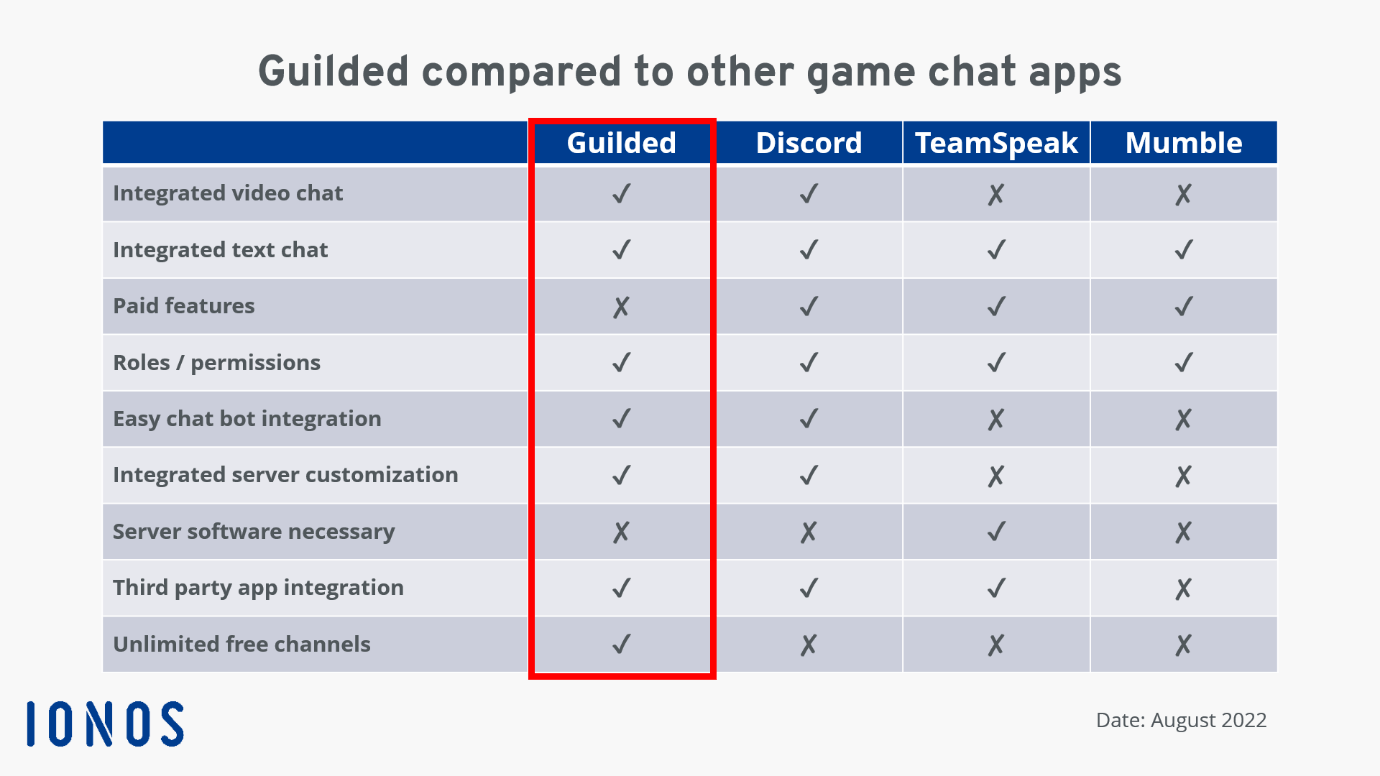
There are a wide range of options available when choosing a suitable chat app. You have the choice between Discord, Mumble, TeamSpeak and several TeamSpeak alternatives. Guilded clearly focuses on gaming communities. This is particularly evident in their stream and tournament features. Nevertheless, it is a great application for everyday group chats also. Our overview shows how Guilded compares to Discord, TeamSpeak and Mumble.
If you still decide to use TeamSpeak or Mumble, we can show you how to
- Create a TeamSpeak server or
- Create a Mumble server.