

What is the Public Cloud?

The Public Cloud is an IT service where businesses or individuals access resources such as computing power, storage, or applications over the public internet from an external provider. These resources are delivered on demand and operated on a scalable infrastructure shared with other users.
- Cost-effective vCPUs and powerful dedicated cores
- Flexibility with no minimum contract
- 24/7 expert support included
What is the Public Cloud? The definition
The Public Cloud is a deployment model of cloud computing. It offers on-demand access to a connected pool of computing resources that are flexibly scalable and available to a wide range of users over the public internet. Public cloud services provide software, infrastructure, and platforms on a pay-as-you-go basis. Public Clouds are scalable and typically operate on a self-service model—if you need more features or computing power, you simply scale up on your own.
How does a Public Cloud work?
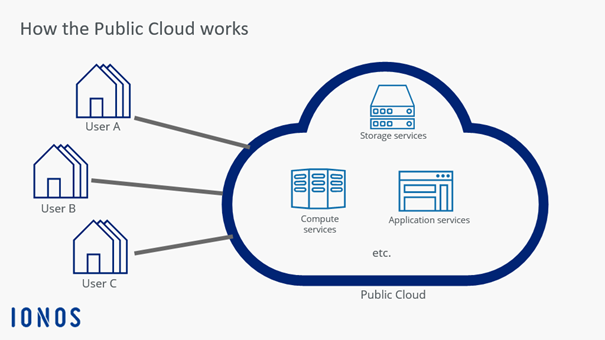
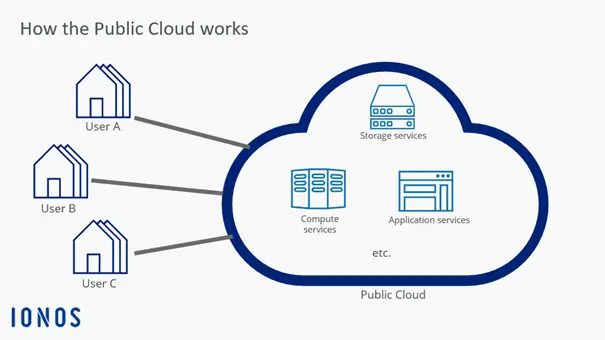
The Public Cloud is based on the principle of providing IT resources—such as computing power, storage, networks, or software—over the public internet. These resources come from large data centers operated by specialized providers. Users access these services through a web-based interface or application programming interfaces (APIs), requiring only an internet-enabled device. Powerful local hardware is not necessary, since the actual processing takes place in the cloud. This type of resource-efficient hardware is known as a “lean client” or “thin client”.
In the background, the infrastructure relies on virtualization. This means that multiple customers use virtual machines on the same physical hardware, while remaining strictly isolated from one another. This approach allows for flexible and efficient use of resources, which can be scaled up or down as needed. Resource allocation is handled automatically by a system called middleware, which acts as a bridge between hardware and applications. It ensures that tasks are intelligently distributed across multiple servers.
To ensure high availability, providers rely on redundancy: data and services are stored multiple times across different servers. If one instance fails, a backup automatically takes over. An even higher level of security is achieved through geo-redundancy, where the same data is stored in data centers located in different geographic regions.
Advantages and disadvantages of the Public Cloud
The Public Cloud offers many benefits for businesses, especially when it comes to efficiency and scalability. Signing up and getting started is straightforward, and billing is based either on actual usage or on a subscription model. This largely eliminates the need to invest in dedicated hardware, helping companies save costs. There’s also no need to purchase expensive software licenses for every employee, as many applications are provided on demand. Cloud providers also offer high availability and strong security: their server farms are monitored and maintained by experts around the clock. Geo-redundant systems ensure reliability across multiple locations. By sharing hardware and using it more efficiently, the Public Cloud is also considered more environmentally friendly than private server infrastructures.
However, there are also some limitations. For example, the GDPR requires that certain types of personal data must not leave the company or the European Union. This means not all cloud providers are suitable for every use case. Since access takes place over the public internet, the Public Cloud is generally considered more vulnerable to security risks. In addition, customers share the same physical infrastructure, which can sometimes affect performance or availability. Some providers also reserve the right to restrict certain features or configurations, which can limit the flexibility customers have in using the cloud.
| Advantages | Disadvantages |
|---|---|
| ✓ Easy sign-up process | ✗ Public internet connection poses security risks |
| ✓ Scalable usage | ✗ Limited provider options due to GDPR |
| ✓ No need for expensive software licenses | ✗ Shared infrastructure |
| ✓ Maintenance by professionals | |
| ✓ High availability and failover protection |
The difference compared to the private cloud
The fundamental difference between the Public and Private Cloud lies in the distinction between public and private access. In the world of cloud computing, there are three main types of access models. On one side is the Public Cloud, which is available to anyone with an internet connection and the necessary budget. On the other side is the Private Cloud, which is isolated from public access. Each model has its own advantages and disadvantages. For this reason, some companies opt for a Hybrid Cloud, which aims to combine the best of both worlds.
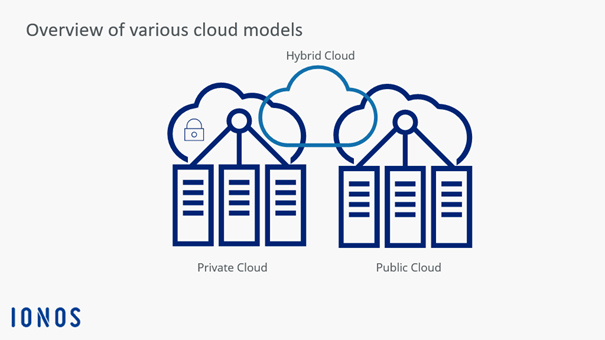
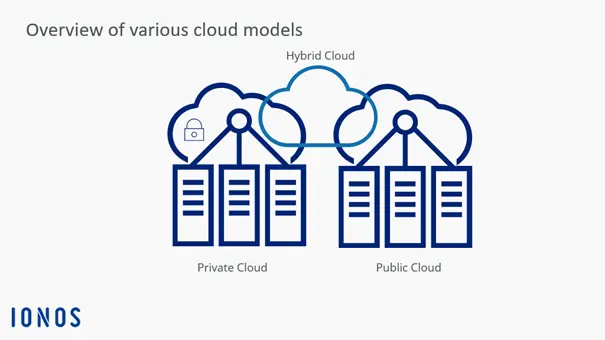
What all three models have in common is their streamlining effect on hardware and software resource consumption within a company. When the IT environment is centralized in the cloud, potential performance peaks are distributed across the virtual servers in use.
Use cases for the Public Cloud
The Public Cloud offers a wide range of use cases for businesses of all sizes and industries. A key area of application is Infrastructure as a Service (IaaS), where companies can flexibly obtain essential IT resources such as virtual servers, storage, or networking through the cloud. This is especially well-suited for development environments, test systems, or running scalable web applications.
In the area of Platform as a Service (PaaS), providers deliver complete development and runtime environments. These are ideal for developers who want to focus on coding without having to manage the underlying infrastructure.
Another common use case is Software as a Service (SaaS) models. These have become standard in the daily operations of many businesses: applications like Microsoft 365, Google Workspace, or cloud-based CRM systems are accessed directly through a browser—without the need for local installation or maintenance. The cloud is now also a key technology for backup and archiving solutions, data analytics, artificial intelligence, video streaming, e-commerce, and remote work.
What to consider when choosing a Public Cloud provider
Whether IaaS, SaaS, or PaaS, there is a wide range of Public Cloud services on offer. Quality standards vary, however, and providers work differently. You will be able to find a service that meets your needs and fits your business.
Value for money
For budget planning, it’s essential to factor in recurring expenses such as Private Cloud subscriptions. Whether a higher price is worth it depends on the features offered—and whether you actually use all of them. A large infrastructure with a fully functional development environment is only necessary if you plan to build and run your own applications. However, cutting back on essentials will likely have a negative impact on your workflow.
Typically, you build your service package yourself through your user account. However, some providers may not offer all the features you need. Most providers enforce what’s known as vendor lock-in—a dependency on the provider—which makes it harder for customers to switch services. In some cases, they use proprietary formats that are not compatible with other applications, or only with significant effort.
Willingness to innovate
Are you constantly evolving and testing your own skills? Anyone who develops creative ideas in the cloud must be able to rely on their service provider. Data security should not be a problem due to redundancy. However, in order for you to be able to continue to make progress, your service provider must also remain innovative and offer you new opportunities. Indications of an innovative company are regular updates and an action plan that has been demonstrably adhered to. Sustainable growth is a sign of reliability, while too rapid growth quickly bursts the bubble of success.
User-friendliness and functionality
A service provider who does not constantly reinvent themselves is something you can live with. However, a service provider who does not offer the basic functions you need for your website is useless. They should include tools and services that make your work easier. User-friendly public cloud providers facilitate communication between people and between applications. This also applies to communication between the experts from the cloud provider team and your own IT team. Without transparent communication, processes slow down and employees may lose motivation. Adjustments should be as simple as possible and implemented smoothly.
Security
If you operate software or even entire development environments, including a communication platform through a public cloud, you inevitably put your personal data on the internet. You have sole access to your data through an interface assigned to your company. You may, however, share the server on which this data is stored with other users. In principle, your company is liable if data protection violations occur.
If your company is based in the United States, you must ensure compliance with data protection regulations such as the California Consumer Privacy Act (CCPA) and industry-specific standards like HIPAA or GLBA, depending on your sector. When storing personal or sensitive data in the cloud, it’s important to choose a provider that operates under U.S. law, offers transparent and compliant data handling agreements, and—ideally—can guarantee that your data is stored on servers located within the United States.
Mobility
With cloud computing, companies rely on a lean client. This “slim” client is your device or a program that cannot function without support from a server. The purpose of lightweight hardware is twofold: lower acquisition and maintenance costs, and the ability to freely scale its capabilities—thanks to virtualization on the cloud server.
So far, so good—but what about mobile devices? Make sure your cloud provider supports compatible platforms that enable mobile SaaS for your business. The same applies to applications your customers access on their mobile devices.
Businesses and individual users alike are increasingly turning to cloud computing for their IT services. The Public Cloud plays a key role as a foundation of digital transformation. It allows a wide audience to access data anytime and anywhere—even on mobile devices—while significantly reducing the need to invest in hardware and software.
The ideal platform for demanding, highly scalable container applications. Managed Kubernetes works with many cloud-native solutions and includes 24/7 expert support.