
What is a multicloud environment? Definition and how it works

A multicloud describes the simultaneous use of cloud services from multiple cloud providers to combine resources, performance, and features in a targeted way based on your needs. Different clouds, such as public, private, or hybrid, can be used in parallel without being tied to a single provider, enabling greater flexibility, resiliency, and optimization of performance and costs.
What is a multicloud?
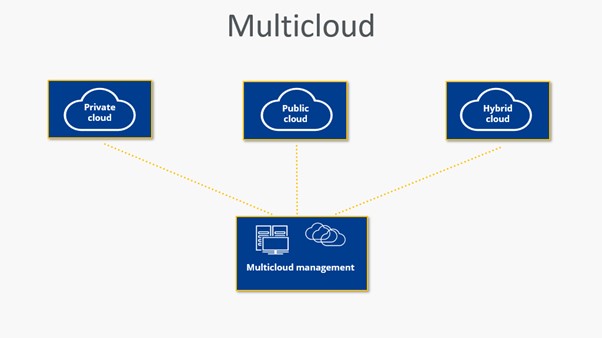
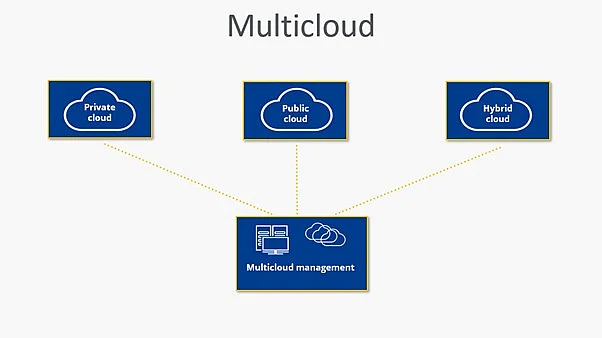
A multicloud describes the simultaneous use of cloud services from multiple providers to flexibly distribute workloads, data, and IT resources across different platforms. Different cloud models, such as a private cloud or public cloud from different providers, can be used at the same time. The goal is to use the cloud solution best suited to each task and thereby optimize performance, costs, security, and compliance. This approach is often implemented through a multicloud architecture that defines how services interact across platforms.
What’s important is the difference from a hybrid cloud. A hybrid cloud combines a private cloud or internal infrastructure with at least one public cloud so that these environments can be integrated and managed together, and data or workloads can be moved between them. In contrast, a multicloud describes the parallel use of multiple cloud services from different providers or models without necessarily being directly integrated, so you can use the platform best suited to each task.
How does a multicloud work?
Cloud services from different providers cover different requirements. While solution A may offer lots of storage space and fast computing power, solution B may excel in data security and data compliance. With a multicloud strategy, you don’t have to choose one or the other; instead, you can select the cloud best suited to each task and ultimately manage all services within a single organizational structure. In practice, this often means designing a multicloud architecture that defines how workloads, data flows, and policies are handled across platforms.
To run a multicloud environment efficiently, services and applications must be carefully coordinated and managed. Key tasks include:
- Monitoring and controlling the different cloud resources
- Data exchange between clouds
- Consistent access permissions and identity management
- AI-powered orchestration to automatically coordinate resources, workloads, and security policies across multiple clouds
- Central identity, policy, and encryption mechanisms to ensure a consistent security level and meet U.S. regulatory and industry requirements (e.g., HIPAA for healthcare, GLBA for financial services, PCI DSS for payment data, and relevant state privacy laws such as the CCPA/CPRA).
Without multicloud management, complexity in cloud computing can grow quickly, because teams have to align and manage multiple APIs, toolsets, and security models across providers.
What scenarios call for a multicloud environment?
By definition, multicloud doesn’t specify how extensively different cloud services are used. In practice, anyone who uses services from more than one cloud provider is already working with multiple clouds, for example by combining different email or storage solutions. In a professional IT context, however, multicloud usually means the deliberately coordinated use of cloud services from different providers. Workloads, data, and services are distributed strategically so each platform is used where it delivers the most value.
This approach is mainly aimed at organizations that run internal or external cloud servers and want to use multiple cloud services in parallel, for example to better meet requirements around flexibility, performance, high availability, or compliance. In most cases, this requires clear coordination and multicloud management, because different platforms, APIs, and security models need to work together.
If these prerequisites are in place, there are several reasons to switch to a multicloud setup:
- Optimize your IT infrastructure: Use a wider choice of providers and apply cloud hosting to scale compute and storage more precisely while reducing operational overhead.
- Get the best out of each application: If you use tools designed for different ecosystems (e.g., workloads optimized for Amazon, Google, or Microsoft), multicloud helps you run each service where it performs best.
- Strengthen data security: Keep sensitive data isolated from other workloads and place it on platforms that meet your specific security and compliance needs.
- Increase resilience: Distribute data and critical processes across multiple clouds to reduce the impact of outages and minimize the risk of downtime or data loss.
An overview of the pros and cons of multicloud
Some of the advantages and disadvantages of multicloud have already emerged in the sections above. To make the comparison easier, here’s a quick summary of the most important points:
| Advantages | Disadvantages |
|---|---|
| ✓ High flexibility when choosing and using different cloud services | ✗ Greater technical and organizational complexity |
| ✓ Straightforward expansion of your existing cloud infrastructure | ✗ Potential challenges with data transfer and communication across providers |
| ✓ Higher availability through distributed workloads | ✗ Increased demands on security and governance |
| ✓ Ability to use the best platform for specific applications |
- Cost-effective vCPUs and powerful dedicated cores
- Flexibility with no minimum contract
- 24/7 expert support included
Reviewer

Christian Heldmaier
Christian Heldmaier is an experienced online marketing and SEO specialist from Karlsruhe. He has been working as an SEO Manager at IONOS since July 2020.