

DNS spoofing

There are a number of ways to tamper with name resolution on the internet. One such attack is DNS spoofing which involves creating fake IP addresses. Here you will learn how it is done, what it is designed to do, the different methods for this kind of attack, and how you can protect yourself against it.
The basis: the Domain Name System (DNS)
The Domain Name System (DNS) is a distributed system used worldwide for translating internet domain names into IP addresses. The DNS returns an IP address that is assigned to a specific domain name. This process is referred to as name resolution.
For name resolution to work, the IP address of the DNS server must be stored on each device. The device addresses its DNS request to this server which executes the name resolution and returns a response. If no DNS server has been stored on the device, the one for the local router will automatically be used.
- Faster domain resolution to keep you online longer
- Added protection against outages and downtime
- No domain transfer needed
What is DNS spoofing?
The term spoofing means “deception” or “forgery”. DNS spoofing refers to a variety of situations in which DNS name resolution is tampered with – specifically to the IP address of a domain name being faked. This means that the device establishes a connection to the fake IP address and data traffic is redirected to a fake server. Here is an example:
| DNS server request | Returned IP address | |
|---|---|---|
| Normal state | 'example.com' | '93.184.216.34' |
| DNS spoofing | 'example.com' | '192.0.2.34' (example) |
Since name resolution largely takes place in the background, the victim usually does not notice any tampering. A particularly insidious characteristic of DNS spoofing is the fact that the correct domain name is displayed in the browser.
How does DNS spoofing work?
DNS spoofing is a collective term for a variety of attack methods. The different methods are described below. The following diagram explains the basics of DNS spoofing.
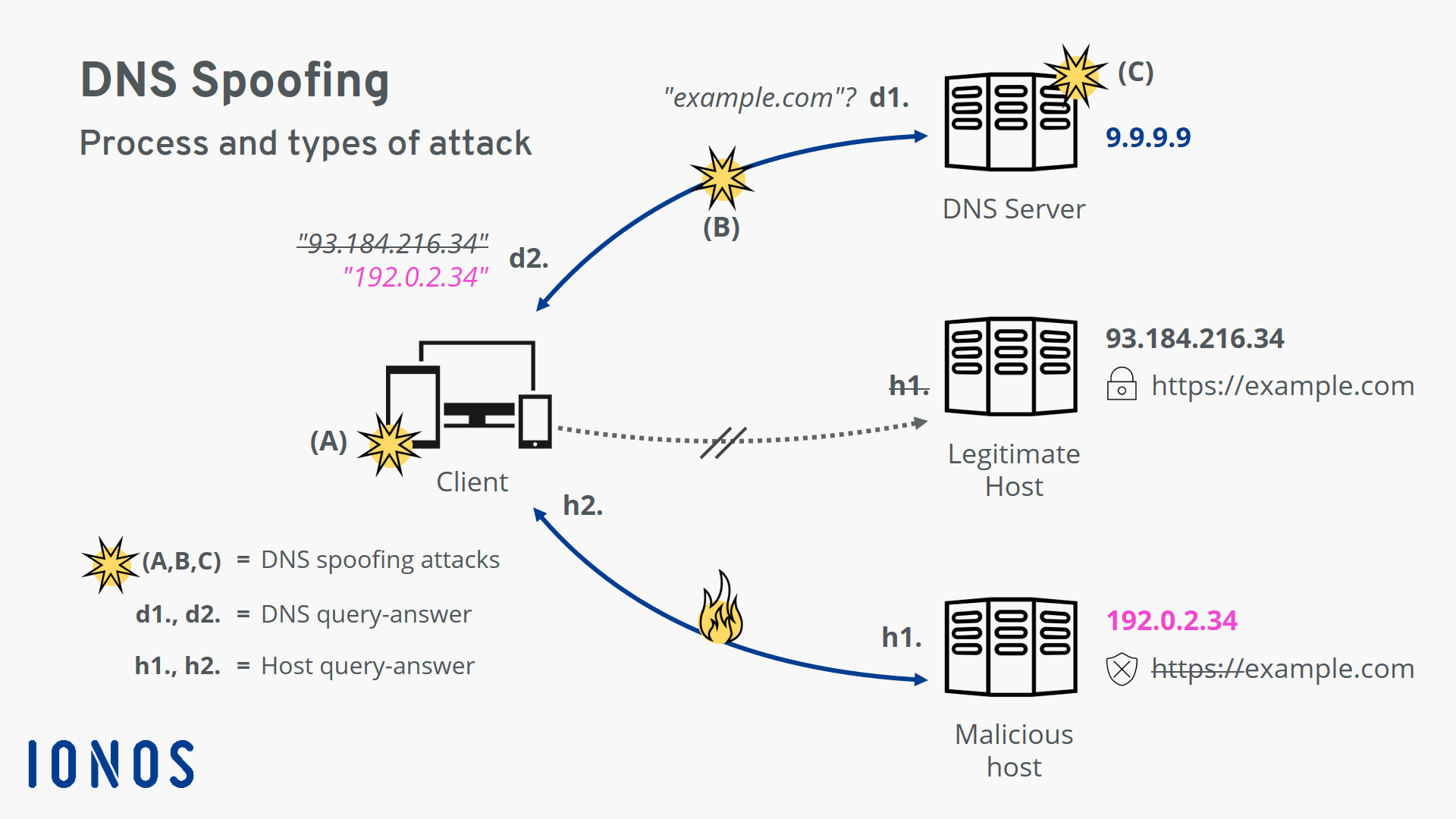
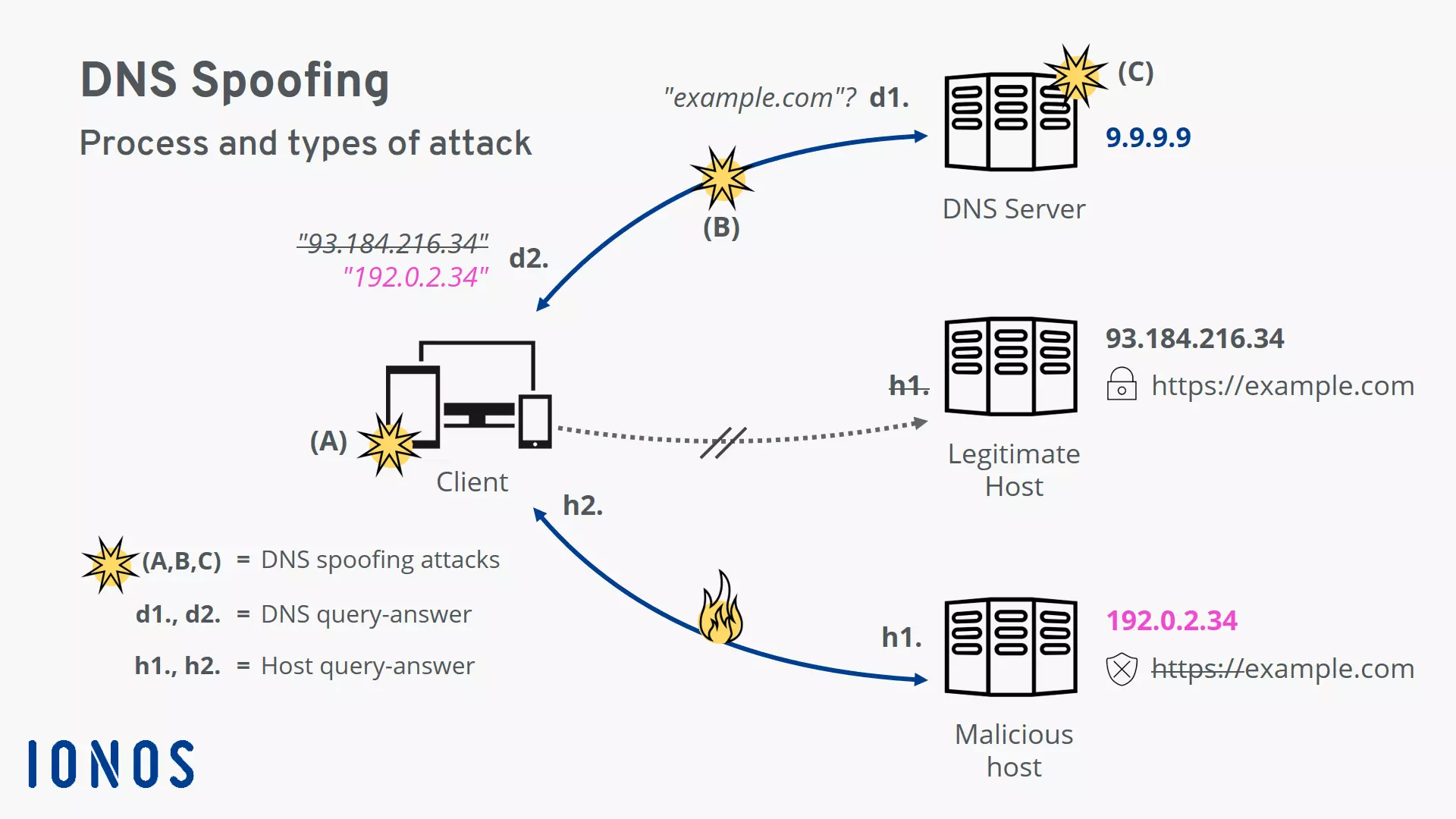
- d1. The client (e.g. the browser on the device) first requests the IP address for the host name example.com from the DNS server.
- d2. The client receives a response to the request, but it contains a fake IP address. The connection to the actual server for example.com is not established.
- h1. Instead, the client sends the request to the malicious host behind the faked IP address.
- h2. The malicious host returns what appears to be a legitimate website page to the client. However, the fake domain name is missing the security certificate which makes the attack visible.
- (A, B, C): These are different attack points for DNS spoofing: on the client-side or local router, on the network connection, and on the DNS server.
Targets of DNS spoofing
DNS spoofing is primarily used by attackers to carry out attacks – usually to steal sensitive user data. However, legitimate companies also resort to DNS spoofing from time to time. It is a known fact that some internet service providers (ISPs) have used DNS spoofing to enforce censorship and for advertising purposes.
What do attackers use DNS spoofing for?
What do internet service providers use DNS spoofing for?
Most people are unaware that they are using a DNS server belonging to their internet service provider. This is normally preconfigured in the local router. Therefore, every DNS request is under the control of the internet service provider.
For example, internet service providers can purposely rig their DNS tables to implement state censorship requirements. In many countries, this is done to prevent users from accessing file-sharing or porn domains. If a user tries to access a blocked domain, they will be redirected to a warning page instead. However, these restrictions can be circumvented with minimal effort by using an uncensored DNS server.
They use the same trick (i.e. redirecting the user to a different page when accessing certain domains) to collect user data for advertising purposes. Internet service providers use DNS hijacking to redirect the user to a specific page when they enter non-existent or misspelled domains. This page may play advertisements or create user profiles to then sell at a profit.
What threats does DNS spoofing pose?
The DNS is a fundamentally useful technology. Nearly every connection uses it for name resolution. In other words, DNS spoofing can affect every single connection established by the client. Whether the victim is accessing a website or sending an email: if the IP address of the server in question is spoofed, an attacker can access their data.
DNS spoofing poses the following risks in particular:
- Confidential data theft: Spear phishing and pharming attacks are used to steal sensitive data such as passwords. These methods are often used to hack into computer systems or for various scams.
- System malware infection: The victim is tricked into installing malware on their own system. This opens the door to further attacks and extensive espionage.
- Collection of comprehensive user profiles: Personal data is collected in the process and then sold or used for additional targeted spear phishing attacks.
- May pose a persistent threat: If a malicious DNS server is set up on the system, communication will be compromised from this point on. Even temporary fake DNS responses may remain in the cache and can cause damage over a longer time.
Here is a concrete example. A wave of DNS spoofing attacks occurred in the spring of 2020 during the COVID-19 pandemic. This involved a router hijacking, which is when a malicious IP address is entered for the DNS server on the router. The attack was made possible due to an insecure admin access attempt on the router. The victim was suddenly displayed a warning that was allegedly from the World Health Organization. It said that they were about to install a COVID-19 information app. In reality, the software was Trojan malware. If a trusting victim were to install the Trojan, it would search the local system and try to access sensitive data. The goal was to create a comprehensive profile that could be used in future spear phishing attacks against the victim. The intercepted data included the following:
- Cookies (browser)
- Browsing history
- Payment information (browser)
- Saved login information (browser)
- Saved form information (browser)
- Cryptocurrency wallets
- All text files on the device
- Databases for two-factor authentication (2fa)
Types of DNS spoofing
The following three attack types refer to the diagram above (A-C).
Type (A): attack on the client or local router
This type of DNS spoofing attack involves malicious tampering on the local device or home router. To the victim, everything seems fine at first. The device connects to the DNS server as usual. However, malicious IP addresses may be returned for the requested host names.
With this kind of attack, the threat will remain until the tampering has been corrected. Nevertheless, the attacker needs an attack vector in order to tamper with anything. This can be a technical factor, such as open admin access, a weak password, or something in a similar vein. An attacker can also use social engineering to trick the victim into making the change themselves in good faith.
Changing the DNS server on the local system
The DNS spoofing attack, known as a “local hijack”, sets the IP address of the DNS server to a malicious address in the network settings of the local device.
This change can be detected by the victim and easily reversed. However, this form of tampering is often accompanied by malware which can restore the malicious entry if the victim changes it.
Use the online tool WhoismyDNS to check whether you have fallen victim to this type of DNS spoofing.
Tampering with the hosts file on the local system
Most operating systems use a “hosts” file to enable name resolution of certain domains to be performed on the local system. If a malicious entry is placed in this file, data traffic will be redirected to a server being controlled by the attacker.
This type of tampering is permanent. However, it can easily be detected by an experienced victim. To fix this problem, all you need to do is change the hosts file.
Hijacking the local router
The IP address of the internet service provider’s DNS server is set on the local router by default. In a “router hijack”, this is replaced by a malicious address. This attack poses a threat to all data traffic passing through the router. Since there are usually multiple devices in a household that will use the router to establish a connection, several parties can fall victim to the attack.
Many users are unaware that they can configure their router themselves. So, this attack often remains undetected for a long time. If any problems occur later, the victims are more likely to suspect that the source is their own device rather than the router. Therefore, it’s well worth considering that the router might be the source of the error in the event of any weird problems.
Use the F-Secure Router Checker to check whether you have fallen victim to this type of DNS spoofing.
Type (B): attack on the DNS server’s response
This type of DNS spoofing is a man-in-the-middle attack. The attacker pretends to be the victim’s DNS server and sends them a malicious response. This type of attack works because DNS traffic uses the unencrypted User Datagram Protocol (UDP). There is no way for the victim to verify the authenticity of the DNS response.
Other kinds of attacks such as ARP spoofing and MAC spoofing can be used to gain access to the local network. The use of encryption technologies protects against many man-in-the-middle attacks.
Type (C): attack on the DNS server
This type of DNS spoofing attack targets a legitimate DNS server and can affect a large number of users. It’s a high-level type of attack, as multiple security mechanisms usually have to be overcome to hack the server.
Poisoning the DNS cache on the server
DNS servers are arranged in hierarchies and communicate with one another. An attacker can use IP spoofing to pretend to be one of these servers and trick a server into accepting a false IP address for a domain. The server places the malicious entry in its cache, and begins “poisoning” it.
Any request to the server after the cache is poisoned will result in the malicious entry being returned to the victim. The threat will remain until the entry is removed from the cache. The DNSSEC extension serves as a server-side security mechanism. It can be used to secure server communication within the DNS.
Use the Domain Guard from IONOS to protect your domain from any tampering.
Hijacking a DNS server
This type of attack, also known as a “rogue hijack”, is probably the most complex kind of DNS attack. This involves an attacker taking control of a legitimate DNS server. Once compromised, even the most current DNS encryption will provide no protection. However, the content encryption should at least alert the victim to the attack.
How to protect yourself from DNS spoofing
As you can see, DNS spoofing is a serious threat. Fortunately, there are a number of simple measures you can take that provide effective protection against DNS spoofing.
Using encryption to protect against DNS spoofing
Encryption methods generally offer two key advantages:
- Data is protected from unauthorized access by third parties
- It ensures the authenticity of the communicating party
The latter point is critical in the fight against DNS spoofing. If an attacker tries to pretend to be a legitimate host, this will result in a certificate error on the user side and the spoofing attempt will be detected.
Using transport encryption
For a basic level of security, you should secure as many connections as possible using the common transport encryption method. Preferably, websites should be accessed in the browser using HTTPS. The popular browser add-on HTTPS Everywhere secures connections to websites that transfer content over both HTTP and HTTPS. You should also make sure that the connections configured in your email client (e.g. IMAP, POP3, and SMTP connections) use secure protocols such as TLS and SSL.
If your connections are secured by transport encryption, you should at least be able to detect a DNS spoofing attack. Since the malicious host does not have the security certificate that the real host would have, the browser and email client will send an alert when a connection is established. This gives you a chance to terminate the connection and implement additional security measures.
Encrypting DNS traffic
While transport encryption secures your data transfer, the connection to the DNS server is still vulnerable and is considered to be the weakest link. However, there are dedicated solutions for DNS request encryption on the user side. The most notable of these are DNSCrypt, DNS over HTTPS (DoH), and DNS over TLS (DoT). These technologies all provide protection against dangerous man-in-the-middle attacks. However, not one of these three solutions comes pre-integrated with any standard operating systems in a way that is suitable for the mass market. Furthermore, the DNS server must also support the respective security technology for DNS encryption to work.
Using a virtual private network
In addition to transport encryption and securing the DNS server connection, using a virtual private network (VPN) can also help to protect against DNS spoofing. When using a VPN, all connections are routed through an encrypted tunnel. However, you should keep in mind that the IP address of a DNS server can still be stored in most VPN programs. If this is a malicious address, the VPN’s protection against DNS spoofing will be rendered ineffective.
If you don’t want to invest a lot of time in choosing a VPN provider, you can use the free Warp app from Cloudflare. It provides VPN functionality and DNS encryption over Cloudflare’s public DNS resolver network 1.1.1.1 (see below for more information).
In addition to the added security, it has an extremely user-friendly interface. The app is currently available on mobile devices and will also be available on Windows and macOS desktop computers in the future.
Using a public DNS resolver network
One of the most effective security measures you can take against DNS spoofing is using a public DNS resolver. The setup is simple enough for practically any user to be able to configure their own device to use. All you have to do is change the DNS server entered on your system. For example, you can use the resolver network provided by the non-profit organization Quad9, which bears the same name.
Using a public DNS resolver provides the following advantages:
- High-speed DNS responses: Large DNS resolver networks operate dozens of servers around the world. Thanks to Anycast routing, the physically closest server is always used for name resolution which is reflected in the short response times.
- High level of data protection and anonymity: Many internet service providers sell their customers’ data that is generated by DNS traffic. These popular public resolvers generally store little to no user data, offering a high level of data protection and anonymity.
- Does not enforce censorship measures: State censorship regulations are only valid within national borders. Internet service providers usually operate within their customers’ country of residence and are required to enforce state censorship. However, a resolver network based abroad can offer its services worldwide without having to consider state-mandated censorship.
- Supports modern security standards: Large public DNS resolver networks specialize in responding to DNS requests. They are often trailblazers in using modern security standards, such as DNSSEC, DoH, DoT, and DNSCrypt.
- Blocks malicious domains: Using a public DNS resolver network can also help protect against malware and phishing, as these keep blacklists of known malicious domains. Attempting to access these domains will result in the user being redirected to a warning page.
The following table provides an overview of popular public DNS resolver networks. In keeping with the convention, each resolver network is configured redundantly over two IP addresses. If the first of the two servers is not available, the second one is used. Some resolver networks offer additional IP addresses which can be used to activate additional functions such as for the protection of minors.
| Content filtering | Data protection | IP address of the name server | |
| Quad9 | Filters malicious domains | Does not store user data | 9.9.9.9 and 149.112.112.112 |
| Cloudflare DNS Family | Filters malicious domains plus provides protection for minors | Does not store user data | 1.1.1.3 and 1.0.0.3 |
| Cloudflare DNS | No filtering | Does not store user data | 1.1.1.1 and 1.0.0.1 |
| DNS.watch | No filtering | Does not store user data | 84.200.69.80 and 84.200.70.40 |
DNS spoofing poses a serious threat. Using a combination of encryption technologies and public DNS resolver networks will provide robust security.