

How do you convert a website to HTTPS (SSL)?

If you want to build a secure website, using SSL/TLS and HTTPS is essential. But what do these terms actually mean — and how can you enable these security protocols to switch an existing website to HTTPS?
- Secures data transfers
- Avoids browser warnings
- Improves your Google ranking
What is SSL/TLS?
The term SSL (short for “Secure Sockets Layer”) refers to a technology used for the encryption and authentication of data traffic on the internet. It secures the transmission between browsers and web servers on websites. Especially in e-commerce, where confidential and sensitive data is exchanged, using an SSL certificate — or its successor, TLS (Transport Layer Security) — is indispensable.
Sensitive data commonly protected by SSL/TLS encryption includes:
- Registration data: name, address, email address, phone number
- Login data: email address and password
- Payment information: credit card number, bank details
- Form submissions
- Uploaded documents from customers
SSL/TLS ensures that communication cannot be intercepted or manipulated, preventing personal data from falling into the wrong hands.
Experts now exclusively recommend using TLS. Often SSL is mentioned, although TLS is meant.
What is HTTPS?
HTTPS (Hypertext Transfer Protocol Secure) is the protocol for secure data transmission between browsers and web servers. In contrast, HTTP is the unsecured version, where all transmitted data can theoretically be intercepted or altered by attackers. This means that when using HTTP, users cannot be sure whether sensitive information — such as credit card details — is actually being sent to the intended recipient.
HTTPS ensures data security by encrypting information during transmission and verifying the authenticity of requests. This is achieved through the use of an SSL certificate.
What are the benefits of SSL/TLS or HTTPS?
- Provides data protection and security for customers and partners
- Reduces the risk of data theft and misuse
- HTTPS encryption is an official Google ranking factor and a standard requirement for high-ranking websites
- Enables the use of HTTP/3 for optimal website performance
- Certificates are easily recognizable to users and build trust
What’s the difference? Free vs. paid SSL/TLS
If you want to switch your website to SSL/TLS, as mentioned earlier, you’ll need an SSL/TLS certificate. Solutions like Let’s Encrypt offer free, easy-to-install alternatives to traditional paid certificates. When enabling HTTPS or creating a secure website, you now also need to decide between free and paid SSL/TLS options. One of the main criticisms of free certificates is that they are increasingly misused by cybercriminals to make phishing sites appear trustworthy — giving visitors the impression of a secure website, which is only true at first glance.
In early March 2020, Let’s Encrypt had to revoke more than three million active SSL/TLS certificates. The incident was caused by an error in the Boulder open-source software used by Let’s Encrypt, which affected the verification of CAA records (Certification Authority Authorization). In theory, this flaw could have allowed certificates to be issued for unauthorized domains. The only solution for those affected was to generate a new certificate within 24 hours to restore encryption for their projects.
In principle, free and paid SSL/TLS certificates mainly differ in the following aspects:
- Validity: The most notable difference is the certificate’s validity period. Most paid SSL/TLS certificates are valid for 12 to 24 months, while free certificates usually expire after just 90 days. If you choose a free SSL/TLS certificate, you’ll need to renew it more frequently — although many providers offer automatic renewal.
- Administration: Paid SSL/TLS certificates typically include management tools and support for administering the certificate. Free certificates usually don’t include these services, so you’ll need to handle administration tasks yourself unless you purchase additional services.
- Domain affiliation: A free SSL/TLS certificate can only be issued for a single domain and is bound to it. Paid SSL/TLS options, on the other hand, can include multi-domain or wildcard certificates that cover multiple projects and subdomains.
How to convert your website to HTTPS/SSL
When you create a secure website, you can use SSL encryption from the start. However, converting an existing site to HTTPS does not require too much effort.
Step 1: Acquire SSL certificates
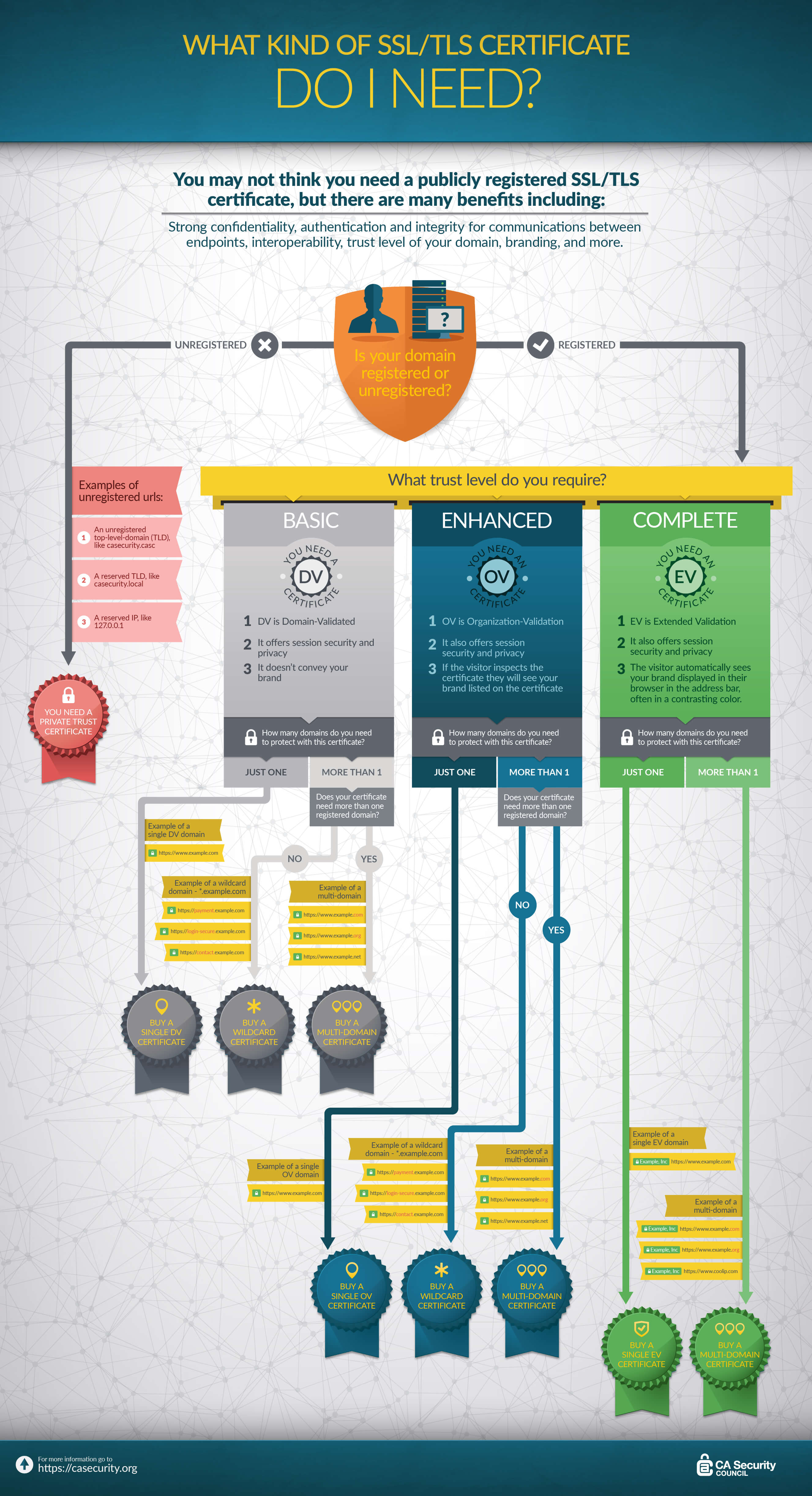
An SSL certificate functions as an identity verification for a website. The official issuing authority (CA) that provides the certificate verifies the identity of the website owner and vouches for the accuracy of the information. SSL certificates are stored on the server and are retrieved each time a visitor accesses a website secured with HTTPS. There are different types of certificates that vary in their level of authentication:
-
Domain Validation (DV) Certificates – free and paid
DV certificates offer the lowest level of authentication. The CA only checks whether the applicant owns the corresponding domain. Company information is not verified, which means there is still a residual risk with this type of certificate.
Suitable for: Websites where trust and credibility are less critical and there is no risk of phishing or fraud. -
Organization Validation (OV) Certificates – paid
OV certificates provide a higher level of security than DV certificates. In addition to verifying domain ownership, the CA also checks key company information. This verified information is visible to visitors, which helps build trust. Because the verification process is more extensive, OV certificates are more expensive than DV certificates but offer stronger security.
Suitable for: Websites where transactions take place but do not involve highly sensitive data. -
Extended Validation (EV) Certificates – paid
EV certificates offer the highest and most comprehensive level of authentication. Compared to OV certificates, company information is even more thoroughly verified, and these certificates are only issued by authorized CAs. The strict validation process ensures maximum security and boosts trust and credibility, though EV certificates are also the most expensive.
Suitable for: Websites that handle credit card data or other highly sensitive information.
Step 2: Install and configure the certificate
The next step is to install the SSL certificate on your server. Many hosting providers handle this process for their customers. In most cases, the certificate can be requested directly through the customer area, and the provider will take care of the setup. For example, IONOS customers can easily add an SSL/TLS certificate to their existing web hosting package through their customer account — and in many packages, it’s already included by default. The exact installation process varies by provider. However, hosting providers or certificate issuers typically offer detailed installation instructions and guides. To ensure a technically flawless setup, pay special attention to the following points:
- correct certificates
- correct encryption
- appropriate server configuration
Step 3: Respond to errors and issues
During the switch to SSL/TLS, various errors can occur that may harm your rankings or even make your website temporarily inaccessible.
Website operators who are migrating to HTTPS should:
- Avoid expired certificates: An invalid or expired SSL certificate triggers a browser warning, which undermines user trust and can deter visitors.
- Set up proper redirects: To prevent duplicate content, configure 301 redirects from HTTP to HTTPS. This ensures search engines don’t treat both versions as separate sites.
- Adjust ad accounts: Embedding unencrypted content (images, scripts, etc.) on an HTTPS site will cause browser warnings. This is especially common with ads, which are often delivered unencrypted. Update your ad accounts to deliver content over HTTPS.
- Switch Google Search Console and analytics tools: Since HTTP and HTTPS are considered separate websites, you need to add and verify the HTTPS version in Google Search Console and update all analytics tools accordingly.
- Update the XML sitemap: Update your sitemap with the new HTTPS URLs and resubmit it to Search Console.
- Check internal and external links: Although 301 redirects will catch outdated links, you should still update all internal links to HTTPS. Depending on your CMS, this may require manual changes. For external links, try to have important backlinks (especially from high-authority sites) updated to your HTTPS version.
- Free Wildcard SSL for safer data transfers
- Free private registration for more privacy
- Free Domain Connect for easy DNS setup
Free checklist download
Below you can download a brief or detailed checklist that lists and explains the most important aspects of switching a website to HTTPS.
Step 4: Monitor certificate duration
To ensure your HTTPS encryption remains active, your SSL/TLS certificate must not expire. Regularly check its validity period and, if possible, enable automatic renewal.
- Monitoring: Track the expiration date of your certificate. Many hosting providers offer reminder features or monitoring tools for this purpose.
- Automatic renewal with ACME: The ACME protocol (Automatic Certificate Management Environment) enables automatic certificate renewal (e.g., for Let’s Encrypt certificates), helping prevent downtime and browser warnings.
- Use provider integration: In many web hosting packages, automatic certificate renewal is already enabled by default. Check this setting in your hosting provider’s customer account.
How to check a site for a valid certificate
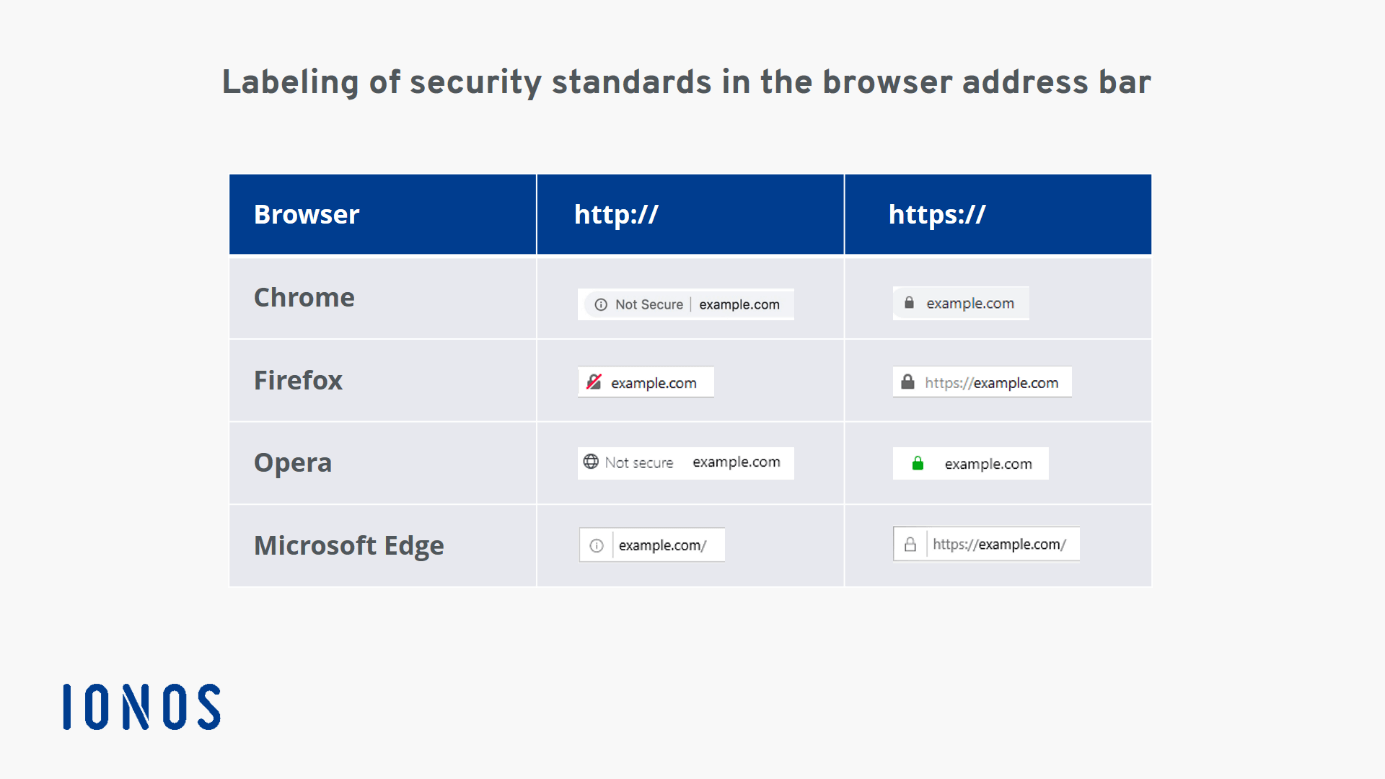
When visiting a website encrypted with a valid certificate, you can recognize it by the URL:
https://www.example.com
The “s” in the protocol part of the URL stands for “secure” and indicates that the page is protected by an SSL/TLS certificate. Depending on the type of certificate and the browser used, there may also be additional visual indicators of secure encryption:
With tools like the free SSL check from IONOS, you can verify in just one click whether your current certificate is correctly installed and protecting your website from attacks.
Increased trust through secure company websites
In addition to the technical benefits of SSL/TLS encryption, the resulting increased user trust in a company’s website — and thus in the company itself — is a key reason to create a secure website. Jeff Barto, Trust Strategist at Symantec, highlights the importance of web trust and the rising expectations of users when it comes to online security.
 To display this video, third-party cookies are required. You can access and change your cookie settings here.
 In this context, he offers businesses three specific recommendations to meet growing user expectations regarding website security:
 To display this video, third-party cookies are required. You can access and change your cookie settings here.
 - Integrate trust seals into the website: Trust seals signal that a website is reliable. They can certify data security, secure transactions, or confirm that the website is free from malware.
- Implement an SSL certificate with a high security level: Certificates with higher validation levels provide visible indicators of secure encryption directly in the browser bar, boosting user trust.
- “Always on SSL”: The SSL certificate should be active on all subpages of a domain — not just on the login page or checkout. This ensures consistent protection for users throughout their entire visit.