

How much does a website cost?

Even if you have a concrete idea of what your website should look like, estimating website costs can be a challenge. We provide a realistic overview of how much it costs to make a website, depending on the type of website you plan to create and how much time and expertise you bring to the table.
- Free Wildcard SSL for safer data transfers
- Free private registration for more privacy
- Free Domain Connect for easy DNS setup
How much does it cost to build a website and what other website costs are there?
There is no single answer to the question “How much does a website cost?”. The spectrum can range from $5 to $100,000. In this article, we’ll give you an idea of the budget you should plan and which technical solutions are suitable for your budget. Don’t forget there are also maintenance and marketing costs to consider for your website:
- Regular maintenance: Updates need to be installed, security gaps must be patched, and new legal requirements should be implemented. If this service isn’t included in your modular system or CMS, you should factor in the costs of hiring a service provider.
- Search engine optimization: You should promote your website so that your target group becomes aware of it.
- Advertising and marketing: Depending on your strategy, your website may incur costs for advertising (e.g. Google Ads and social media ads), newsletter marketing, etc.
When planning your finances, you should also take into account that other indirect website costs will arise if you want your website to be successful. For example, does your company have a professional corporate identity? If you do not want to design a logo yourself, you may have to pay for a designer.
What factors affect website costs?
The cost of a website depends on your requirements and what level of dynamic capabilities your website requires. The more time and expertise you can contribute yourself, the lower your website creation costs will be.
| Level of difficulty | Advantages | Disadvantages | Price | |
|---|---|---|---|---|
| Self-programming | Hard |
|
|
Starting at approx. $10 per month |
| Content management system | Medium to hard |
|
|
Starting at approx. $10 per month (premium plugins incur additional fees) |
| Modular system | Easy to medium |
|
|
Starting at approx. $10 per month |
| Web design agency / freelancers | Easy |
|
|
One-time fee starting at approx. $5,000-10,000, additional maintenance costs |
| Web design service | Easy |
|
|
Starting at approx. $40 per month |
What solutions are the right fit for which budget?
We briefly outlined the technical options for implementing a website above:
- A modular system
- Content management system (CMS)
- Individual programming
- Web design service
With the first two options, you can create a website without any special IT knowledge and at a low cost. With the last two options, you work with agencies or service providers and can even have your website created for you, although this comes with higher website costs.
Here is an overview of the strengths and weaknesses of each solution:
Modular website systems
For lots of simple websites (blogs, portfolios, small company websites), a website builder such as the IONOS Website Builder is completely sufficient. There are various offers available on the market, but the principle of a website builder is always the same. You can choose from various design templates, customize page elements and add your own content using a WYSIWYG editor. You can choose from various amounts of customization options depending on your plan. Search engine optimization features are usually integrated or can be booked additionally.
Many providers also take care of hosting and domain registration and provide you with an email address that matches your domain, so you don’t have to worry about these technical details. It makes sense to closely compare price and performance in advance. Depending on the provider, website builders can cost up to $40 per month. With other technical solutions, website costs are higher.
- Intuitive website builder with AI assistance
- Create captivating images and texts in seconds
- Domain, SSL and email included
| Strengths | Weaknesses |
|---|---|
| Professional results for simple websites and online stores | Limited design adaptability / standard optics |
| Quick website creation using templates | Advanced functions often not possible |
| No programming skills required | Unsuitable for complex websites |
| Low costs |
Take the design of your website into your own hands. With IONOS MyWebsite, you can create your own website and test it for free. MyWebsite comes with personalized advice, 24/7 support and a money-back guarantee. Take your time to explore all the features that MyWebsite has to offer.
Content Management System (CMS)
After a while, many people make the switch from modular systems to a CMS. You can find an overview of the major CMS providers in our CMS comparison. CMSs also offer a graphical interface with various templates but with more design freedom. There are plugins for nearly every application, so those without extensive IT skills can make do without needing to rely on external assistance. Even simple online stores can be launched without the need for additional support. However, there is one major drawback: Plugins can incur high one-time costs or ongoing fees. They can sometimes also have a negative impact on website performance. Another advantage of using a CMS is that it is more suitable for projects that need to be scalable so they can respond to rapidly increasing requirements and traffic.
- Stress-free, no matter your skill level with easy AI tools
- Fully customizable with themes and plugins
- Hassle-free updating and less admin
For larger adjustments or an initial setup, it’s worth calling in professional support to write changes into the code, as individual programming is not possible with website builders. You’ll also need to factor additional website costs into your budget for maintenance and technical problems that commonly arise over time.
You will also need to take care of hosting and domain registration yourself. Monthly fees are usually required for this. For hosting a site with relatively low traffic, you can expect to pay at least $40 a year, and for domain registration, you should plan on an additional $20 a year. You won’t incur any additional charges for the CMS itself if you use an open-source solution like WordPress or TYPO3. IONOS offers Hosting for WordPress, which has themes and plugins that run automatically, ensuring that there are no security vulnerabilities.
| Strengths | Weaknesses |
|---|---|
| Higher level of customization | No support |
| Costs can be customized | Training necessary for beginners |
| Free choice of hosting providers | Technical know-how is required as well as collaboration with service providers |
| Can be easily scaled for changing business requirements |
Web design agencies & freelancers
This is probably the most convenient solution. With this option, your website is developed by professionals according to your specifications. However, this is also the most expensive choice. For complex online stores and web apps, it’s the only suitable professional approach.
If you want to create a website and save on costs, you can work with individual service providers including a designer to create the user interface of your website and a programmer to develop your website’s functionalities. If you go this route, it’s helpful to have some experience with project management or knowledge of usability and user experience yourself to ensure that your website is highly functional and enticing to visitors.
If you want more advice, you are better off using an agency. With an agency, designers, developers and project managers usually work together to fulfill a client brief. After evaluating the client’s requirements, they provide an overview of possibilities and functionalities, and coordinate individual project steps in accordance with the brief.
How much does a website designed by professionals cost? The investment can quickly rise into the five-figure range. That’s why it’s important to make sure that your website is being created based on precise market analysis and has a good chance of being successful
Planning on developing a web app? If so, the cost of your website might end up rising into the six-figure range. You should only make this kind of investment after thoroughly analyzing your website’s economic viability, planning your finances in detail and selecting service providers.
There are also additional running costs for domain and hosting as well as website development. If you want to host a website using a virtual private server, you’ll need to plan for around $30 per month.
| Strengths | Weaknesses |
|---|---|
| Highly individual results can be achieved | Higher costs |
| Fast rates of success for the website |
Web design service
In addition to web design agencies, some hosting providers may also offer a design service. In this instance, hosting providers work with experts to help achieve individual client needs. The big advantage with this option is that the design and hosting (often including domain registration and SSL certificate) come from the same provider. This can be particularly helpful when it comes to maintenance and support.
With a web design service, you can choose from a combination of personalized advice and a website building kit. You can count on expert assistance and achieve great results without having to invest a lot of time or money into the design concept. You simply choose your design from a variety of templates and have them adapted as needed. This makes it possible to get professional help, but still pay just a fraction of the price of a website design agency.
| Strengths | Weaknesses |
|---|---|
| Expert advice | Slightly higher costs compared to modular systems and CMS |
| Often available in combination with hosting plans | Not entirely customizable |
| Variety of design templates |
How does the type of website you have affect the cost of your website?
Websites can be categorized into different types. Website types differ not only in their structure, but also in the technical effort required for development and maintenance. And this in turn affects the budget you should plan for your project. Which website type is right for you depends on the objective of your company or project.
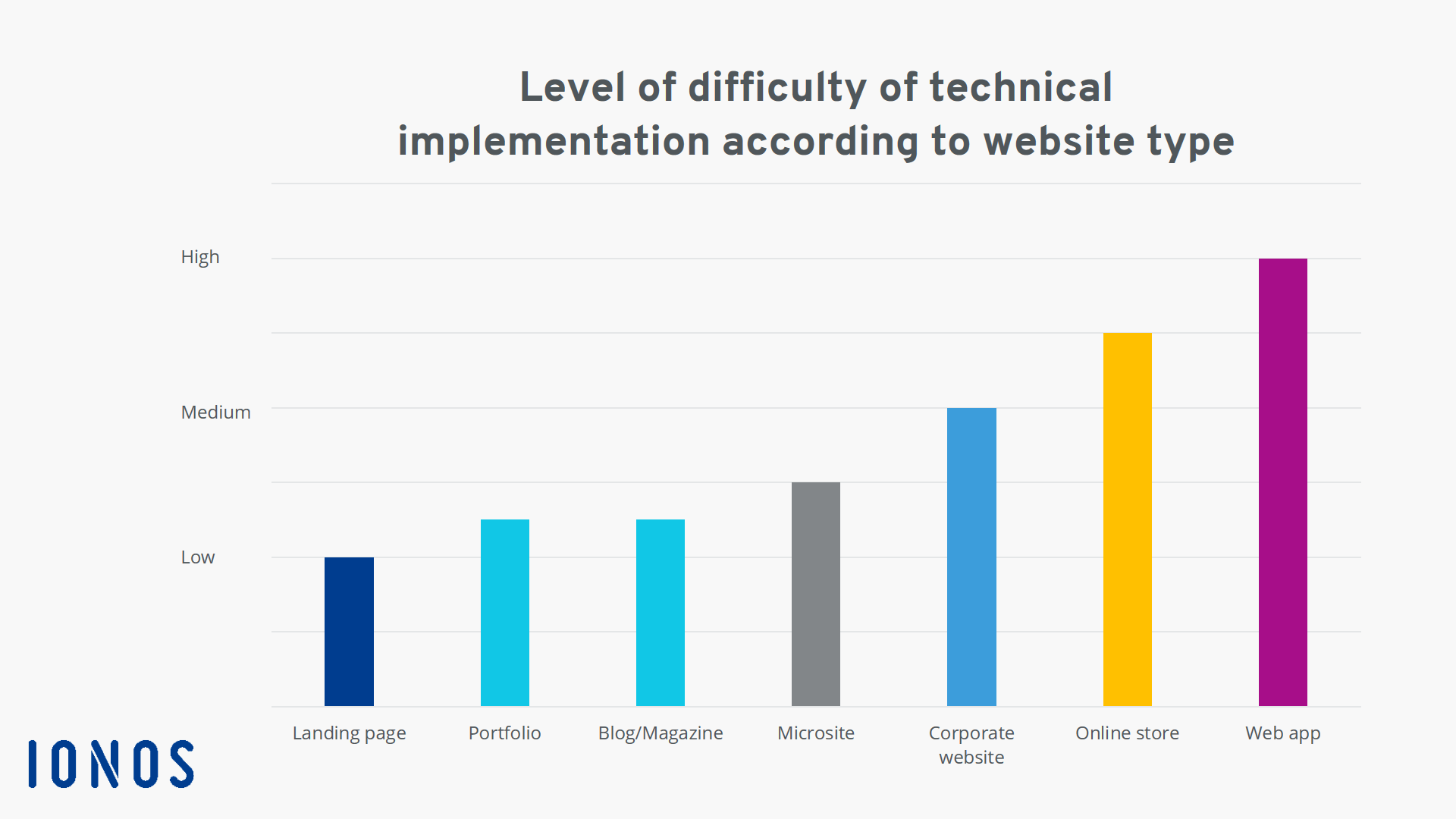
In the diagram below, you can see the respective degree of difficulty for the technical implementation of each website type:

Want to get started with your own online store? Download our practical checklist to get the best possible start to your e-commerce adventure!
1. Landing page: Whether you are creating a basic sales page or an informative landing page, the costs and technical requirements are minimal. With interfaces to email marketing systems, you can collect email addresses and generate sales through redirects to shop systems.
2. Portfolio: If you want to provide information about yourself or your creative work on a portfolio page, you can use CMS systems such as WordPress or TYPO3. With CMSs , you can get professional results without too much customization, even if you’re a non-technical user.
3. Blog/magazine: If you want to prioritize creative design and plan to regularly publish new content, collect email addresses from readers and potentially sell individual products, a CMS is an excellent choice. However, you may still have customization needs that require programming skills.
4. Microsite: For more creative and interactive websites with dynamic responses, you need IT skills. Microsites are usually custom-programmed, either partially or completely, which is why professional support may be required.
5. Corporate website: You can create a simple company website with a modular system without having to touch a line of code. However, if you have higher demands for your website, asking a developer or agency is a good idea. When it comes to multilingual websites, pages with dynamic content and integrated applications, the difficulty of implementation increases.
6. Online store: A simple online store can be implemented using a modular system. Larger online stores are technically demanding projects. In addition, you should consider the cost of payment solutions and shipping options.
7. Online apps. Depending on the range of functions, website costs for custom programming can run into the six-figure range. These projects can only be managed in collaboration with an agency or a competent team of freelancers.
How do time constraints affect website costs?
In addition to deciding on the type of website you want to build, there are three other factors that need to be considered: time, money and know-how.
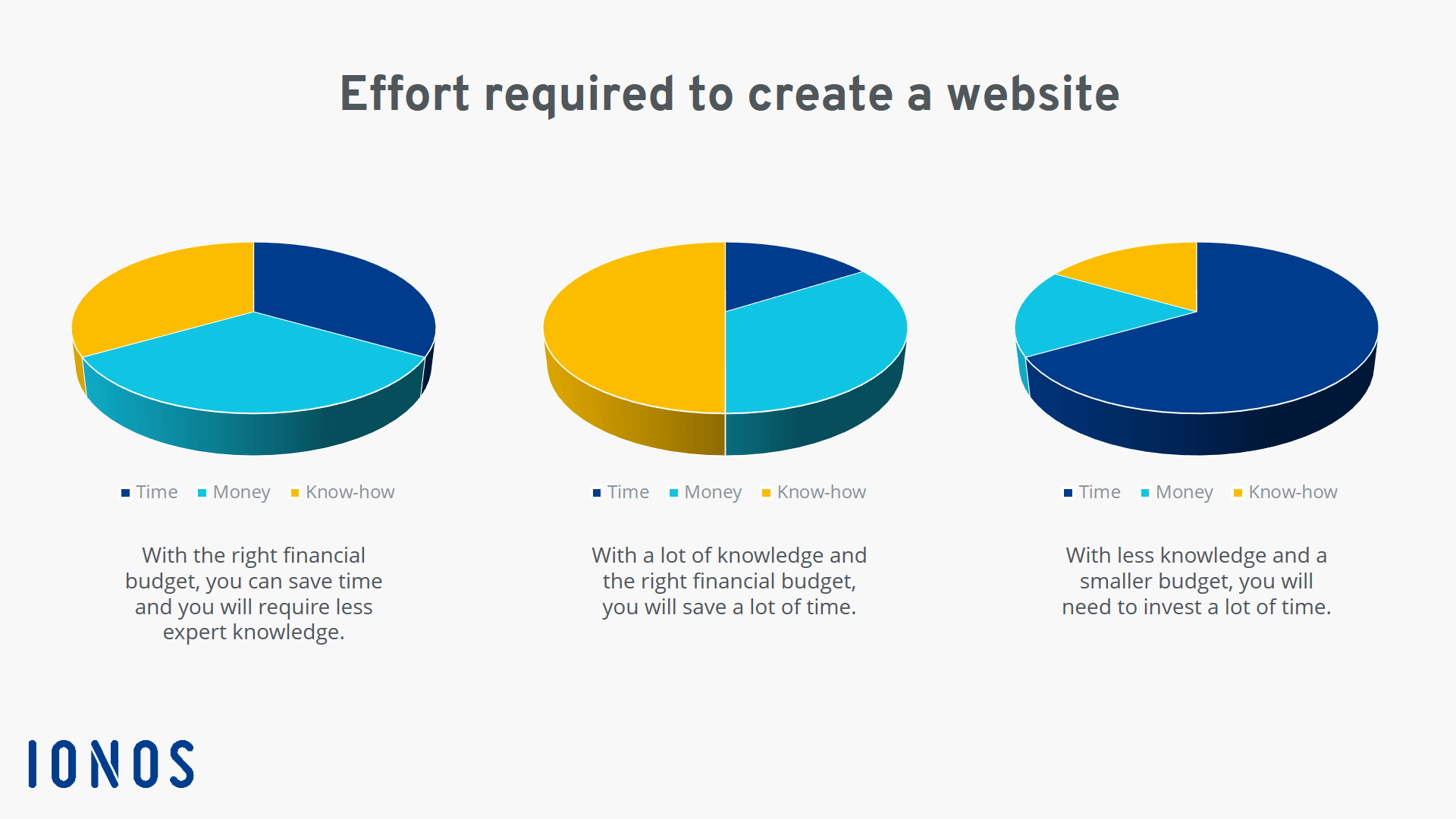
This infographic shows that the more money you have at your disposal, the less know-how and time you will need to create your website. In other words, you can easily compensate knowledge deficits and time constraints if you have the necessary financial resources.
However, if you want to develop a website and keep costs as low as possible, you have two other ways to go about this. Either you invest more time in the project and acquire the necessary skills so you can take on as many tasks as possible yourself or you already have a certain level of expertise and don’t need to rely as heavily on support from service providers.
With the website builder from IONOS, you can get a free domain without ads.
FAQs
We’ve summarized the most important questions and answers on this topic for you below.
What types of websites are there?
Websites can be categorized into seven different categories:
- Landing pages
- Portfolios
- Blogs/Magazines
- Microsites
- Corporate websites
- Online shops
- Online apps
What options are there for creating websites?
Technical options for implementing a website project include:
- Modular systems
- Content management systems (CMS)
- Custom programming
- Web design services
With the first two options, even IT beginners can set up a website online, while the last two options usually require working with agencies or service providers.
How can you create a website at an affordable price?
With little or no programming knowledge, the cheapest way to create a website is with a website builder or a content management system.
What are indirect website costs?
Indirect website costs include:
- Logo design
- Maintenance (installing updates, closing security gaps, implementing new legal requirements)
- Service provider costs (e.g., hosting)
- Marketing costs (e.g., ads in Google Ads)
- Our experts run your campaign
- Increase your online visibility
- Save money thanks to greater efficiency