What is a hub page?

Hub pages are central pages on a website that provide an overview of a topic with internal and external links. They’re good for SEO and improve user experience, thanks to their simple navigation and targeted information.
What is the definition of a hub page?
Hub pages are centralized pages that contain links to content surrounding a certain topic. That topic is usually one that is of key importance to your website and has content with high-volume keywords. The goal is to reach as large a target group as possible.
The content you publish on your hub page should be relevant for your specific niche. So if you have a photography blog or company, the content on your website’s hub page should center around photography. The content should also be high quality and contain keywords that are relevant to photography. This will help you get effectively indexed by search engines. When doing keyword research, you should focus on finding the most relevant terms for your topic.
Hub pages can be broken into different categories based on how they’re structured and what their aim is:
- Hub Page/Pillar Content: Provides a comprehensive overview of a broad topic
- Subpages/Cluster Content: Contains comprehensive information on specific aspects of the main topic
- Hyperlinks: Links that connect the main page with the subpages. The main page should contain links to all the subpages and each subpage should link back to the main page.
What are internal and external hub pages?
An internal hub page is a hub page on your website that organizes and connects content from your site according to topic, making it a central point for information on that topic. External hub pages, on the other hand, are specialized websites or platforms that are located outside your website and likewise serve as a centralized place for information and resources on specific topics or areas of interest.
While internal hub pages organize content from a single website, external hub pages bring together content from a variety of outside sources. External hub pages have a positive impact on search engine optimization (SEO). Because they link different external sources and build backlinks, they can help boost your website’s visibility and ranking in search engine results.
External hub pages can also boost the reach and visibility of brands, companies and organizations. By publishing content outside of your website, you can reach new target groups and increase your credibility on certain topics. Hub pages are a valuable tool for content marketing and digital strategies that aim to increase your presence in certain areas of interest while also providing valuable resources for users.
Don’t confuse hub pages with pillar pages. Pillar pages take a close look at one main topic and present comprehensive information on it. While hub pages provide orientation on a topic, pillar pages present in-depth information and cover the connection of the topic to its subtopics.
Why are hub pages so important for SEO?
There are a number of reasons hub pages are good for SEO:
- Structure and organization: Hub pages serve as a central hub for information on a topic. Their clear navigation structure makes it easier for search engines to understand the hierarchy and the connections between different content. Breadcrumb navigation is an effective method for illustrating the structure of hub pages.
- Internal links: Hub pages makes it easier to link internally, as they list various relevant subpages. These links help search engines to recognize the relevance of and relationships between the content, which can positively impact your ranking.
- Keyword optimization: Since hub pages each focus on a specific topic, they can be optimized with relevant keywords. This helps boost the page’s ranking for certain searches.
- Authority and expertise: As a comprehensive overview of a particular topic, hub pages can be perceived as an authority in their area. Search engines favor pages that are considered credible and competent.
- Improved user experience: A well-designed hub page improves user experience by making it easier to navigate through various bits of relevant content. Positive user experience is a factor that search engines rate websites on.
- Backlink potential: If your hub page contains high-quality and informative content, other websites might link to it. Backlinks from high-quality sources can improve your SEO performance.
- Content marketing strategy: Hub pages are often part of a comprehensive content marketing strategy. By providing valuable content, they can increase engagement and help keep users on your site longer, which also has a positive effect on your ranking.
What are the downsides of hub pages?
Hub pages play an important role in structuring content and in SEO strategies, but they do bring some downsides and challenges with them. These downsides can in turn have a negative effect on website administration, content management and SEO performance.
- A lot of work: Creating and maintaining a hub page requires a lot of time and resources. You’ll need to do thorough research, create high-quality content and constantly update the page to keep it relevant. This can present a challenge for individuals or small teams.
- Complex structures: Hub pages need to be well structured to work effectively. A poorly structured page can make the user feel lost or miss important content. Creating an intuitive and user-friendly structure requires careful planning and constant updating.
- The right balance of keywords: It can be difficult to find the right balance when inserting keywords. Using too many keywords can make a page read like spam, but not using enough will decrease SEO efficiency.
- Overlapping content: If you have several hub pages on similar topics, you run the risk of repeating content. This can confuse users and decrease SEO efficiency due to internal competition between the pages. -Potential navigation difficulties: If a hub page contains a lot of information and links, it can make navigation more difficult. Users might not find what they’re looking for right away, which negatively affects user experience. -Dependence on external links: Hub pages often depend on external links to strengthen their authority and relevance. If external content is deleted or changed, this can affect the integrity and ranking of the hub page. -Risk of overwhelming the user: An abundance of information and options can end up overwhelming your audience. This will decrease engagement and conversion for your hub page. -Potential technical problems: Due to their complexity and large amount of linked content, hub pages can come with a number of technical challenges, such as long loading times and difficulty displaying on smartphones.
How to create a hub page
Creating a hub page requires putting care into the planning, structuring and implementation of the page. Follow these steps to create an effective hub page:
Step 1: Choose a topic
Choose a clearly defined topic for your hub page. Make sure that the topic is relevant for your target group and is a good fit for your brand or company.
Step 2: Structure subtopics
As soon as you’ve decided on a main topic, you can start choosing suitable subtopics. There are various ways to get ideas, like using keyword tools. You should also take into account each topic’s search volume. If the search volume for a certain topic is too low, you can combine it with a different subtopic to increase its relevance.
Step 3: Create user-friendly structures
User friendliness is of key importance. You should design your hub page to be as clear and intuitive as possible, so users can easily find what they’re looking for.
Step 4: Choose content
Decide what kind of content you want to include on your hub page. Some examples include:
- Blog posts
- Articles
- Photos
- Explainer videos
- Podcasts
Think carefully about which formats are popular among your target group.
Step 5: Add internal links
Link to any subpages you’ve created and other relevant content on your own website. Make sure internal links are well placed and help users to dive deep into the topic.
Step 6: Integrate conversion and CTAs
All content should include a CTA that fits the user’s place in the marketing funnel. For example, if the user has just started their journey, a good CTA might have them sign up for a newsletter.
Step 7: Search engine optimization
Make sure your hub page is designed for search engines and your SEO content is optimized. This involves using relevant keywords, a clear URL structure, the right meta description and other SEO techniques. Learn about how to best use various SEO techniques in our SEO guide for small businesses.
Step 8: Generate attention
Promote your hub page across a variety of channels. Build backlinks by contacting influencers or websites in your industry and asking them to link to you.
Step 9: Analyze and update
Monitor the performance of your hub page using analytics tools. Keep an eye on how it performs in search results and how users react to it. Update your hub page regularly to ensure that the information on it stays relevant and up to date.
- Intuitive website builder with AI assistance
- Create captivating images and texts in seconds
- Domain, SSL and email included
Hub page example
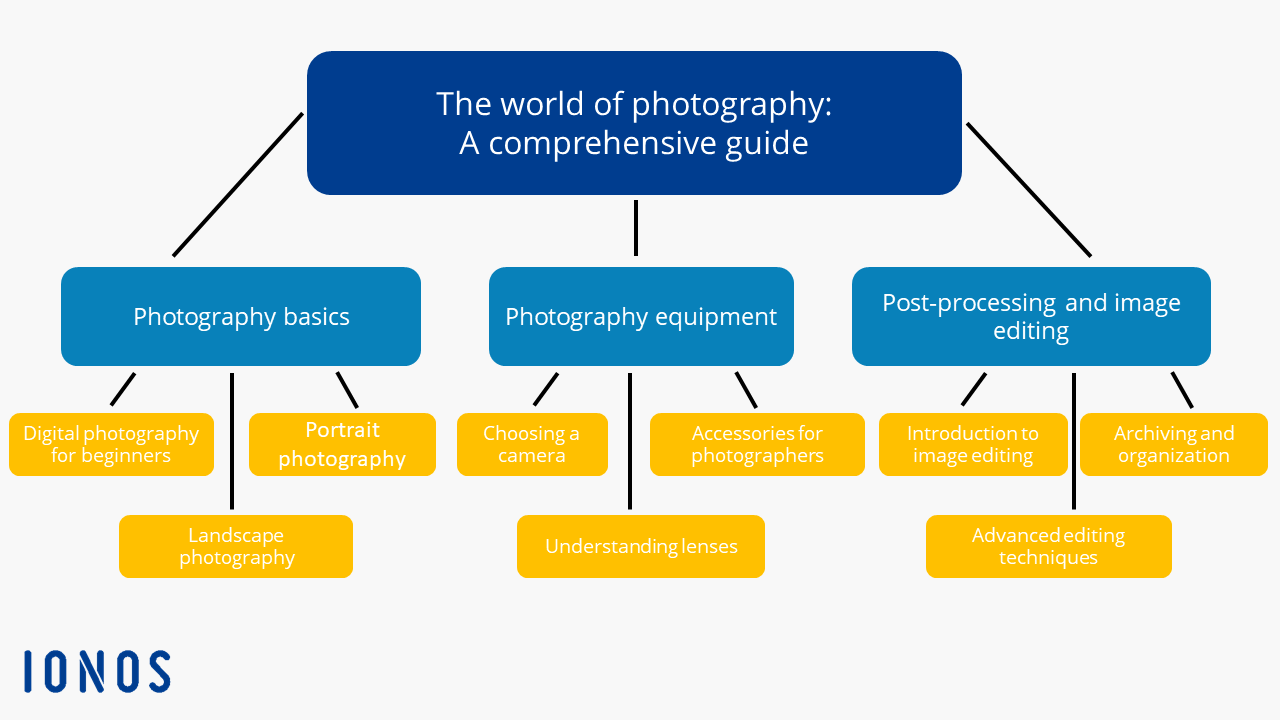
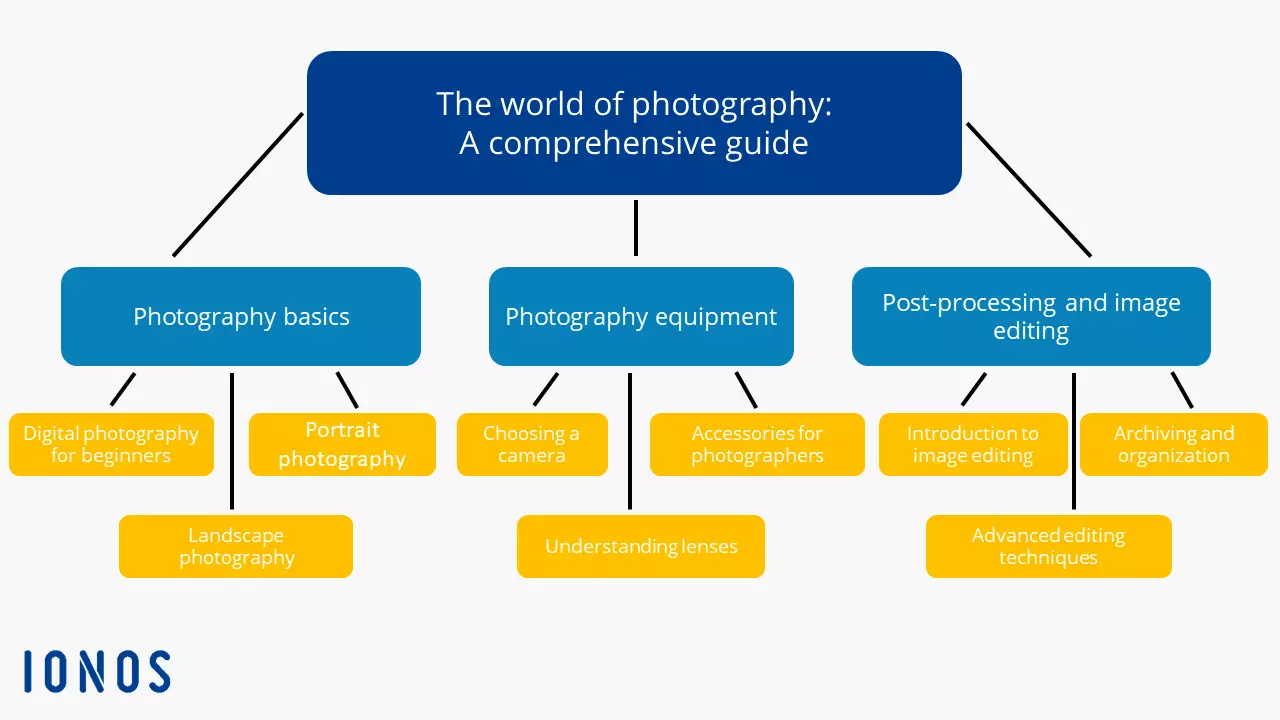
Let’s look at an example hub page on the topic of photography. The page is called “The world of photography – A comprehensive guide” and links to three subpages that in turn link to three more specific pages.
Subpage 1: Photography basics
- Digital photography for beginners
- Landscape photography
- Portrait photography
Subpage 2: Photography equipment
- Choosing a camera
- Understanding lenses
- Accessories for photographers
Subpage 3: Post-processing and image editing
- Introduction to image editing
- Advanced editing techniques
- Archiving and organization
Each of these subpages includes a detailed introduction to the topic at hand and provides links to additional resources. The structure allows users to find specific information and dive deeper into various aspects of photography.