

What is a website?

Websites are without a doubt the most important element of the internet. Businesses and individuals alike use them to establish their presence on the web. Find out how websites are structured and what options there are for creating your own website.
- Intuitive website builder with AI assistance
- Create captivating images and texts in seconds
- Domain, SSL and email included
Do you need your own website?
With your own website, you can display different kinds of content (such as texts, images and videos) on the internet. Websites are beneficial for business owners in a number of ways. A website allows them to represent their company on the web, distribute goods online and inform potential customers about products and services. It also provides a way for people to contact different departments within the business.
For private users, a website gives people the chance to actively take part in public affairs. Additionally, individuals can create personal sites that contain informative material or are used for entertainment purposes.
Give your website that extra edge and add a personalized Favicon to your page. Try out the IONOS Favicon Generator for free now!
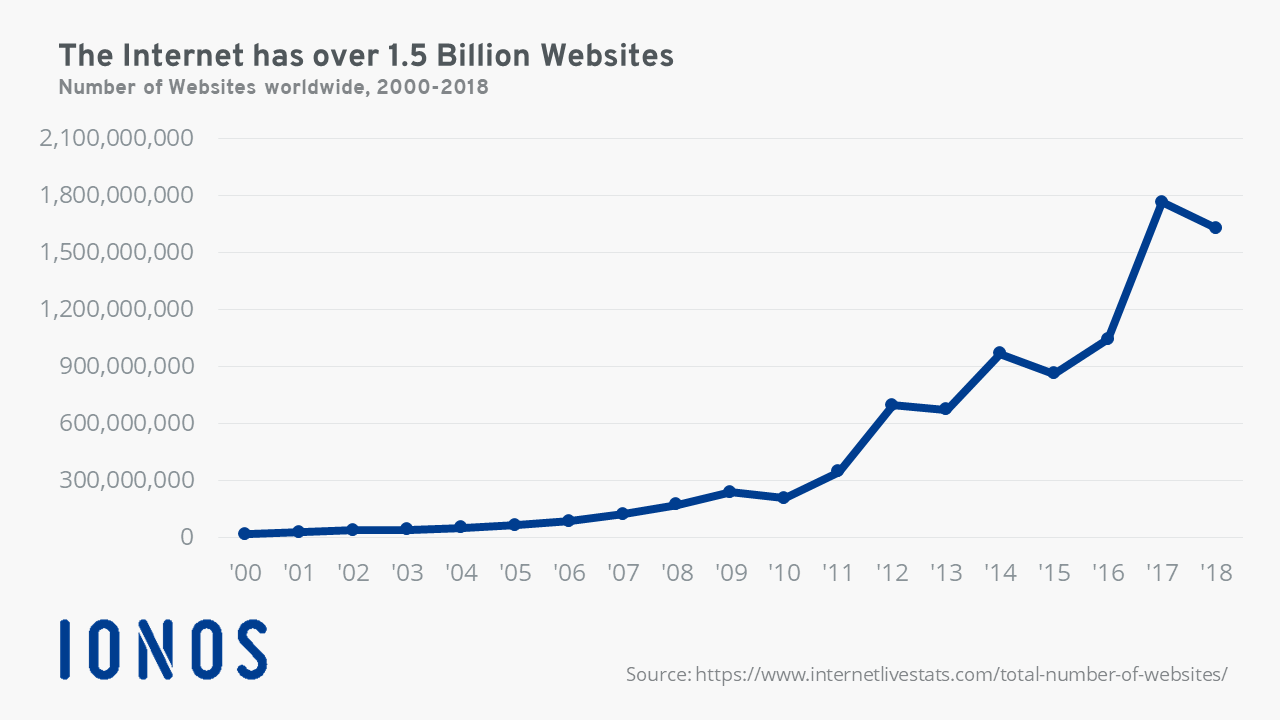
Additionally, if you have a link to a personal website next to your social network profile, you increase the chances of catching the attention of potential employers, people who share similar interests or people who may be interested in finding out more about you. The large reach that websites have is certainly one of the reasons for the growing number of internet sites in recent years:

Artificial intelligence is developing faster than ever. Many AI tools are also now available for free online. Some of the most popular tools are AI text generators like ChatGPT. In a separate article, we take a look at the best AI tools and websites.
How are websites structured?
Many companies include a link to their website on their business cards or in their email signature. When this address is typed into a browser’s search bar (known as the uniform resource locator, URL), the website’s home page appears.
Depending on the size of the website, site visitors have the opportunity to access the website’s subpages. Hyperlinks, or simply “links”, are used to connect single HTML documents of a website. Links to important subpages (e.g., departments, product categories, or important information pages) are usually integrated into the navigation and can be found in the header of the website. These are displayed on every subpage of the website, providing an overview of the website’s structure and helping users as they move around on the website.
Links to more subpages can also be placed in the text and images of the website (commonly referred to as the website’s content). The footer at the bottom of a page often has links to further pages that contain information about the site owner and the terms of service for using the website.
What types of websites are there, and how much does a website cost? Learn more about websites in our articles on these topics!
Should I create a dynamic website or a static website?
If the aim for your site is to take on the role of a digital business card, then a static website should suffice. With a static website, HTML documents containing the information you want displayed are created and stored under their own URL on a web server. When a user enters the web address, they are presented with a static HTML document that looks exactly like those stored on the server.
But what if you want to add new content to your website on a regular basis? If you have a static website, you’ll need to manually carry out the changes in the HTML code of each individual subpage of your website. With dynamic websites, this step is avoided since the web server freshly generates the website every time it is accessed. Instead of continuously issuing the static HTML pages unmodified, the server adjusts the page content automatically in accordance with the latest update.
Dynamic websites are based on a strict division of content and layout. Both aspects are assembled when the site address is entered into the browser. As a result, dynamic websites require more powerful servers than their static counterparts. They also depend on a database system (for example, like MySQL) so that website elements can be managed on a server. Generally, dynamic websites use pre-defined layouts and design templates, which are then filled with content. Due to the flexibility they offer, dynamic websites have become the more popular choice.
With IONOS, you can get your business online in just a few steps with a fully customizable one-page website. The website comes with a free domain and a personalized email address!
What are the pros and cons of static and dynamic websites?
Advantages and disadvantages of static websites
| Advantages | Disadvantages |
|---|---|
| ✓ Cost-effective to operate since the server only needs to meet storage requirements and no additional demands | ✗ Requires more effort to replace information that is outdated |
| ✓ Low amount of maintenance for delivering information that will be relevant for a long period of time | ✗ Requires FTP program for transferring HTML documents to the web server |
| ✓ Fast retrieval times |
Advantages and disadvantages of dynamic websites
| Advantages | Disadvantages |
|---|---|
| ✓ Excellent flexibility with regard to content and management/update | ✗ Creation typically requires a management system (CMS or e-commerce system) and a database |
| ✓ Changes to website content can often be made by individuals without programming knowledge | ✗ Additional programming languages such as Perl or PHP are required |
With IONOS, creating a website with AI is easy. Whether it’s writing texts, deciding on the color palette or generating images, the AI website builder can do it in just a few seconds. Thanks to AI search engine optimization, your website will easily be found by Google and other search engines. Get started with the AI website builder from IONOS today.
What options are there for creating a website?
Depending on the type of website you want to create and how extensive it should be, there are three possibilities you can choose from to create a personal website. In the past, it used to be common practice to write the source code for a website yourself using an HTML editor, but now there are many website builders and content management systems that provide more comfortable solutions. If you don’t have the relevant programming experience, you can choose from a variety of highly-specialized providers, which create and manage your website for a reasonable fee.
- The easy way to get your website online quickly
- Build your brand with own professional domain name and email
- Always have up-to-date your website with our maintenance service
Website builders (Great for beginners)
You don’t have to be a professional programmer to create your own website. With the help of a website builder, you can have your own website up and running in just a few clicks. With a number of ready-made templates and designs to choose from, you can systematically adjust blocks within the pre-set options in a “what you see is what you get” editor (WYSIWYG). All changes you make can be seen using the preview function on the screen. Once the layout is ready, the individual web pages can be filled with content such as text, images or videos.
If the website builder is used in combination with a web hosting service, the finished website can immediately be put online. Creating a website using a such a service offers numerous advantages: You can design your website without any programming skills and you can carry out adjustments easily via the editor. A disadvantage, however, is the limited flexibility of such a system since it’s only limited to the default design settings and can only be used for static websites.
Thanks to their intuitive aspect, website builders are a great tool to get started with when building your own site, especially for beginners who have no programming experience.
Content management systems (Advanced web design)
If you feel ready to delve a little deeper into creating a website, and you’re not afraid of languages like HTML or PHP, you can use a content management system (CMS). This option provides considerably more flexibility. When installed on a web server, a CMS manages website content in a database, which is separate from the design template. This results in a dynamic website that is generated every time a user accesses the site.
Content management systems are popular in both professional and personal contexts due to the fact that there are many different CMS platforms that are both highly efficient and available as free, open-source software. Market leaders include WordPress, Joomla, Drupal and Typo3. Each of these platforms comes with numerous templates and plugins that you can use to customize your website.
Content like texts, images and videos can be updated using an editor, which is similar to a website builder. This part of the CMS is referred to as the “frontend”. You can carry out editorial tasks with a CMS, even if you don’t have a lot of IT skills.
Secure website operation includes more than just installing software, and therefore a CMS should always be supervised by an administrator. This task involves carrying out software updates and looking after the management system’s performance. The administrator works in the back end, which means it’s essential that this person has a basic knowledge of the CMS’s programming language.
Programming your website yourself (The professional solution)
If you want to completely customize your website, you have to program the source code of the HTML document or the personal CMS templates from scratch. This option is really only available to private users if they have the necessary knowledge or are willing to acquire it. Many companies decide to outsource the programming of their website(s) instead of hiring specialists.
A very simple static website can be created with basic knowledge of HTML and CSS (cascading style sheets). Beginners can rely on editors that work on the WYSIWYG principle. This way, you are able to see the effect that the source code has on the structure, layout and design elements of the website at any time during the process. Since professional websites should adhere to certain security standards as well as meet certain visual and functional standards, it’s best to get help from a programmer, web designer or an agency when it comes to creating a business website.
WordPress simplifies the creation and hosting of a website significantly, but it can still be quite unintuitive for users who aren’t familiar with the platform. Our WordPress guide for beignners provides step-by-step instructions for creating and operating a WordPress site.
What legal considerations are there with a website?
Placing content online is easier than ever, but before a website goes online you should check every individual subpage for legal compliance. Otherwise, legal issues could arise, which could prove costly.
- Online copyright: Copyright laws also exist online. If you include texts, images, videos or music files on your website without first seeking permission, you make yourself liable to prosecution. You can only use copyright-protected material with the consent of the person who holds the rights. Software also falls under the copyright category and using a template could cause problems if the programmer hasn’t explicitly made it available for free use.
Your website is online, but it’s not getting any attention. Nowadays, marketing and search engine optimization (SEO) are among the most important tasks when operating a website. In our Digital Guide, we go over different strategies for promoting your website. We also take a look at the role that artificial intelligence is already playing in SEO in our article on website optimization with AI SEO.
- Simple registration
- Premium TLDs at great prices
- 24/7 personal consultant included
- Free privacy protection for eligible domains