

What is StartTLS? How it works, uses, and security risks

The StartTLS command (also known as “Opportunistic TLS”) extends the Transport Layer Security (TLS) protocol to encrypt the communication of information using the TLS protocol.
How does StartTLS work?
As a protocol extension for TLS, StartTLS offers the major advantage that encryption does not impede communication with clients that do not support the method. Thus, there are far fewer compatibility issues with StartTLS. However, if a server refuses TLS, a mail program (client) must know how to proceed with the data. Another advantage is the mutual negotiation of encryption, which makes automated processes unnecessary without the admin’s or user’s intervention in case of a communication failure.
In the StartTLS process, a connection always starts unencrypted, specifically on the port designated for plaintext. Only after executing the StartTLS command does the protocol negotiate encryption with the client, without establishing a new connection. Thanks to StartTLS, if there’s a communication error, no port change is required, and the client can simply rely on the StartTLS procedure provided by the email server.
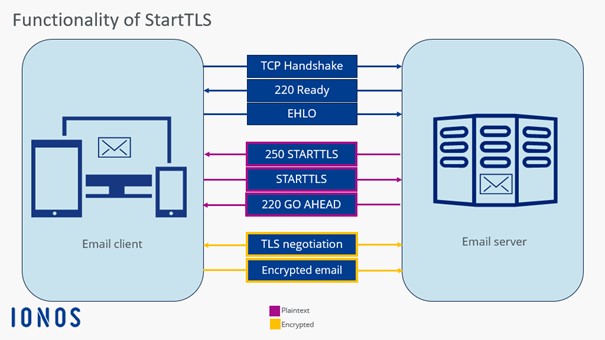
Example of encrypting an email
An email is to be encrypted using the TLS method. The StartTLS protocol is selected to seamlessly integrate the encryption method into normal operation. You usually find the corresponding option in the account configuration or account settings of your email client. After sending the email, communication begins:
- The client sends an EHLO request to inquire about the encryption methods.
- The mail server responds with “250-STARTTLS,” indicating that it accepts StartTLS.
- The client sends “STARTTLS” to initiate encryption.
- The server responds with the status code “220 OK”.
- Write perfect emails with optional AI features
- Add credibility to your brand
- Includes domain, spam filter and email forwarding
Areas of application for StartTLS
StartTLS is primarily used as a protocol extension in communication via email for the protocols SMTP, IMAP, and POP. HTTP has its own procedure (specified in RFC 2817) that is very similar to StartTLS. Today, however, the use of HTTPS (RFC 2818) is more common. Besides the mentioned email protocols, StartTLS can at least initiate the encryption process in the following protocols:
With internet providers, StartTLS is by far the most popular email encryption method because it allows many different domains and certificates on one server. However, the method is controversial because some private details like the IP address are initially unencrypted and Man-in-the-Middle attacks are possible, as StartTLS can be overwritten unnoticed by the provider.
Advantages and disadvantages of StartTLS
Disadvantages become apparent in the StartTLS procedure in terms of security software. Firewalls must analyze the procedure at the application layer to distinguish encrypted from unencrypted data. The same applies to proxies, which prefer to work with port differentiation – however, with StartTLS, the ports are not switched. This makes the corresponding caching difficult or not executed at all.
When it comes to data protection, StartTLS is not without concerns. Most email programs use the option “TLS if available,” which means users are unaware if the connection to the mail server is encrypted or not. Additionally, the risk of a man-in-the-middle attack increases as the network operator can simply filter out the StartTLS extension, getting the chance to log the data exchange. If the StartTLS command is not executed, the data is communicated unencrypted – and users generally do not notice this.
Therefore, it’s recommended to first conduct a careful test to ensure that the server is indeed capable of StartTLS. Only then should the procedure be used by default. If encrypted communication fails, an external problem must exist.
How can I test StartTLS?
TLS protocols use different ports depending on the provider. However, because StartTLS can be easily embedded in the connection, making port switching unnecessary, the encryption method can be tested with a suitable console. This shows which port the respective provider uses for StartTLS. The following command can be used (e.g., in Netcat) to check if a mail server accepts StartTLS as an encryption method during normal operation:
$ nc smtp.ionos.com 587
220 mail.example.com (mreue011) Nemesis ESMTP Service ready
ehlo test.local
250-mail.example.com Hello test.local [80.187.86.70]
250-8BITMIME
250-SIZE 141557760
250 STARTTLS
STARTTLS
220 OKThe command “STARTTLS” should appear here to enable encryption. You can also see that private data, such as the IP address, is transmitted unencrypted.
For OpenSSL, the command looks as follows:
$ openssl s_client -starttls smtp -connect smtp.ionos.com:587
CONNECTED(00000005)
[…]
SSL handshake has read 4650 bytes and written 1659 bytes
Verification: OK
---
New, TLSv1.3, Cipher is TLS_AES_256_GCM_SHA384
Protocol: TLSv1.3
Server public key is 3072 bit
This TLS version forbids renegotiation.
Compression: NONE
Expansion: NONE
No ALPN negotiated
Early data was not sent
Verify return code: 0 (ok)
---
250 STARTTLSFor SMTP, authentication is not as straightforward. The “AUTH PLAIN” method usually provides a solution, where credentials must be encoded in Base64. A code can be generated with the Perl command $ perl -MMIME::Base64 -e 'print encode_base64("\000user-ju\000secret"), which is then given to the SMTP server (AUTH PLAIN [Code]). If the server responds with Authentication succeeded (with code), the StartTLS test was successful. Subsequently, further mail commands can be executed.
If you want to test StartTLS on servers or protocols that are not compatible with OpenSSL, the tool gnutls-cli (from the package gnutls-bin) can help.