

QUIC: What is behind the experimental Google Protocol?

Thanks to even faster DSL access, Internet site load times have reduced considerably. As a result, fast page-loading is now taken for granted, meaning that slow-loading websites have little chance of surviving in the market. To make matters worse, the subject of encryption is becoming increasingly important: the HTTPS-Standard is a trusted ally when it comes to protecting user privacy, but a TLS handshake, certificate, and key exchange will result in additional delays in the loading process. Google’s QUIC protocol will solve this problem.
- Simple registration
- Premium TLDs at great prices
- 24/7 personal consultant included
- Free privacy protection for eligible domains
What is QUIC (Quick UDP Internet Connections)?
QUIC is an experimental protocol, created by search engine giant Google and introduced to the public in 2013. The name stands for ‘Quick UDP Internet Connections’, which is due to the fact that it allows the fast and easy sending of simple packets over the connection-less User Datagram Protocol (UDP). The reason for developing QUIC was a desire to provide an alternative to the established security solution TCP, HTTP/2 and TLS/SSL by developing the same protection but with a reduced connection and transport delay, and allowing multiplexing connections. Google has designed QUIC like this so that the protocol itself controls the connection. During the first handshake between sender and receiver, they exchange the certificates and keys needed to encrypt the sent datagrams. Later communications eliminate this exchange, which minimizes latency. The encryption protocol is the current, speed-optimized TLS version 1.3 (standardized in March 2017), which is preferred over the in-house crypto solution. When it comes to multiplexing, the QUIC protocol follows the Google-developed SPDY protocol, which provided the template for HTTP/2: a single client-server connection which can be used to transmit several different data streams, reducing load time significantly.
Since 2016, an official working group of the IEFT has been working on optimizing the QUIC protocol. Nearly 50 developers from Google, Mozilla, Microsoft, and other companies are being led by Lars Eggert and Mark Nottingham with the aim of advancing and disseminating QUIC’s specifications. The protocol has been in use on Google servers for several years (since 2013). Additionally, QUIC was also implemented in their in-house Chrome browser, which is why some Internet traffic (eg. YouTube) is currently being processed using the advanced transport protocol.
What advantages does QUIC offer?
Some important features and advantages of QUIC have already been mentioned, but here they will be discussed in greater detail, and with reference to further improvements. TCP, which plays a major role as a pioneer in the concept of the emerging transport protocol, serves as a good protocol comparison. However, it is clearly inferior to the Google protocol in some respects, as the following guide will illustrate:
Faster Connections
The main aspect of performance that gives QUIC an advantage over TCP is that the connection setup is much faster. Even without encryption via SSL/TLS, a connection using the traditional transport protocol with the ‘three-way-handshake’ takes more steps than the UDP-based Google solution. QUIC will start a connection with a single packet (or two packets if it is the first connection), and will even transmit all necessary TLS or HTTPS parameters. In most cases, a client can send data directly to a server without relying on a response, while TCP must first obtain and process the server’s acknowledgement.
Multiplex connection options
TCP uses the TCP ports and IP addresses of connected systems to identify a connection. Because of this, it is not possible for a client to communicate with the server over multiple ports in a single connection. The QUIC protocol solves the situation in a different way: it uses 64-bit connection detection and various ‘streams’ to transport data within a connection. Therefore, a QUIC connection is not necessarily bound to a specific port (in this instance a UDP port), an IP address or a specific endpoint. As a consequence, port and IP changes are both viable options, as is the previously described multiplex connection.
Assignment of unique sequence numbers
Each data segment of a QUIC connection receives its own sequence number, regardless of whether it is an original or a forwarded segment. By default, TCP does not do this, which is why a host cannot determine the status of a sequence – only in using a timestamp extension can the classic transport protocol allow that kind of distinction. Continuously tagging the packets is advantageous because it allows a more accurate round trip time (RTT) estimate.
Forward error correction
Lost packets do not present a big problem when transporting data over QUIC. Thanks to a simple XOR-based error correction system, it is not necessary to resubmit the corresponding data. These can be constructed at any time using FEC (Forward Error Correction) packages – backups of the original packages for a data group. However, error correction does not work if several packages from a data group are missing.
Overload control (packet pacing)
TCP always tries to send data as fast as possible, which is an advantage in terms of having a fast data connection, but is also associated with a certain loss rate. If a packet is lost, the retransmission (TCP Fast Retransmit) is initiated quickly. For this purpose, however, TCP temporarily reduces the size of the boutique window, which often results in the data being transmitted intermittently. The QUIC protocol counteracts these load peaks with ‘packet pacing’. This procedure ensures that the transmission rate is automatically limited. So, even with low bandwidth connections, there is no overload. However, this is not a new technique: some Linux kernels also use the method for the TCP protocol.
Authentication and encryption
Safety has been a key aspect in the planning and design of QUIC right from the very beginning. Developers have also prioritized finding a solution to one of TCP’s biggest issues: the header on a sent packet is in plain text and can be read without prior authentication. Man-in-the-middle-attacks are not uncommon as a result. However, QUIC packages are always authenticated and largely encrypted (including payload). The parts of the header that are not in encrypted form are protected from injection and tampering by authentication on the receiver’s end.
Hardware independence
Another major advantage of QUIC over TCP is that the Google protocol is detached from the system. While TCP needs support from the respective platforms or devices to be able to communicate, QUIC support is only required at application level. It is up to the individual software companies to integrate the software – they are not dependent on hardware manufacturers. To date, it is mainly Google applications like Google servers or Google Chrome that have QUIC implemented. However, programs like the browser Opera, Caddy server software, and LiteSpeed Technologies’ load balancing and web server products already have third-party applications which enable connections through the new transport protocol.
Disadvantages of the QUIC protocol
The fact that QUIC is likely to become more popular is thanks to IETF’s commitment. With adjustments to common standards since the group’s inception in 2016, the protocol has evolved from a Google-centric to a common network protocol. However, the optimization process is far from over: the QUIC team continues to address existing issues which still require the right solution.
One of the most important issues still facing the QUIC protocol is security. While authentication and encryption provide a more secure method of transport for data, they are also responsible for one of QUIC’s major drawbacks: Since the packet headers contain less plain text information than those with TCP connections, tasks like troubleshooting, traffic regulation, or network management become more difficult with QUIC connections. Because of this, network operators and firewall manufacturers among others find it difficult to ensure the quality of their product.
Another problem with the QUIC protocol is that automatic congestion control on high-bandwidth data connections may result in poorer transmission rates in some cases.
- Write perfect emails with optional AI features
- Add credibility to your brand
- Includes domain, spam filter and email forwarding
Activating and deactivating QUIC – how it works
Although QUIC’s development has been significantly advanced, particularly in recent years, it has only been used experimentally in Google Chrome browsers and Opera. It is activated by default in Chrome, while Opera users will need to manually unlock the protocol to take advantage of the potential performance boost. The following sections will explain exactly how to activate and deactivate QUIC in both of these browsers.
Configuring QUIC in Chrome
To change the settings of the QUIC protocol in Google Chrome, you need to go to the experimental features configuration menu. Just enter the following command in the address bar:
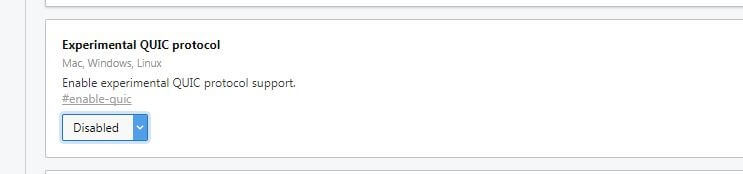
chrome://flagsFind the experimental QUIC protocol menu item using the search function, which you can do by pressing the key combination [CRTL+F]. If you haven’t made any changes to the basic settings yet, the ‘Default’ option should be selected for the protocol. In terms of QUIC, this default Chrome configuration means that the protocol is enabled.


If you want to deactivate the protocol, just click ‘Disabled’ and then click ‘Start Now’. Chrome will then close, but the next time you start your browser, the new settings will be activated. If you want to reactivate the protocol, proceed in the same way, but select either ‘Default’, or ‘Enabled’.
Chrome offers the ability to view active QUIC sessions. You just need to insert the command chrome://net-internals/#quic into the QUIC address.
Turning QUIC off and on with Opera and other browsers
Opera, which is based on Chromium, has been integrating an experimental version of the QUIC protocol since version 16, which was released on August 2013. The difference with Google Chrome is that the protocol is disabled by default on Opera. To use the new data transport technology, you’ll have to activate it yourself. You can find the option for this in the configuration menu for experimental features, like with Google Chrome. On Opera, this is called ‘experiments’ and can be called up by entering the following command into the address bar:
opera://flagsIn the list of features, you will find the protocol under ‘Experimental QUIC protocol’. To turn on QUIC, just select ‘Enabled’, and then ‘Restart Now’. If you want to change back to the original settings later, you can do that the same way, but with ‘Disabled’ selected.
Opera lets you view active data connections that run on QUIC. To do this, add the command opera://net-internals/#quic into the browser after enabling the protocol.
Which websites already use QUIC protocol?
As the developers of QUIC, Google integrated the protocol into their servers as early as 2013, which is why various Google services are among the best-known web applications that allow the transport of data through the progressive protocol. First and foremost, of course, is the search engine at the center of the company. But other Google web services such as Maps, Google +, Gmail, Google Docs, and YouTube can all be delivered using the QUIC protocol, provided the appropriate client has been used.
Chrome users can use the HTTP/2 and SPDY indicator to run QUIC on other websites. The extension adds a small lightning bolt symbol next to the address bar which turns green when the page that has been called and confirms that it can support the transport protocol. If you move the mouse over the symbol, a tool also reveals the version number.


- Intuitive website builder with AI assistance
- Create captivating images and texts in seconds
- Domain, SSL and email included