

Google Ads optimization – how to perfect your Google Ads campaign

Thanks to Google Ads, advertising in the search engine results pages (SERPs) of the leading search engine is a straightforward task. But running a successful campaign that meets your demands and expectations is a bigger challenge. Only by optimizing a Google Ads campaign can the door be opened to SEA success. One of the most important things here is regular maintenance. Depending on the business model, the best way to use your click budget is usually to employ it daily on the basis of relevant indicators like conversion rate, cost-per-click (CPC), or return on investment (ROI).
But how exactly is the different data interpreted? And what other tricks for AdWords optimization are there besides the click budget?
- Our experts run your campaign
- Increase your online visibility
- Save money thanks to greater efficiency
Choosing the right bid strategy
The success of a Google Ads campaign can often be decided by the predetermined bid settings. As we’ve already mentioned, there are many different ways to personalize your strategy using certain advanced Google Ads tips. But before all this, the first step is to define yourcampaign’s goal. There are four basic goals available:
- Maximizing clicks: best used if the campaign is geared towards generating visitors – with conversions playing a secondary role. This is why many affordable keywords can be used to increase traffic, but not necessarily to encourage a user to complete an action.
- Maximizing conversions: this is useful if you’re looking to prompt a user into completing an action, like purchasing from an online shop. User tracking is equally as important in this case, as it allows you to align your maximum average bid to meet your defined conversion.
- Maximizing profits: this scenario is also about conversions. But in this case, the trick is to find keywords that promise a particularly high profit, instead of simply finding all the keywords with conversion potential.
- Increase brand awareness: a less common but equally worthwhile goal is to run a Google Ads campaign to increase brand awareness. In this case, the bid strategy viewable CPM (cost-per-mille = cost-per-thousand impressions), whereby your bid is dependent on the number of delivered impressions, is a perfect choice. But this is only available if you opt for a Display Network campaign.
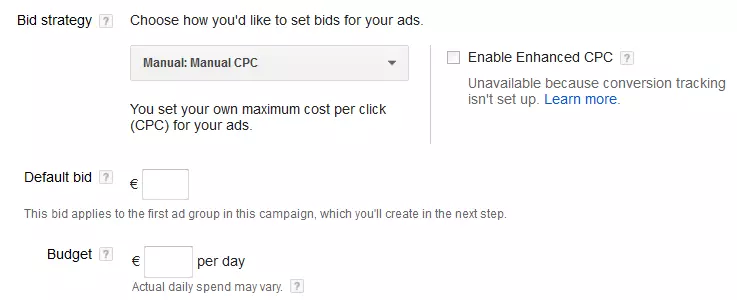
The approaches listed here demonstrate why a blanket bid strategy isn’t possible. Nor is there a universal evaluation method for Google Ads optimization. If the focus is on click optimization, then the number of clicks should be set in relation to payment (CPC), but if maximizing conversions is the goal then conversions should be the central element. Should you be aiming to maximize profits, then ROI is the best strategy. In order to control the bids manually, don’t forget to select manual bidding when creating the campaign.
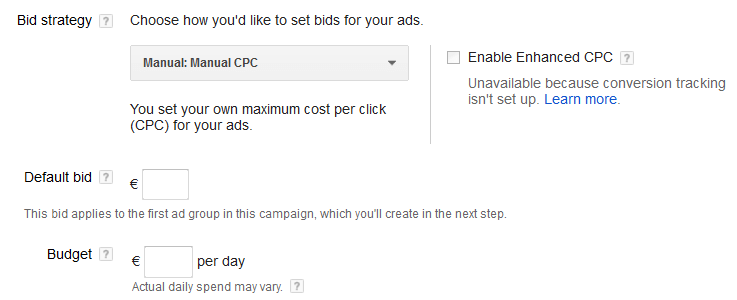
Optimize Ads with the right campaign settings
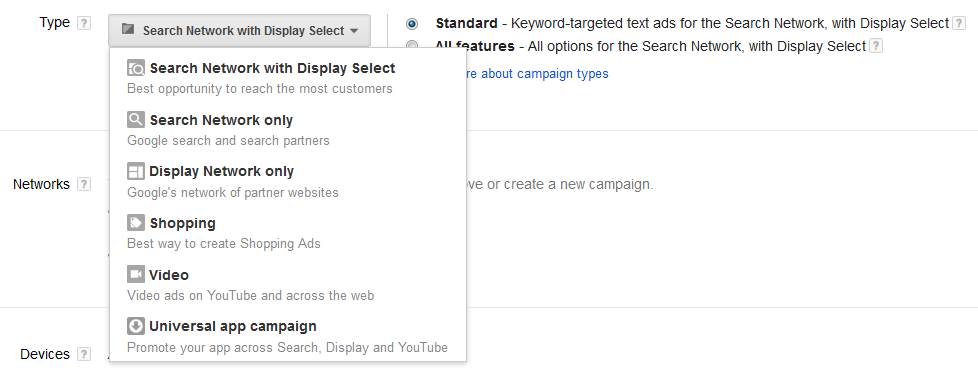
When creating your Google Ads campaign, you’re presented with a range of settings that can have a big influence on the success of your ad. First, you are asked to select a campaign type. The two most common types (the Google Search Network and the Google Display Network) are combined as the default setting. Given that these networks are drastically different, combining them isn’t recommended. Instead, it often makes more sense to choose just one, typically the Google Search Network, and then select the option ‘All features’. Other options you have before beginning your campaign are:
- Device settings: all ads will run on all supported devices. But you can specify whether your ads are to be optimized for mobile devices. You can also define individual bid strategies for different device types.
- Location and language information: to ensure that your ads only appear in the SERPs of relevant users, language and location information is very important. You should run an analysis in advance to decide whether a regional focus in a particular city or zip code might be better than a state or nationwide target. This can be optimized in Google Ads thanks to the location settings.
- Ad extensions: if it fits your web project, you should add features to your advertisements. Google Ads offers features like additional links, the company location, snippets, or reviews.
- Schedule: ad scheduling is a powerful ally when trying to optimize your daily budget. By defining the day(s) and time(s) that your ad will appear, you stand a much better chance of reaching your target audience.
Optimizing keywords
With the introduction of the Keyword Planner, Google Ads presents one of the most important tools in keyword research. Putting together certain keyword sets and including them in your ad lays the foundation for reaching the right audience. As time-consuming and detailed as this initial research may be, it’s still only the first step – keywords must be regularly analyzed and improved in order to optimize Google Ads. So be sure to explore data and statistics on your keywords regularly (cost, impressions, average position, etc.) and filter out the ones performing poorly.
The keyword match types also require regular care. While you should choose the match types ‘exact match’ and ‘phrase match’ at the beginning of the campaign or when faced with a very limited budget, in the long term, the types ‘broad match’ or modified broad match’ will prove to be a more interesting choice. The latter types mean that your ads are also displayed on searches that are only roughly the same as your keyword phrases. In this case, it’s critical to define negative keywords that will be excluded from the search.
Improving ad quality
As important as it is to optimize your bidding strategy and employ high-quality keywords, they only help the positioning of your ads. When it comes to generating clicks or conversions, the text and structure of your ad is chiefly responsible, which is why you should dedicate just as much time to this, too. The main things to do are:
- Implement main keywords, typically in the title, at least once in the text and also in the display URL if possible
- Formulate a meaningful message, i.e. one that answers a question or solves a problem
- Use call-to-actions if possible, positioned optimally
- Include built-in ad extensions, like snippets or reviews, to make your ad more attractive
By checking the relevance of your ads regularly, referring back to these Google Ads tips, and continuously refining your keyword optimization, your Google Ads campaign stands a good chance of success. Finally, always follow the Google Ads ad guidelines.