

The most important Google SEO Tools at a glance

Sooner or later the name ‘Google’ will crop up when mentioning the topic of search engine optimization. With a US market share of over 68 percent this search engine giant is crucial for the field of SEO. Almost all SEO measures are aimed at better visibility in Google’s search results. After Google, you will find search engines like Bing and Yahoo in second and third place respectively. The good news is that the industry leader offers lots of free tools that webmasters and developers can take advantage of. Here is a summary of the best Google SEO tools:
- Simple registration
- Premium TLDs at great prices
- 24/7 personal consultant included
- Free privacy protection for eligible domains
Google Search Console
Originally known as Google Webmaster Tool, the Google Search Console delivers detailed information about how Google classifies a website. It shows the owner which parts of their site can be improved. Retroactive analyses help the owner understand the site’s past developments at a later point in time. The Google Search Console provides an overview of:
- crawl errors
- indexing status
- search queries
- keyword development
- visitor figures
- backlink profile
The tool also allows you to submit your current sitemap to Google.
Google Analytics
Google Analytics is the Google SEO tool for professional web analysis that virtually every website owner uses. The extensive analysis of user data makes it possible to understand a website’s traffic. You can find out which search query brought the visitor to your site, how long they stayed, when they exited, as well as information on the quantity and origin of visitors. The practical Real-Time feature provides additional help for analyzing campaigns. This way you can see exactly what effect a viral campaign has on the traffic. In order to use this tool, you first have to generate a tracking code on the Google Analytics website and then insert it into the source code of your website.
AdWords Keyword Planner
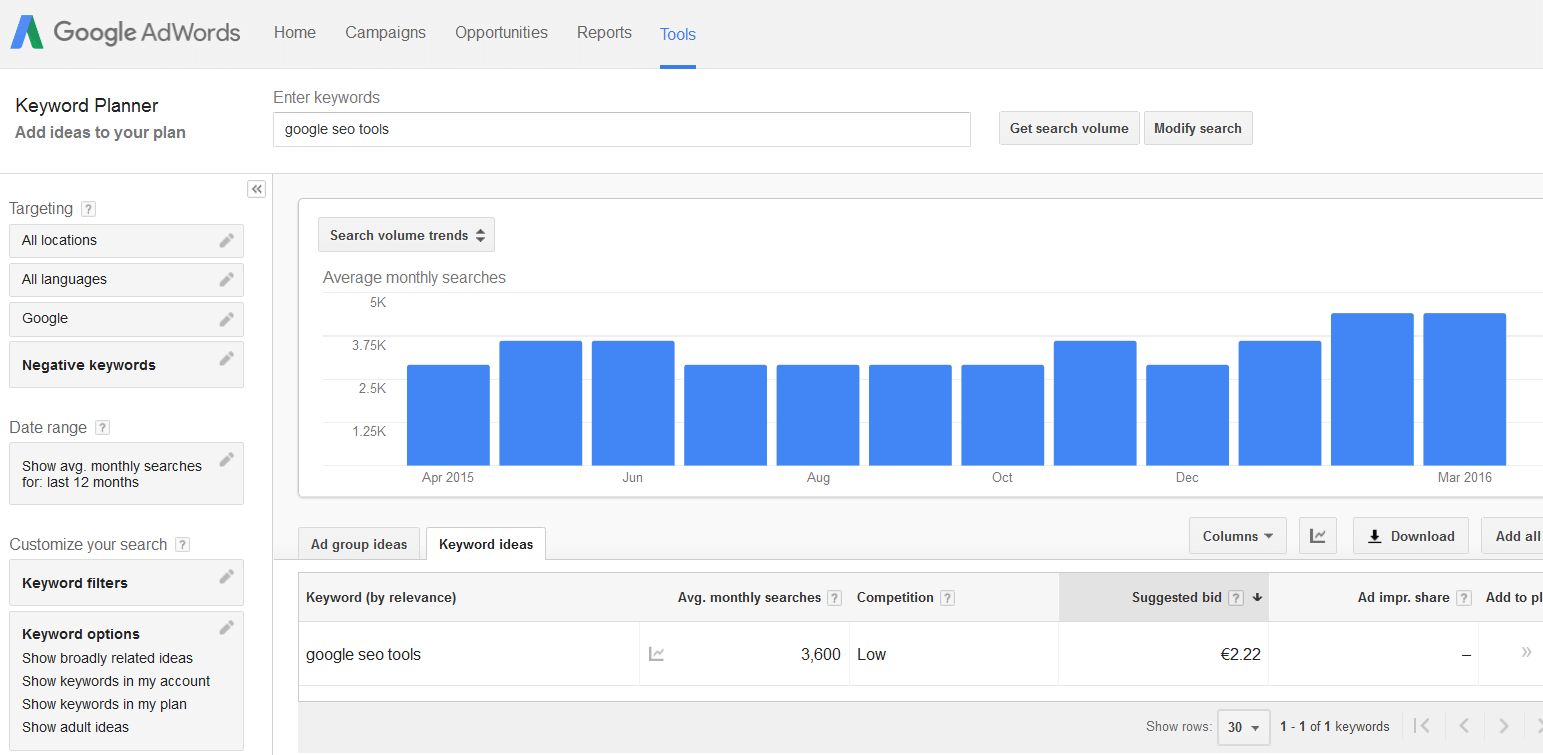
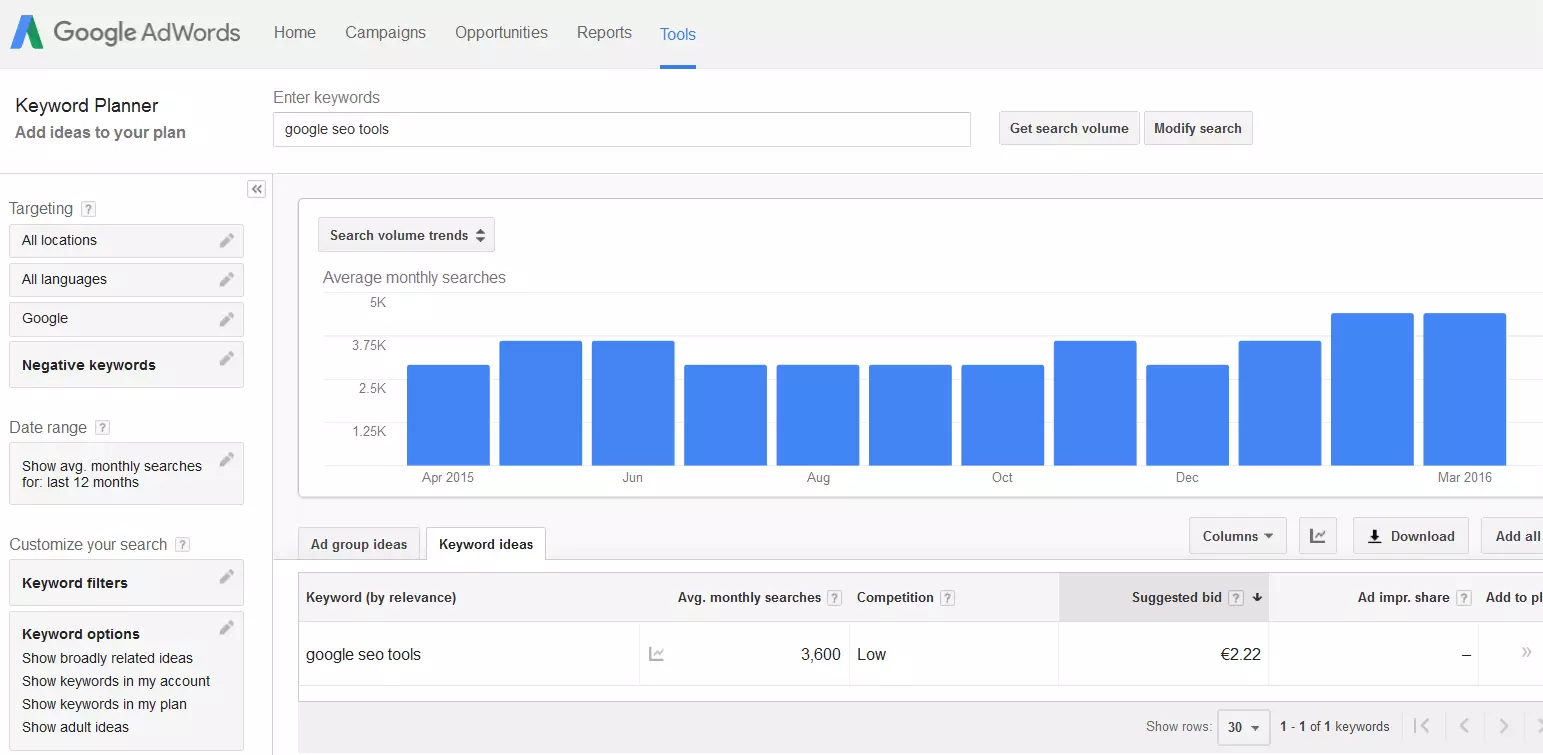
Google’s Keyword Planner is a free tool for evaluating and analyzing search terms. With the planner’s help, you can find new keywords and retrieve important parameters regarding relevance and search volume. The search is carried out by entering a group of words, a website or simply via a Google category. The search volume of the keywords is then displayed. Users can also:
- see flow statistics
- create and interlink keyword list
- select suitable competitive bids and budgets for campaigns
- Our experts run your campaign
- Increase your online visibility
- Save money thanks to greater efficiency
Google Cache
Cache is not a Google SEO tool in the traditional sense; rather it is a somewhat hidden additional feature of Google search. Google Cache gives you the option of seeing a website in a text-only version. When all the images, animations, and designs have been removed, the remaining version is what’s left over for Google Crawler to read. These features helps the user better understand how Google interprets the navigation, the formatting, and the images on a page. This also means you can determine whether individual areas are not being properly detected, or not being detected at all (because of using Flash or Java Script, for example).
How to use the Cache feature:
- Search for your own website using Google.
- In the organic search results you will find a small green arrow right after the URL.
- Click on the arrow and select the “cached’’ option.
- On the overview page click on the “text-only version’’ and change to a pure text view.
Google Suggest
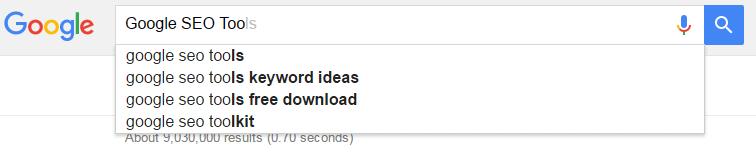
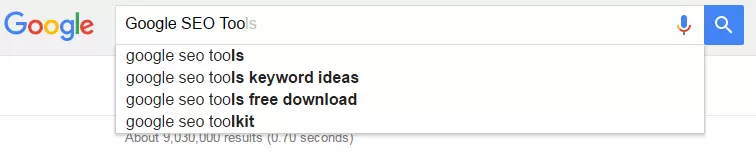
Just like the Cache feature, Suggest is also not a Google SEO tool per se. It is a feature of standard Google search and is free. It is quite amazing: just by typing a couple of letters into the search bar, Google can guess what you are searching for. The autocomplete feature finishes the phrase with relevant search suggestions. These suggestions are based on search frequency, search behavior, and the search term. Those responsible for SEO can incorporate these search suggestions (which are usually long tail keywords) into their own keyword research.
Google Trends
Google Trends provides a source of inspiration for content that piques the reader’s interest since the tool shows which topics were most often searched for in the last 24 hours. The quantity of these news articles can be requested and filtered depending on the country or the category. This tool further allows users to selectively search for terms and see how current and popular they are. The goal of this function is to facilitate the subject search, detect trends, and to create a strong backlink profile through publishing interesting content. When the content of a website is up-to-date and useful, it increases the chance of both a better ranking as well as the possibility of other sites linking to yours.
- Intuitive website builder with AI assistance
- Create captivating images and texts in seconds
- Domain, SSL and email included
Mobile-Friendly Test
Since the introduction of Google’s “Mobile-Friendly” update, the way a site is optimized for mobile devices, such as smartphones and tablets, can officially influence the ranking of mobile searches. Google provides a Mobile-Friendly Test where you can check whether your site is optimized for mobile display and complies with Google guidelines. Carrying out the mobile Google SEO check is simple: just enter the URL and Google will check how user-friendly the site is for smartphones and tablets. The tool also suggests ways of solving any problems. It is important to know that the tool carries out an analysis for individual pages and not for the whole web presence.
Google PageSpeed – Developer Tools
The PageSpeed Tools can be used to evaluate a website’s performance and improve it. These features are available for desktop and mobile sites. The suggestions for improvement (e.g. reducing the size of Java Script) will be prioritized (from high to experimental) in a list. There are many other features belonging to the Google Developer Tools that help you integrate features and extensions into your site like social media plugins, APIs, Google Maps, YouTube and interactive games.
- Improve your Google ranking without paying an agency
- Reply to reviews and generate social media posts faster
- No SEO or online marketing skills needed

Author

Sebastian Mews
Sebastian Mews is an experienced SEO expert with over 15 years of professional experience. Since March 2022, he has been Head of SEO at IONOS, a leading provider of web hosting and cloud services. In this role, Sebastian is responsible for optimizing the company's search engine performance and increasing its online visibility.