

IP Address

Everyone knows that for a letter to reach the right recipient, you need to provide the exact address, including country, city, ZIP code, street and house number. Only then do the post office and its staff know where to send it. The same is true on the internet: every device within an internal or external network needs a unique “house number” to communicate with other devices and receive data packets from them. But an IP address looks completely different from the address you write on an envelope. Read on to learn more about these cryptic digits.
Definition: What is an IP address?
The internet protocol address (also known as the “IP address” or simply the “IP”) is based on the internet protocol that is also the underlying foundation of the internet. It refers to the uniquely identifiable address of a device (such as a computer, web server or printer) in an internal or external network. An IP address can also designate a whole group of devices, as is the case with broadcasting or multicasting. Likewise, a single computer could be assigned multiple addresses. However, each IP address in a network can only be used once at any given time.
What makes up an IP address?
There are two versions of IP addresses which look very different. What they have in common is that they contain a network component (for IP routing) and a device component (for assignment to a certain computer).
IPv4 addresses for the present
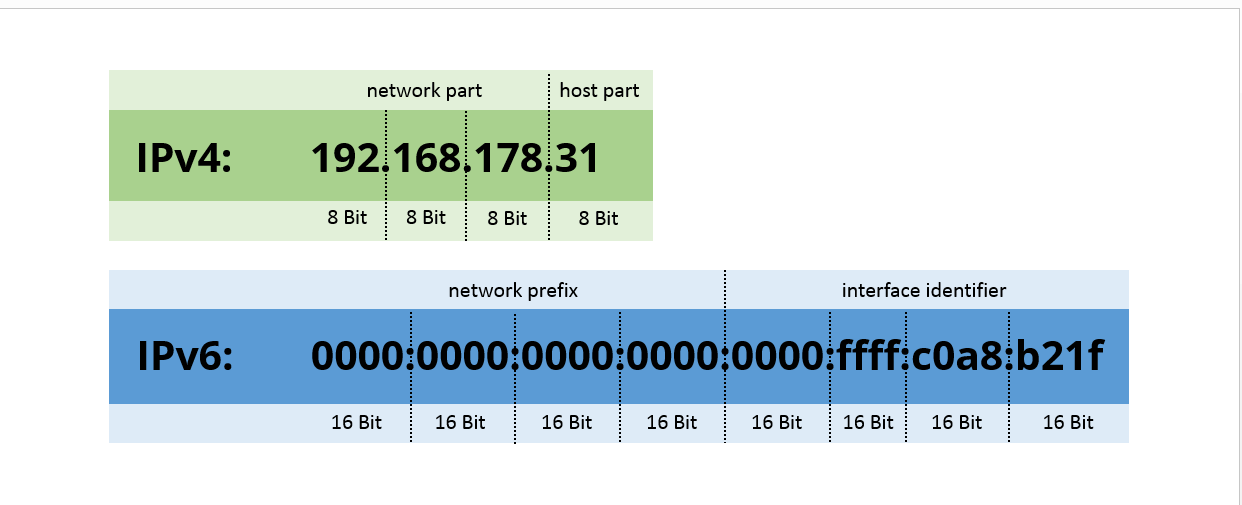
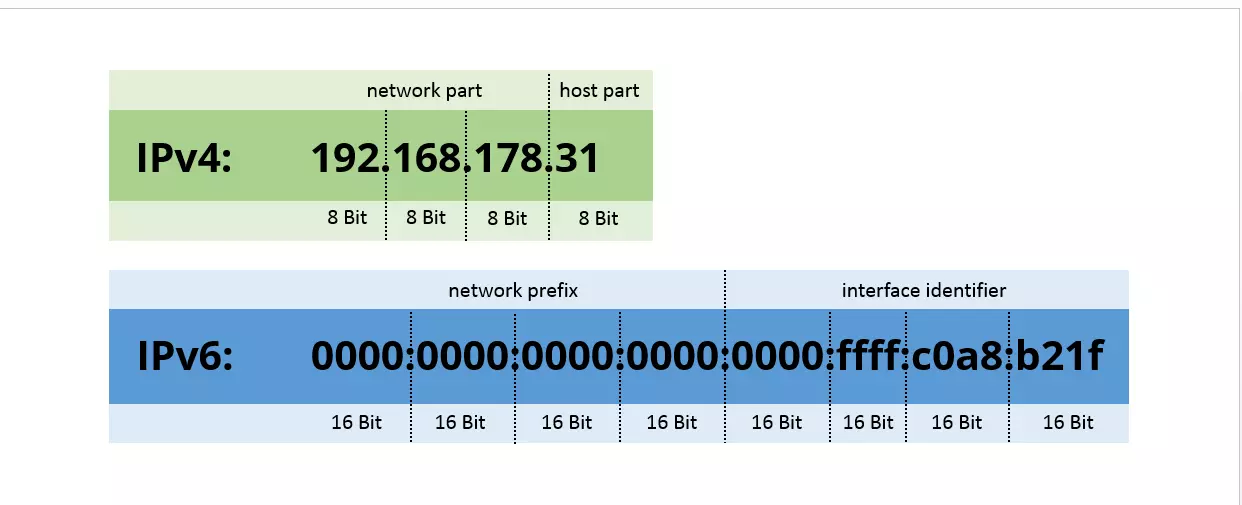
At the moment, addresses following Internet Protocol Version 4 (IPv4) are predominantly in use. They consist of 32 bits and technically therefore refer to a 32-digit binary number, such as 11000000 10101000 10110010 00011111. To keep this numerical beast under control, it’s typically represented as a combination of four decimal figures with values from 0 to 255, separated by points. In this format, our example looks like this: 192.168.178.31.
IPv4 is able to constitute around 4.3 billion different addresses in total. Although this is far less than the number of devices in the world (and many of them are reserved for special applications), all of them are never required simultaneously and some are only used in private networks. For this reason, this number has been quite sufficient so far.
IPv6 addresses for the future
However, this fact will soon change, not least due to the Internet of Things (IoT): As more and more everyday devices are able to connect to the internet and a large share of them need their own IP address, the availability of IPv4 addresses is gradually becoming scarce. To this end, IPv6 has been launched as the direct successor, enabling around 340 undecillion (a number with 37 zeros) addresses – an almost inexhaustible supply for all future IP requirements.
Addresses of this version have 128 bits and would therefore have to be written as a 128-digit binary number. Since such a number is far too long and impractical, hexadecimal notation is applied to compress the 128 bits into eight blocks of 16 bits, separated by colons. This results in the IPv6 address of 0000:0000:0000:0000:0000:ffff:c0a8:b21f, for example. Here, the letters a to f are also used as hex digits. If we omit the zeros at the start of every block and replace a series of consecutive 0000-blocks with two colons (::), this format can be simplified even further. In our example, this would produce the following shorthand: ::ffff:c0a8:b21f.
Network and device components of IP addresses
If we want to send a letter, it’s not enough to simply provide the country and city of the recipient. A complete address also includes a street, house number and perhaps also the floor. The same applies to data transmission: In order for a data packet to arrive at the right place, the IP address needs to specify not only the right network but also the target device (the host) within the network.
What is an IP address used for?
An IP address enables the clear identification and addressing of a device in an internal or external network. It therefore provides the basis for transporting information from the sender to the right recipient. If a device wants to send a data packet, the associated router orients itself on the IP header and reconciles the source IP with the target IP. If both network components match, the sender and recipient are located within the same network and the packet is sent directly.
If this is not the case, the router (the internet’s post office) contacts the global Domain Name System (DNS). This system is responsible for name resolution online, i.e. for translating device names into IP addresses and vice versa. For instance, when accessing a website , the DNS provides the IP associated with the URL: The domain www.example.com is converted to the IPv4 address 93.184.216.34 or the IPv6 address 2606:2800:220:1:248:1893:25c8:1946, for example. The data packet is then forwarded to the recipient’s router via multiple routers, networks and subnets.
Who assigns IP addresses?
The highest body for assigning IP addresses is the Internet Assigned Numbers Authority (IANA), which in turn is a department of the Internet Corporation for Assigned Names and Numbers (ICANN). It has complete control over the entire availability of IP addresses and assigns blocks of them to five Regional Internet Registries (RIR), namely AfriNIC, APNIC, ARIN, LACNIC and RIPE NCC (short for: Réseaux IP Européens Network Coordination Centre).
The latter is responsible for Central Asia, the Middle East and Europe (hence also Germany) and allocates its assigned IP addresses to Local Internet Registries (LIRs) and National Internet Registries (NIRs). They subsequently pass on IP addresses to (sub)providers or directly to end customers.
What types of IP address are there?
A distinction is typically made between dynamic and static IP addresses. There are also IP addresses “for special purposes” – most of which are reserved for private networks.
Dynamic IP addresses for browsing the internet
Dynamic IP addresses are most frequently used for normal online browsing. When a DSL customer dials into the internet using their router, their internet service provider (ISP) assigns them with an unallocated, random IP address. This assignment is deleted again after each session or is automatically changed at regular intervals, usually every 24 hours.
As soon as the dynamic IP address changes, the customer will experience a short “forced disconnection” from the internet. This typically occurs between 2 and 3 am. Ongoing downloads and telephone conversations will be briefly interrupted during this period, but the router will automatically reconnect immediately afterwards. For most users, this process largely goes unnoticed.
Since each available IP address can be “reused” in this way, the provider needs far fewer addresses than it has customers – after all, they’re never all online at the same time. Together with IPv6, dynamic addresses therefore help to mitigate the scarcity of the IPv4 address space. Since they’re also less expensive than static addresses, this results in a cost advantage for the provider who’s able to serve more customers with a smaller pool of addresses.
Moreover, they benefit from privacy protection with respect to third parties, as dynamic IP addresses enable users to surf more anonymously. Conversely, website operators lose out, as a constantly changing IP address is unsuitable for tracking visitor behavior. Instead, cookies are generated then deleted again after a certain period of time. Only the internet service provider is able to track what its customers are doing based on their IP. However, this has been the subject of data protection disputes for quite some time, particularly concerning telecommunications data retention.
Static IP address for websites and companies
A static IP address always remains the same, unless the owner actively changes it themselves. These IP addresses are used for web servers, for example, which always have to be accessible at the same URL. They are also employed in private networks (LANs) for communicating with a local printer or another computer in a home network. From a user perspective, the biggest disadvantage of static IP addresses compared to dynamic addresses is that they are far easier to track.
Reserved IP addresses for special purposes
The IANA has reserved around 14.5 percent of the IPv4 address space for special purposes. Here are a few examples:
- The IPv4 address space 0.0.0.0 to 0.255.255.255 – encapsulated in the CIDR address block 0.0.0.0/8 – refers to the host of a network.
- When the IP address 127.0.0.1 is dialed, it’s possible to communicate with the local host, i.e. the user’s own computer. This is necessary for testing newly programmed applications, for instance.
- The IP address 255.255.255.255 is designated for broadcasting.
- The address spaces 10.0.0.0 to 10.255.255.255, 172.16.0.0 to 172.31.255.255, and 192.168.0.0 to 192.168.255.255 are reserved for private networks in which they can be used without any registration. In the case of IPv6, the prefix fc00::/7 is designated for private use.
These IPs are not assigned by the IANA and also don’t route to the internet. But if you do want to go online, the router converts the private IP address into a valid IPv4 or IPv6 address applicable to all devices in the local network by means of network address translation (NAT). For incoming data packets, this process is reversed. Admins can distribute private IP addresses either manually or automatically via the DHCP server.
IP addresses and data protection
Although IP addresses themselves do not contain any information, they can be used to draw conclusions on the user. As a result, they are the subject of dispute among data privacy advocates.
What does an IP address reveal about its user?
First of all, it’s relatively easy to link a user’s IP address to their internet provider. For example, if it begins with the numbers 81, 91 or 212, the address belongs to Deutsche Telekom. This can simply be determined by means of a reverse DNS query or the command line tool Tracert. Other numbers indicate certain companies or agencies, if you know which address spaces are assigned to them by the responsible LIRs or NIRs.
Depending on how close the user of an IP is to the next internet dial-in node, an exact location may be identifiable to some extent. In rural areas, it’s only possible to ascertain a general area. But in urban areas, “geolocation” is much more precise since dial-in nodes can be found here almost every few hundred feet.
Are IP addresses considered to be personal data?
The short answer: Yes. IP addresses essentially enable internet providers to monitor and track their customers’ stream of data. This means storing IP addresses is a controversial issue. After all, the General Data Protection Regulation (GDPR) has determined that IP addresses, regardless of whether they’re dynamic or static, fall into the category of personal or personally identifiable data as online identifiers and as such require special protection.
This results in strict rules for handling data protection, such as in e-commerce. For instance, website operators may only store a user’s IP address if this is absolutely necessary for the purpose and functionality of their range of products or services. Only security agencies are permitted special access rights in criminal matters.
Is it possible to conceal an IP address?
It’s impossible to fully hide an IP address, but it can be obfuscated in a number of ways. Here, the basic principle is always the same: Data packets are first redirected to a server that has its own IP address and then forwarded to the recipient. The following tools are available for this purpose:
- The Tor Browser Bundle, based on Mozilla Firefox, enables users to browse the internet anonymously. Since all data packets first have to pass through a separate network, high bandwidths aren’t possible at times.
- Virtual private networks (VPNs) allow the encrypted transmission of data. When you browse the web via a VPN, the requested web server only sees the IP address used by the VPN and not the user’s own address.
- A proxy server can also accept data packets and forward them through its own IP address.
How can you find out your own IP address?
If you want to configure an email program or a cloud service, it’s sometimes necessary to enter your IP address manually. But where can you find it?
The standard tools available to an operating system are sufficient to display a computer’s local IP:
- For Windows, all you have to do is enter the command “ipconfig” into the input prompt. This can be opened by pressing the [Windows] + [R] keys and entering “cmd” into the console that appears.
- The local IP of a Mac computer can be viewed as follows: System settings > Network.
If you want to find out your public IP address, you can use our IONOS IP Check.