

What is an operating system?

Many people use electronic devices such as PCs, laptops, smartphones, or tablets on a daily basis. And all of these devices are usually running an operating system (OS). But only few users know what this software can do and why it comes pre-installed on most devices. While laptops and desktop devices usually run on Windows, macOS, or Linux, most mobile devices either run iOS or Android. And although most operating system differ widely; their core functions and structure are very similar in principle.
What do you need an operating system for?
After you switch on your laptop, one of the first things to usually happen is that the system will boot up. Depending on the operating system installed, Windows, Linux, or macOS will launch. Only once the system used to run the device has been booted, users can launch their favorite programs, connect to the internet, or access their data. The operating system is not, however, responsible for the actual boot-up process. That’s what the BIOS is for.
But the BIOS only has basic functionalities relating to the boot-up process. One of its tasks is to load the operating system which then takes over the whole system administration. Much of this happens in the background. Windows and co. are also available as intersections between the user and the computer. The OS allows users to make system setting changes to their devices, install programs, and uninstall applications they no longer use.
Operating systems aren’t only reserved for common technological devices like smartphones or PCs. In principle, most complex digital devices will run an OS in the background.
Nowadays, most operating systems rely on graphical interfaces and are designed to be user-friendly. Using just a few mouse clicks, the most important functions are easily accessible for users. Menu navigation tends to be intuitive. However, this was not always the case. Right at the start, when computers were used for scientific and military purposes, operating systems were not yet in use. All tasks were solved by the machine itself without a network layer. But with the launch of the first PCs that were not the size of a wardrobe, operating systems became part of the standard configuration.
The very first operating systems did not have a graphical user interface. Instead, they used the command line, which is still available as Windows PowerShell, for example. For each action, whether the opening of a data file, the navigation of a file system, or the launch of a program, users had to know the correct command and enter it manually. Only once computers entered our home did simpler user interfaces became the norm, with Microsoft (Windows) and Apple (macOS) now leading the market.
Operating system functions
The operating system is at the core of the computer. Without this complex piece of software other applications wouldn’t be able to run. The tasks an OS has to accomplish are manifold and while some functions run primarily in the background, many will run simultaneously (foreground and background applications at the same time).
Hardware administration
One of the most important functions of the operating system usually happens in the background. The system administers the entire hardware – inputs and outputs. The system uses a driver provided by the hardware producer to do so. This driver ensures that commands from devices and the hardware itself can be received and passed on. This allows for keyboard, mouse, screen, hard disk, graphics card, and all other components that are part of a computer to function.
Software administration
When you download software online, you will usually be presented with a choice of different operating systems. This shows just how strongly the programming of applications is tied to the specifications of the operating systems. Basic computer systems have interfaces which regulate the communication with individual applications. This enables applications to be assigned system storage, make use of processing resources, and be responsive toward commands entered by mouse and keyboard devices.
Data management
When a document is being written, it can be printed or saved as a file in a folder. The command, for example, to print a file, is transmitted to the operating system which transfers it to the printer. Working as part of a directory structure is only possible because of the OS. This type of structure does not exist on the hard drive itself.
Rights management
In some cases, for example, in the case of business use, multiple people use a single device. But not all of them will be allowed to make changes to the system settings. Modern operating systems can be used to create different users and adapt their individual rights. Every account can be secured using a password.
User guidance
Even people without broad IT know-how should be able to use computers without difficulty. That’s why operating systems must be designed with simple functions and options. Laypersons should be able to use the most important parts of an OS effortlessly. Additionally, many operating systems – especially in the case of PCs – provide added options for professional users.
Network settings
Because the operating system organizes the hardware, it’s also used to establish a connection to the internet and other network components. In this way, one can configure the computer to act like a network participant, for example, by defining a specific IP address. A user can also enter the specifications for LANs and subnets to connect to another PC. Network settings allow users to make adjustments to their DNS server.
Security provisions
Security is not traditionally part of an operating system’s core functions and can usually be adjusted using additional software. Because computers are subject to constant threats online, many operating systems now come pre-installed with certain security measures. For example, Windows generally ships with a firewall and an anti-virus scanner.
Structure of an operating system
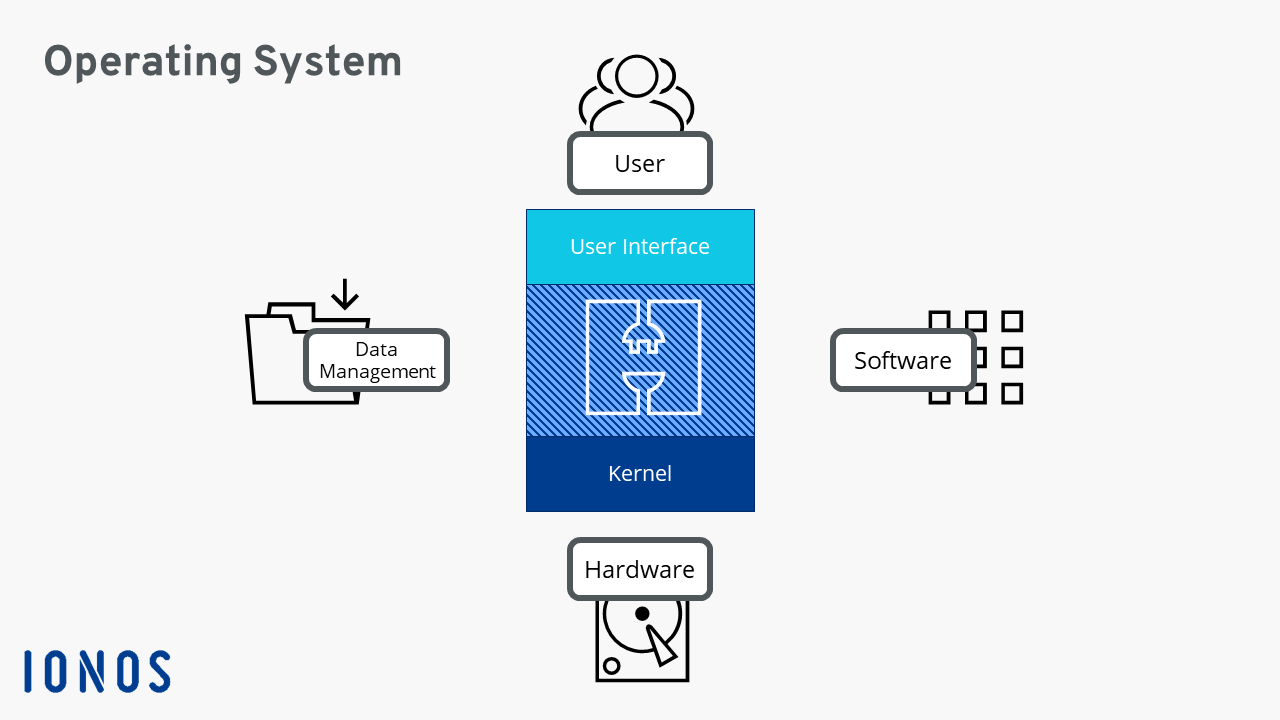
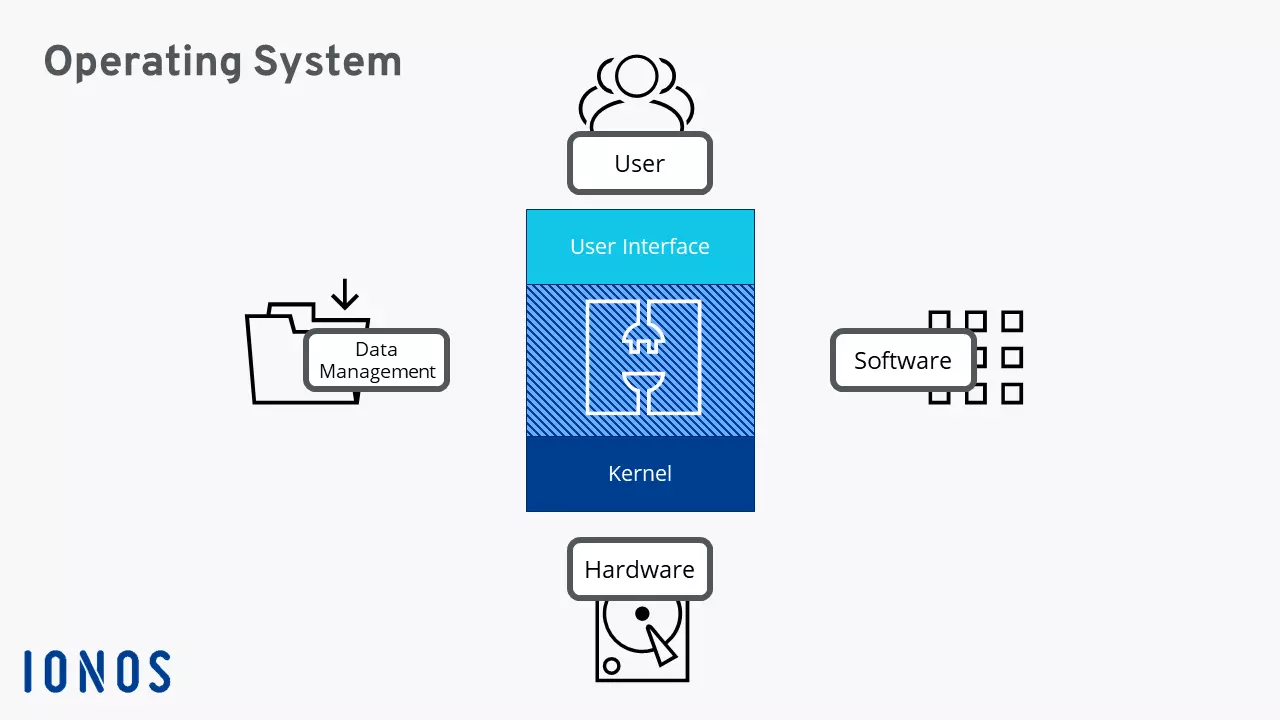
The operating system sits somewhere between the hardware and other software. To ensure smooth administration, the operating system is structured differently than most other programs. Usually, the systems consist of different layers. The base layer, the one furthest removed from the user interface, is at the core of the OS and is its most important element. That’s why this part is usually loaded first. The core presents a direct interface to the hardware, because it initializes and passes on commands between programs and the hardware.
All other layers are assembled on top of the core element and are progressively removed from interacting with the hardware. Each level communicates with the layer above or below it. At the top is the user interface which presents the interface between the user and the software. When a user executes a task, the command is transmitted through the different layers until it reaches the correct one, for example, the processor.
Different operating systems
Operating systems can be categorized under various aspects. One can differentiate between operating systems for mobile devices and those of desktop PCs or laptops. Or one can look at the underlying software by distinguishing Unix-based systems (for example, macOS and Linux) from VMS-based OS such as newer Windows versions. Older editions of Windows expand on DOS. There are also operating systems that are specifically configured for servers. Generally, the best-known and most widely distributed operating systems are Windows, macOS, the various Linux distributions, iOS, and Android.
Windows
Windows is probably the best-known operating system worldwide, and with over 30 years on the market, also one of the oldest. It’s likely that most people will have used a Windows PC at some point in their lives. That’s partially because Microsoft tends to pre-install the OS on many of its products and computers. A new version of the operating system is released regularly. Windows 10 is the latest edition, but how these versions are counted tends to change. That’s why the current version may not actually be the 10th version of the OS.
Microsoft has also tried its hand at developing a mobile operating system. These have been less successful on the market. Thus, the latest version (Windows 10 Mobile) will not be further developed.
macOS
At around the same time when Microsoft launched its first OS, IT company Apple issued its first operating system. Back then, the Macintosh OS simply referred to as “System” was well-known for its graphical interface. Later called Mac OS X, it is now commonly referred to as macOS to match the company’s mobile operating system iOS. One of the special features of macOS is that the operating system only runs on Apple hardware.
Linux
Linux is one of the best-known alternatives to Microsoft and Apple OS. Even if you’ve never used it before, most computer users will have heard of Linux. It has an unjustified reputation as a more complicated counterpart to Windows. In reality, Linux is just a kernel which is installed across various distributions. Among the best-known are Ubuntu, Debian, openSUSE, Fedora, or CentOS.
Many Linux distributions are open source and are actively being developed by a motivated community. They are usually available for free.
iOS
The Apple iPhone is one of the most successful smartphones available on the market and has led to the widespread use of the iOS operating system. The OS which comes pre-installed on every Apple smartphone, follows the same approach as macOS: users should be able to navigate the various menus and programs effortlessly. What one gains in terms of user-friendliness, one loses in freedom. Apple iOS is known for restricting adjustment to its system settings.
Until 2019, the iPad came pre-installed with iOS. Now, the Apple tablet has received its own operating system called iPadOS. The iPod Touch – the mobile media player by the US company – continues to run on iOS.
Android
One of the other major players on the mobile OS market is Android. The system was created by Google and takes a very different approach to its main competitor Apple. Android is available as a free software and provides a variety of options for setting adjustments. Android is not dependent on a single device manufacturer. Almost every smartphone, apart from Apple devices, now comes pre-installed with Android.
Device makers often adjust Android to suit their demands, which is why configuration options can differ significantly between smartphone devices.