

RAID 1

The approach of merging storage media in a so-called RAID is still as relevant as it was when it first emerged in 1987. RAID 1 (or RAID level 1) is still a popular data storage technology for the operation of server applications: the combination of hard disks provides a good level of security for high-availability systems. But what makes a RAID 1 system more secure than others and what is RAID 1 anyway?
What is RAID 1?
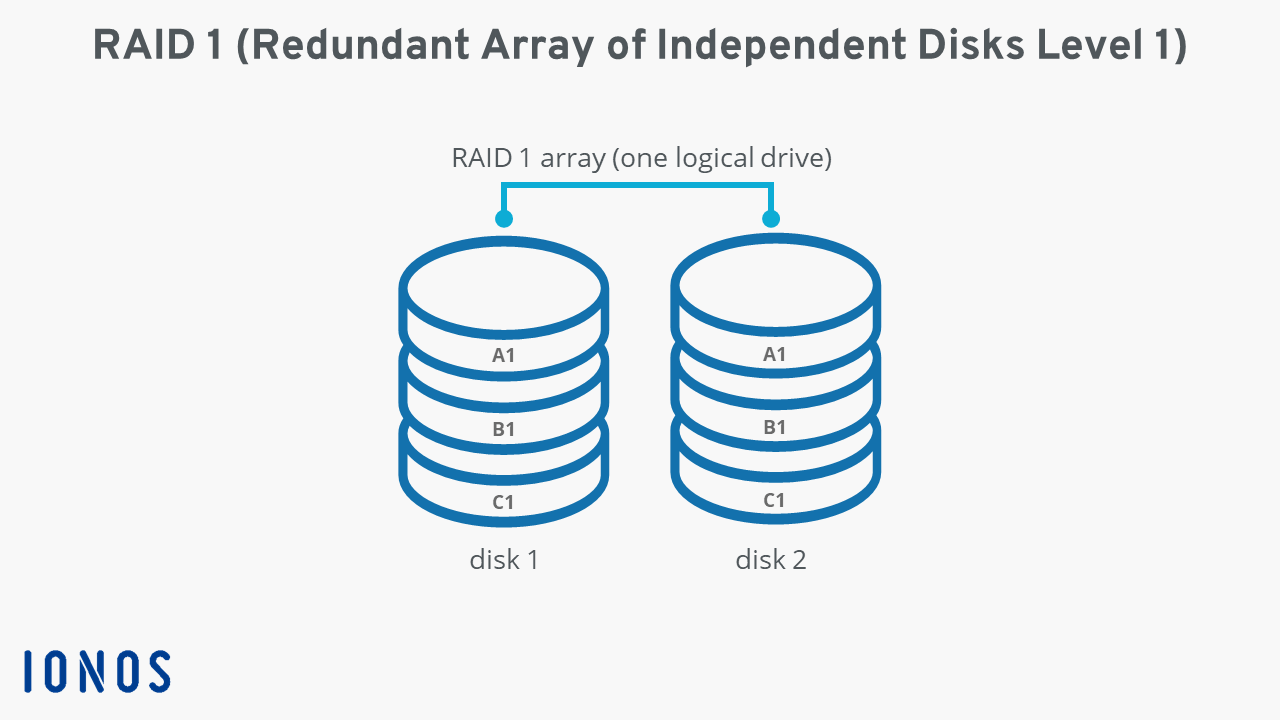
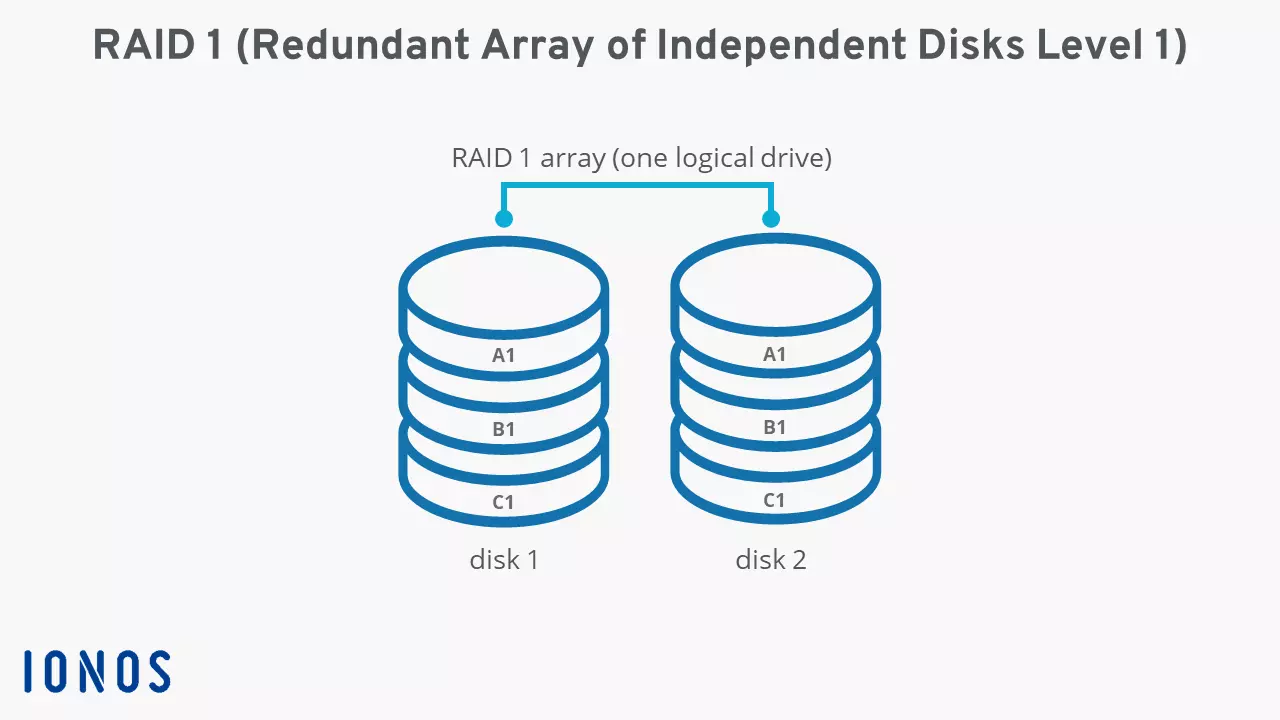
RAID 1 is a standard that aims to improve the security of stored data. The concept relies on a network of two or more hard disks to store data in a mirrored manner, i.e., in duplicate. This process is also known as “mirroring”. In a RAID 1 setup, files that are written and saved onto hard disk 1 are also written to hard disk 2 or other disks, which means that the system offers complete redundancy. If one data carrier fails, the next one jumps in.
The maximum capacity of a RAID 1 is only as high as the storage capacity of the smallest integrated hard drive.
If the RAID controller (in the case of a hardware RAID) or the management software offers a corresponding function, security can be increased by controlling more than one hard drive during the read process and comparing the read data streams with one another. When there are discrepancies, the system issues an error message and identifies potential hardware defects at an early stage. However, the performance of the system deteriorates slightly at this point. The read speed can also be improved with RAID 1 because the system accesses more than one hard disk during the read process and then reads different sections of these disks in parallel, similar to RAID 0. The output performance of two linked data carriers can be doubled this way.
A RAID (Redundant Array of Independent Disks) is a combination of at least two different storage media to form a single logical drive. The specific function is determined by the respective hard drive setups, which are defined in RAID levels such as RAID 1. The key advantages include enhanced data security and an improved data throughput rate.
An overview of the functional principle of RAID 1
There is no limit or specification as to the number of storage media in a RAID 1 system. However, there must be a minimum number of two disks. With every medium to which the data is mirrored, the reliability increases automatically. It should be noted, however, that the storage capacity does not increase as the number of hard disks increases. Instead, it’s always limited to the capacity of the smallest integrated component.
The following picture highlights the functional principle of RAID 1 based on a classic combination with only two hard disks.
What are the pros and cons of a RAID 1 system?
Compared to other storage networks, RAID 1 is characterized by its simplicity. All disks contain the same data, i.e., the complete database of the system at all times. With the right hardware, this means that each hard drive can be operated and used in a separate computer. In addition, the advantage is that the failure of a single component is not a problem: the RAID 1 system can continue to operate without interruption and the defective hard disk can be replaced at any point in time.
A RAID is not an alternative or replacement for a good backup solution. If data is lost in a RAID 1 network, for example because it was accidentally deleted or because a data block is damaged, there is no way of restoring it.
RAID 1 has the advantage of providing improved read speeds and additional protection of the hard disks if the controller or the management software enables simultaneous access to more than one storage medium. In case of the former, this is made possible by parallel access to different sectors, in the latter case by comparing the data.
Its greatest strength – complete redundancy – is also its weakness. Since every hard disk in the network must store the same data, lots of potential storage capacity is automatically lost. Conversely, this means that RAID 1 storage is at least twice as expensive (when two hard drives are combined) as individual data carriers with the same storage capacity. Compared to other RAID levels that generate redundancy with the help of parity, the high-cost factor of RAID 1 is a disadvantage.
| Advantages of RAID 1 | Disadvantages of RAID 1 |
|---|---|
| Complete redundancy | The maximum storage capacity of the network is the same as the capacity of the smallest hard disk |
| Data security and speed can be increased with a suitable controller or software | More expensive |
When is RAID 1 used?
Combining hard disks in a RAID 1 is always worthwhile when one requires high availability of their stored data. Since the storage of these redundant arrays is relatively expensive, they are not suitable for backing up large amounts of data. Suitable application scenarios are server systems of various types (including operating systems), e.g., setups for a fileserver or a webserver.
In addition, RAID 1 is repeatedly combined with other RAID levels for more powerful storage systems. The combination RAID 10 (also known as RAID 1 + 0) is particularly popular, offering not only the security of a RAID 1 system, but also highly optimized read and write speeds.
Irrespective of whether you have a RAID 1 installed or not, regular backing up of your data is a must. Cloud Backup from IONOS encrypts and stores your smartphone or PC data in certified IONOS data centers.
What are other common RAID levels?
Following the classic RAID definition, RAID 1 ensures redundancy of the stored data. Other levels also store data redundantly but use a different approach to RAID 1. RAID 5 and RAID 6 use parity information to store data safely. On the other hand, a RAID 0 system works without redundancy, which makes it a “non-redundant” array of independent disks. Our RAID level comparison provides a comprehensive comparison of different RAID levels and setups.