

What is Google Drive? Google’s cloud storage explained simply
Google Drive is included automatically with every Google account and offers 15 GB of cloud storage completely free. This can be used for convenient cloud backups or collaborative work on projects.
All information is correct as of January 2025
What is Google Drive?
By creating a Google account, users can access a variety of free integrated Google services, such as Gmail, Calendar, Docs, Meet, and Sheets. A particularly useful feature is that all Google Account holders also have access to Google Drive. This is cloud storage that Google introduced in 2012 and it has continuously been optimized since then. The free basic version with 15 GB of storage is included with every Google Account, with no hidden additional costs.
- Store, share, and edit data easily
- Backed up and highly secure
- Sync with all devices
What do you do with Google Drive?
Google Drive works similarly to Dropbox, one of the most popular Google Drive alternatives. In Google’s cloud storage, you can back up files as desired – be it documents, photos, videos, contacts or email conversations. You can also, for example:
- Create a WhatsApp backup with Google Drive
- Sync files on your desktop with Google Drive
- Use Google Drive offline, to access your data regardless of device or location
- Work on files with others via file sharing – also regardless of location and device
Google Drive is perfect for creating backups of important data. However, if you want to create a backup of Google Drive, we’re happy to help you with that as well.
What are the requirements for Google Drive?
The only requirement for using Google Drive is having a Google Account. However, there may be an additional step when creating your account, especially if you’re setting up a new Gmail address. While Google Accounts didn’t used to require a phone number, it’s now mandatory for Gmail registration. The good news is, you can still use Google Drive with a Google Account even if you don’t have a Gmail address. Simply create your Google Account and link your existing email address.
If you don’t have a Google account yet, we can help. Our guide explains step-by-step how to create your own Google account.
On which devices can Google Drive be used?
What’s especially useful about Google Drive is that you have access to your data in the cloud from any device. You can use the cloud service via an app or browser, also on Android and iOS. You can also access your account via a browser on Windows and Mac PCs or install the Google Drive application (Drive for Desktop) to upload or download files.
Is Google Drive free?
Google Drive provides users with 15 GB of free cloud storage. So, if you’re looking for powerful cloud storage for backups of important files or collaborative projects, Google Drive is the ideal tool. Google’s paid subscription model, Google One, offers more storage space for private users. Here, you can choose between 100 GB of storage for $1.99 per month, 200 GB for $2.99 per month and 2 TB for $9.99 per month. “AI Premium” also offers a 2 TB plan with access to Google’s AI Gemini Advanced (with the 1.5 Pro model).
Google Drive and security
With Google Drive, you access your data via a connection encrypted with TLS and AES-256 bits by default. Google also stores your data in secure data centers that offer high security standards and protection against hacker attacks. Given the increasing number of cyber threats, using cloud services securely is even more important, so Google offers a reliable level of security. Content is also automatically scanned for spam, malware and phishing. Servers are located worldwide, but you cannot determine the storage location of your data.
Whether for secure automatic backups or collaborative project work, with HiDrive Cloud Storage from IONOS, you can store your data securely and centrally in certified data centers.
How does the Google Drive user interface work?
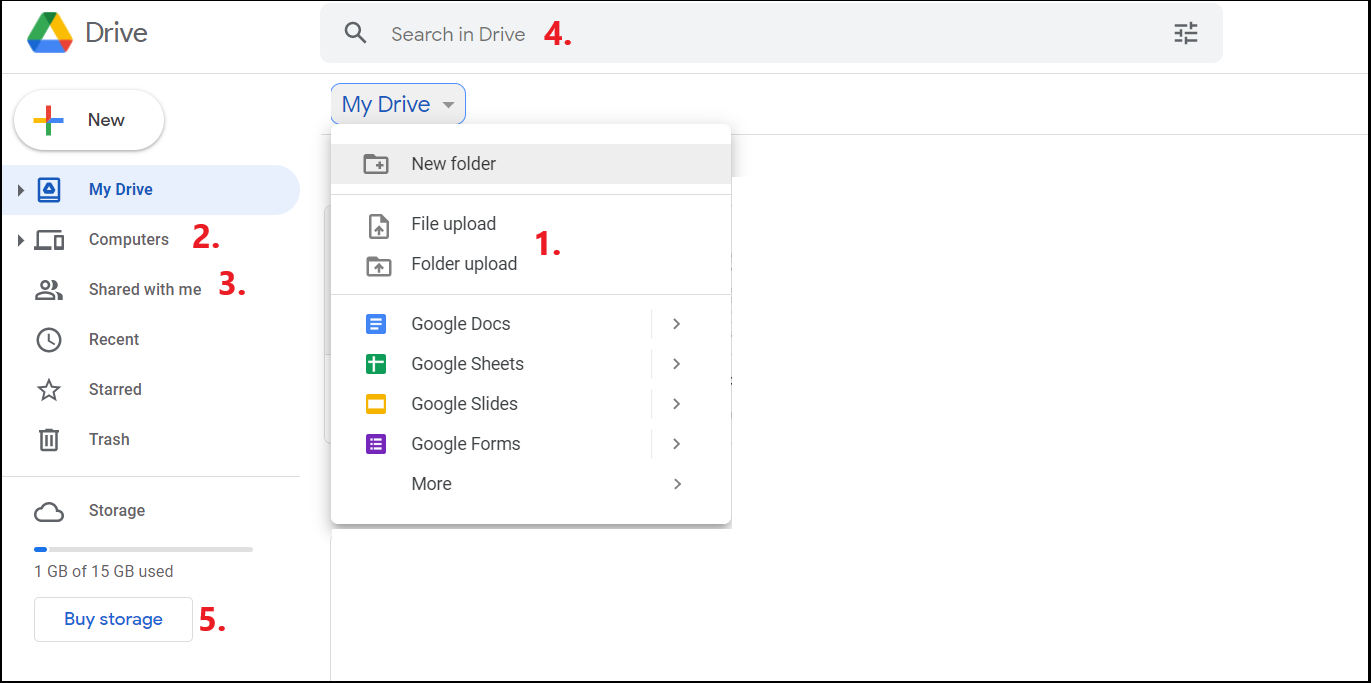
A quick look at the Google Drive user interface shows the key functions through intuitive icons. One of the most essential features is the ability to upload and download (1) files and folders, allowing you to securely store them in the cloud. Equally important is the file-sharing option, which lets you grant others access. By right-clicking on a selected document, you can share it with others and send them a link to the document in Drive.
In the menu on the left, under “Computers” (2), you can see your computers synchronized with Drive and under “Shared with me” (3), you can see your documents shared by other users.
With the Google Search (4) function, you can filter your cloud storage for the files you’re looking for. Thanks to the integration of Google services like Docs and Sheets, you can edit documents directly in the browser. Changes to the document are immediately applied and visible to other authorized users.
Google Drive also includes Google Photos. The image feature provides automatic image management, including convenient categorization of content according to various specifications.
Click on “Buy storage” (5) to access the option to purchase more storage.
Google Drive and Google Workspace
Users who utilize Google Drive professionally or for business often require additional cloud storage and enhanced features for project collaboration. Google provides the option to expand the free 15 GB of storage through Google Workspace (formerly known as Google G Suite).
Google Workspace for Business offers the following models:
- Business Starter with 30 GB cloud storage per person
- Business Standard with 2 TB of cloud storage per person
- Business Plus with 5 TB of cloud storage per person
Depending on your plan, you not only get more cloud storage, but also more options for video conferencing and individual and business email addresses. The Enterprise version offers additional security features such as S/MIME encryption.
You can get affordable complete office solutions with Google Workspace from IONOS, including your own domain.