

What is Google One? Google’s cloud subscription at a glance
If you use Google One, you “subscribe” to additional cloud storage for Google Drive and Google services such as Photos, Docs and Gmail at a rate of your choice. There are also benefits such as technical support, additional filters and effects for photos and videos, and discounts for the Google Store.
All plan information correct as of January 2025.
What is Google One?
If you use Google Drive, you may have asked yourself what Google 1 or Google One is. The answer is simple: Google Drive users automatically receive 15 GB of free storage in Google’s cloud. However, if you need to back up very large or many files, create WhatsApp backups with Google Drive or share storage with family members, it’s best to use Google One. This is a subscription model that allows you to expand the available cloud storage for a fee.
Google One currently offers one plan with 100 GB and two plans with 2 TB of storage. The two higher-tier plans differ based on whether they include Gemini Advanced, Google’s AI solution. Subscribing to Google One doesn’t change how you use Google Drive — you’ll simply gain extra cloud storage and additional features. However, unlike Google Workspace, Google One is designed exclusively for personal use. Businesses requiring more storage and advanced tools for video conferencing and collaboration should opt for Google Workspace subscription plans instead.
- Store, share, and edit data easily
- Backed up and highly secure
- Sync with all devices
How does Google One work?
Google One works like Google Drive. It requires no conversion or customization. You continue to use the functions of your Drive storage to back up files in the cloud, synchronize local files with Google Drive or use Google Drive offline. The only difference in terms of cloud functions is the greater storage volume. Attachments, files, photos and videos are therefore still added to the storage space used. Device- and location-independent file access and Drive file sharing also remain unchanged. There is therefore no separation between storage for Google Drive and Google One.
What additional functions does Google One offer?
In addition to the extended cloud storage, Google offers you many other features for each subscription plan. These include:
- Round-the-clock support for Google One subscribers
- Shared family storage space for up to five family members (with separate storage)
- Dark web monitoring
- Up to ten percent discount on purchases in the Google Store
- VPN for multiple devices
- Additional image and video editing tools and filters
If you need Google’s cloud storage for business purposes, opt for the business version of Google Cloud. Use Google Workspace with IONOS and get all Google apps in one place — including business email and team functions.
What does Google One cost?
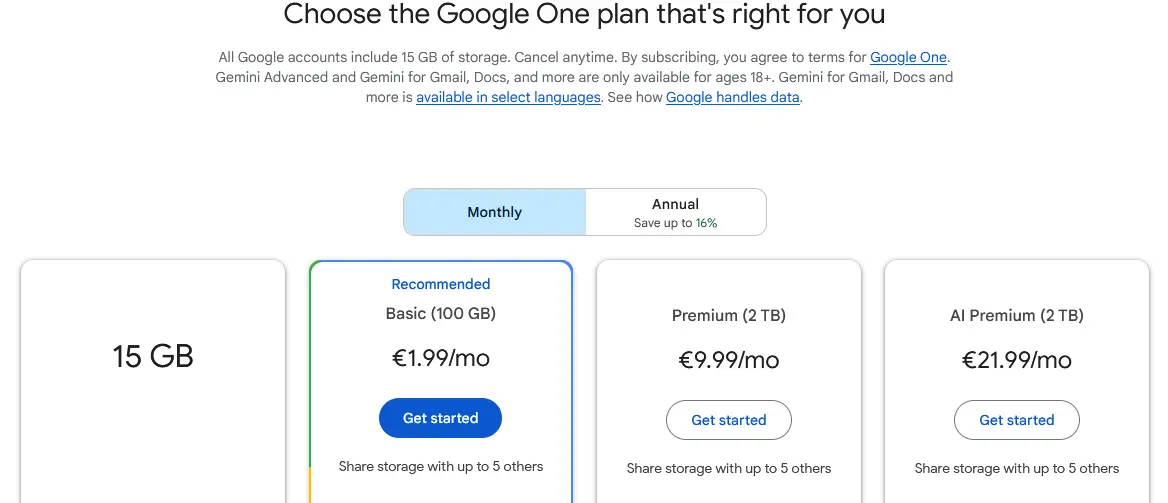
The prices for Google One are staggered as follows:
- Basic plan at 100 GB for $1.99 per month
- Premium plan with 2 TB for $9.99 per month
- AI Premium plan with 2 TB and use of Google’s AI Gemini Advanced for $19.99 per month
Those who opt for an annual payment method also receive a discount of up to 29 percent on the total price.

How can Google One be activated?
If you don’t yet have one, you must first create a Google account to activate Google One. When creating an account, either link an existing email address to your Google account or create a new Gmail account. Then go directly to the Google One website, select a suitable subscription and pay by credit card, PayPal or with Google Pay credit.
If you want to cancel your Google One subscription, log in to Google and go to Google One. You can cancel at any time at the end of the current billing period.
Google One compared to other providers
Google One focuses on large storage volumes for private individuals. If you’re looking for similar cloud services or Google Drive alternatives, our comparison table will give you an overview:
| Cloud service | Properties | Price for 100 GB to 2 TB | Server location |
|---|---|---|---|
| Google One | Cloud storage on a subscription basis for data and device backup and “family storage” | 100 GB: $1.99 per month 2,000 GB: $9.99 per month |
USA/Worldwide |
| HiDrive | Cloud storage for backing up, editing, synchronizing and sharing files; creating automated backups; ISO-certified, highly secure European data centers | 100 GB: $1.50 per month 250 GB: $3 per month 2 TB: $10 per month |
Germany |
| OneDrive | Cloud service for private individuals and companies for creating backups, central data access and sharing large data via link | 100 GB: $1.99 per month 1 TB: $9.99 per month |
USA, Asia, EU |
| Dropbox | Large cloud storage for collaborative work, file sharing, and centralized access to files | 2 TB: $9.99 per month 3 TB: $16.99 per month |
Personal: USA Business: USA, Australia, EU, Japan, UK |
| SecureCloud | German cloud storage for data backups and collaborative business file sharing | 100 GB: €8 (around $9) per month | Germany |
Do you want the highest data protection standards for your cloud storage? Then choose IONOS HiDrive cloud storage. Back up your files at affordable rates in highly secure, ISO-certified data centers.
What is the Google 1 app?
Just like with Google Drive, a Google One subscription gives you access to extended cloud storage from any device. You can work with your cloud data using both desktop and mobile browsers. Google also provides the Google One app, available for Android and iOS, which lets you back up important data from your mobile devices, including documents, photos, videos, chats, contacts, and calendar notes. To sync essential data and folders on your desktop, install the Backup & Sync tool for macOS or Windows with Google One.
 To display this video, third-party cookies are required. You can access and change your cookie settings here.