

Gigabyte – an explanation of the data storage unit

There are many different units of information that measure data storage capacities, i.e., the storage capacity of a hard disk or the size of a file. One of the best-known units of measurement is the gigabyte, which we tend to encounter regularly – be it when buying a new USB stick, a memory card for a smartphone, or when choosing the data volume of a new mobile phone contract. But what’s actually in a gigabyte; how large is it in practice, and how can you convert it to other units such as megabyte or terabyte?
- Simple registration
- Premium TLDs at great prices
- 24/7 personal consultant included
- Free privacy protection for eligible domains
What is a gigabyte?
A gigabyte (GB) is a frequently used standard unit in information technology that provides information about the storage capacity of a medium or the size of a file. GB is also used for mobile phone tariffs to indicate the monthly data volume included in a mobile phone contract. To classify the term gigabyte correctly, it’s worth understanding what the unit of measurement consists of and how it relates to other data storage units.
One gigabyte is equal to around one billion bytes, with one byte representing the smallest data quantity in digital technology. In practice, a byte represents a single letter. The byte comprises 8 bits, so-called “binary digits”. The bit is the smallest unit of information that binary communication by computers is built on. Since computers always process more than one bit for data storage or data transmission, bits are summarized in bytes.
While 8 bits correspond to one byte, a data quantity that encompasses half a byte, i.e., 4 bits, is called a half-byte or a nibble. The synonym “tetrade” is also fairly common. Going smaller is also a possibility: three bits make up a tribit and two bits make up a dibit. However, these units of measurement are rarely used.
Megabyte, gigabyte, and terabyte – what’s the difference?
Nearly as common as gigabytes are measurements in megabytes and terabytes. According to the decimal system, 1,000 MB = 1 GB and 1,000 GB = 1 TB. However, this conversion has its pitfalls: Computers use the binary system (or dual system), which is based on only two digits and is therefore based on base 2 (2x). The SI prefixes mega, giga, and tera originate from the decimal system, which is based on base 10 (10x), since a total of ten digits are being used.
When you convert bytes using the number 1,000, deviations arise and as data quantities grow, these deviations also become ever larger making for imprecise measurements. That is why the International Electrotechnical Commission (IEC) introduced new prefixes based on the power of 2. The revised units of measurement are called binary prefixes or IEC prefixes. They are based on the SI prefixes but contain the intermediate syllable “bi”. Since the conversion number 1,024 is used in the system, 1 gibibyte = 1,024 mebibytes and 1 tebibyte = 1,024 gibibytes.
Although these measurement units are also recommended by the International Bureau of Weights and Measures (BIPM), they have yet to catch on. Instead, the conversion number 1,024 is used alongside existing terms mega, giga, and tera.
What other data quantity units are there?
Megabytes, gigabytes, and terabytes are the units of information, you’re likely to encounter most frequently when using digital media. The table below summarizes different units used globally, the number of bytes they contain, and how they are related to each other.
| Storage unit | Conversion | Value in byte |
| Byte (B) | = 8 Bit | |
| Kilobyte (KB) | = 1,024 Byte | 1,0241 |
| Megabyte (MB) | = 1,024 KB | 1,0242 |
| Gigabyte (GB) | = 1,024 MB | 1,0243 |
| Terabyte (TB) | = 1,024 GB | 1,0244 |
| Petabyte (PB) | = 1,024 TB | 1,0245 |
| Exabyte (EB) | = 1,024 PB | 1,0246 |
| Zettabyte (ZB) | = 1,024 EB | 1,0247 |
| Yottabyte (YB) | = 1,024 ZB | 1,0248 |
| Brontobyte (BB) | = 1,024 YB | 1,0249 |
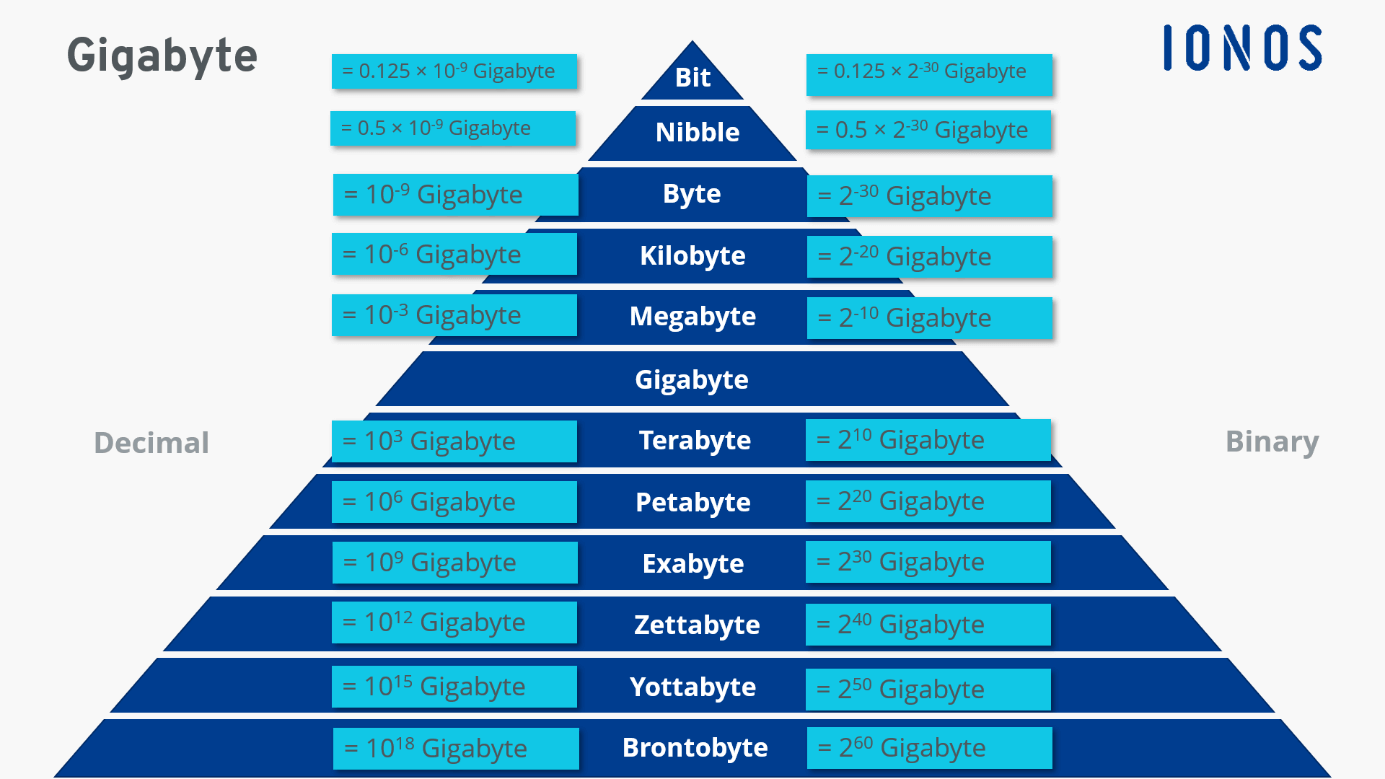
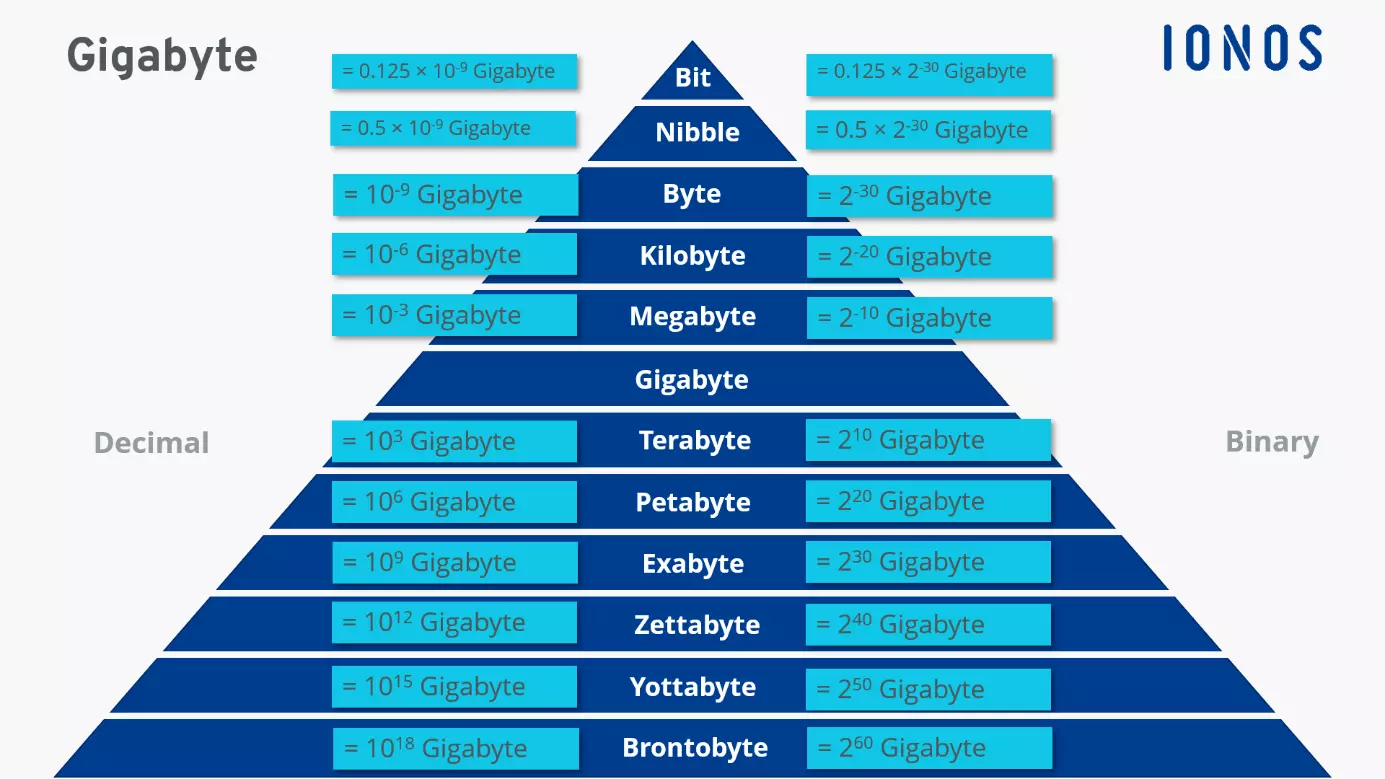
The units of measurement displayed in the table are quite abstract. To give you a better idea of the amount of data each unit can store, here are a few examples:
Storage capacities:
1 KB = a text with approx. 1,000 letters
1 MB = approx. 400 pages in a book
1 GB = approx. 250 MP3 songs in medium quality
1 TB = approx. 250 downloaded movies
Data usage:
Approx. 10 KB = Sending a message in WhatsApp
Approx. 10–30 MB = a one-minute YouTube video in HD quality
Approx. 1 GB = 5 hours of video streaming in standard definition.
Since when has the gigabyte been used and what for?
Until the early 1980s, a size specification in megabytes was sufficient for storage media. With increasing capacities, however, megabytes have been replaced by the next largest unit of measurement – the gigabyte. In 1980, IBM released the first 1.28 GB hard drive that was the size of a refrigerator. It took 10 years before the first computers with 1 GB drives became commercially available. Thanks to ongoing technological advances, terabytes or even petabytes have become more common units of measurement for hard disk drives.
Gigabytes are far from being obsolete. Today, GB is used to indicate file sizes or the storage capacity of USB sticks, external hard drives, CD-ROMs, or DVDs. Commercially available memory cards in smartphones or tablets usually have a storage capacity of 16, 32, or 64 GB. Mobile phone providers indicate contractually guaranteed, monthly data volumes in GB. Cloud providers tend to use this unit to calculate the costs incurred for their storage capacities (e.g., in the form of cents per gigabyte).
Companies and private users now tend to store their data in the cloud, which helps to avoid potential loss of data and allows them to access their data from any device and anywhere. Highly secure, low-cost HiDrive Cloud storage from IONOS offers a storage space of between 100 and 2,000 GB.