

What is an exabyte?

While computer users measure storage capacities for photos, texts, and videos in gigabytes and terabytes, technology giants like Google and Tesla are already dealing in units of exabyte. When you’re scrolling through social networks, you may be able to imagine the huge number of terabytes of images and videos that accumulate on the servers of social media giants. And that’s only a fraction of the global data quantities measured in exabytes on a monthly basis.
What is an exabyte?
Unlike clothing sizes, which eventually plateau at M, L, or XL, data volumes show no intention of stopping their growth. Quite the opposite: when IBM introduced the first hard drive with the IBM 305 RAMAC in 1956, it offered a storage capacity of just 3.75 megabytes. To put that into perspective, a single photo with a 12-megapixel resolution today requires roughly the same amount of storage space.
Globally, we now generate multiple exabytes of data monthly. Google alone claims to store several exabytes worth of data. The exabyte is a unit of information that’s still restricted to global data volumes and storage quantities in data centers; it’s not a measure of our commercially available hardware like the external storage hard drives we may use daily. In other words, it’s a measure of big data.
As of right now, private users cannot make use of storage space in the exabyte range. However, usually it’s sufficient to be able to access data flexibly and centrally without filling up hardware space on computers and other devices. That’s why cloud storage is the optimal solution. With HiDrive Cloud Storage from IONOS you can add data to a secure cloud storage and access it any time from a device of your choice.
How many bytes are in an exabyte?
One byte is the smallest quantity of data and consists of 8 bits. This means that a bit is the smallest unit of information. So, everything is based on bits and bytes. One bit (binary information digit), can represent one of two states: 1 or 0. Since computers process information via the binary code, this is the smallest understandable piece of information in the IT sector.
In information processing, one bit is too small to transmit or store complex information. One byte is therefore the smallest amount of data and serves as the basis for all storage capacities. In contrast to the bit, one byte can assume 28 (256 bits) different states. At least one byte is required to represent a letter or an alpha-numeric character.
According to the decimal system, an exabyte comprises 1018, i.e., one trillion bytes. A megabyte is made up of one million bytes. As a reminder: around 4 megabytes are required today to save a high-resolution photo. The current largest unit of information is the zettabyte, which, according to the binary system, corresponds to 1,024 exabytes. Anyone who owns an external hard drive in the terabyte range may be able to imagine what that means: 1,024 terabytes are 1 petabyte, 1,024 petabytes make 1 exabyte.
Day to day, computer users typically handle data volumes of one byte or more. But there’s an even smaller data unit: the half-byte, better known as a nibble. A nibble comprises 4 bits and is primarily used in 4-bit computer architectures and protocols.
Exabyte compared to larger data sizes
Units to measure memory size typically come in two standards: binary and decimal. The binary standard is recommended by the IEC (“International Electrotechnical Commission”) because it maps storage capacities more precisely and is better suited to data carriers. The decimal prefix is based on the SI (“International System of Units”) and is more common, but reflects rounded, less precise data quantities. Where it gets confusing is that decimal prefixes are also being used for binary quantities. So far, however, binary prefixes have failed to become more established.
Here are the eight official units of measurement for byte powers:
| Binary prefix (IEC) | In byte + conversion factor |
|---|---|
| Kibibyte (KiB) | 1,024 (210) |
| Mebibyte (MiB) | 1,048,576 (220) |
| Gibibyte (GiB) | 1,073,741,824 (230) |
| Tebibyte (TiB) | 1,099,511,627,776 (240) |
| Pebibyte (PiB) | 1,125,899,906,842,624 (250) |
| Exbibyte (EiB) | 1,152,921,504,606,846,976 (260) |
| Zebibyte (ZiB) | 1,180,591,620,717,411,303,424 (270) |
| Yobibyte (YiB) | 1,208,925,819,614,629,174,706,176 (280) |
- Intuitive website builder with AI assistance
- Create captivating images and texts in seconds
- Domain, SSL and email included
| Decimal prefix (SI) | In byte + conversion factor |
|---|---|
| Kilobyte (KB) | 1,000 (103) |
| Megabyte (MB) | 1,000,000 (106) |
| Gigabyte (GB) | 1,000,000,000 (109) |
| Terabyte (TB) | 1,000,000,000,000 (1012) |
| Petabyte (PB) | 1,000,000,000,000,000 (1015) |
| Exabyte (EB) | 1,000,000,000,000,000,000 (1018) |
| Zettabyte (ZB) | 1,000,000,000,000,000,000,000 (1021) |
| Yottabyte (YB) | 1,000,000,000,000,000,000,000,000 (1024) |
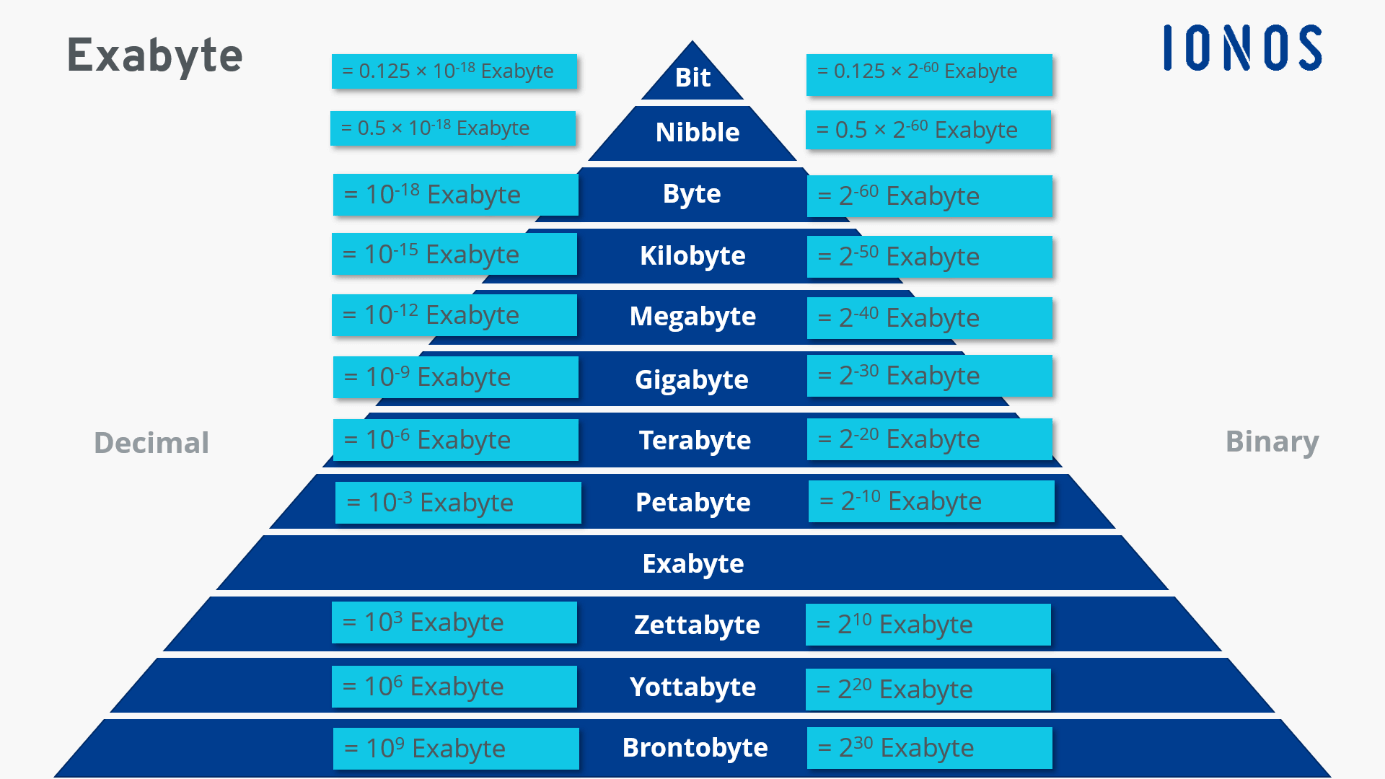
Here’s a well-known analogy for exabytes: if a megabyte represents the Earth, an exabyte would be the size of the Sun. To fill just one exabyte, you’d need a video call lasting an astonishing 237,823 years. Movie enthusiasts, however, could fit a staggering eleven million HD films on a single exabyte of storage.