

How to link a custom domain to Tumblr

You can connect your Tumblr blog to a custom domain to make it more unique. All you need is a web address of your choosing and the proper configurations for your settings with your hosting provider.
Register a custom domain for Tumblr
When you create a blog on Tumblr, the URL you are given ends with tumblr.com/blog/. If you want to change this and showcase your content in a unique way, you can publish it under your own domain for a small fee. Having a custom Tumblr domain not only adds individuality but also makes it easier for other people to remember and access your blog. You can link Tumblr and your own domain at any time as long as you have registered the domain you want to use.
Tumblr offers its own service for registering web addresses with Tumblr domains. This means that you don’t necessarily have to register your own address with an external domain registrar. However, the range of top-level domains that can be used with Tumblr is very limited.
Register a custom Tumblr domain using IONOS
If you want to set up your own domain for your Tumblr blog and also have a wide selection of domain extensions to choose from, IONOS is the right choice for you. Simply go to the official IONOS website, select Domains & SSL from the options at the top of the page and then select the option Domain Names from the menu that appears.
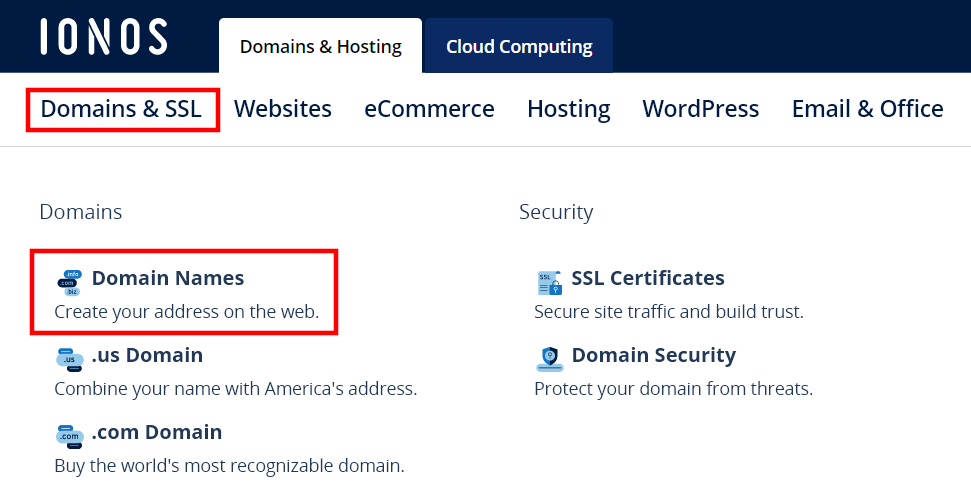
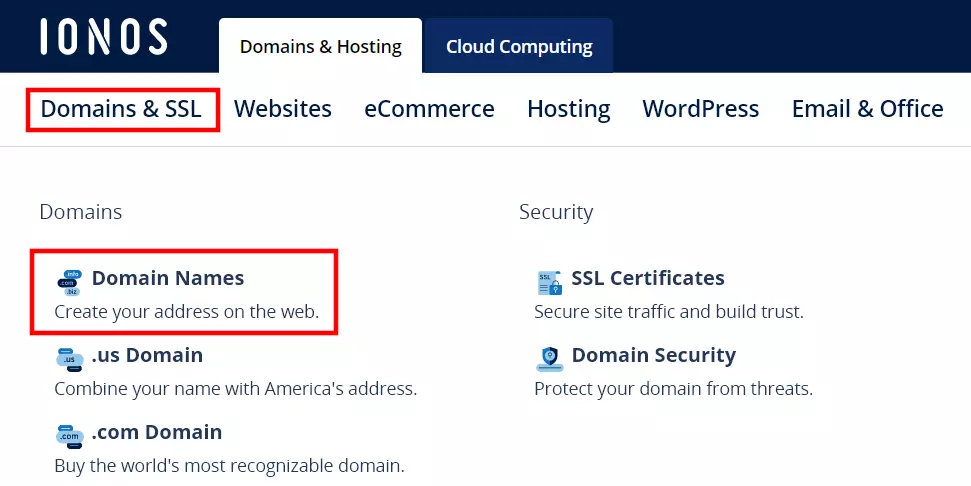
You will be taken directly to the IONOS Domain Checker, where you can see if the address you want to use is available. Enter the name you want (with or without a top-level domain) and click on Check.
After a few seconds, the checker will tell you whether your desired Tumblr domain is available. If the address has already been registered by another user, the tool will let you know and will also provide you with a number of alternative suggestions with different spelling or domain extensions.
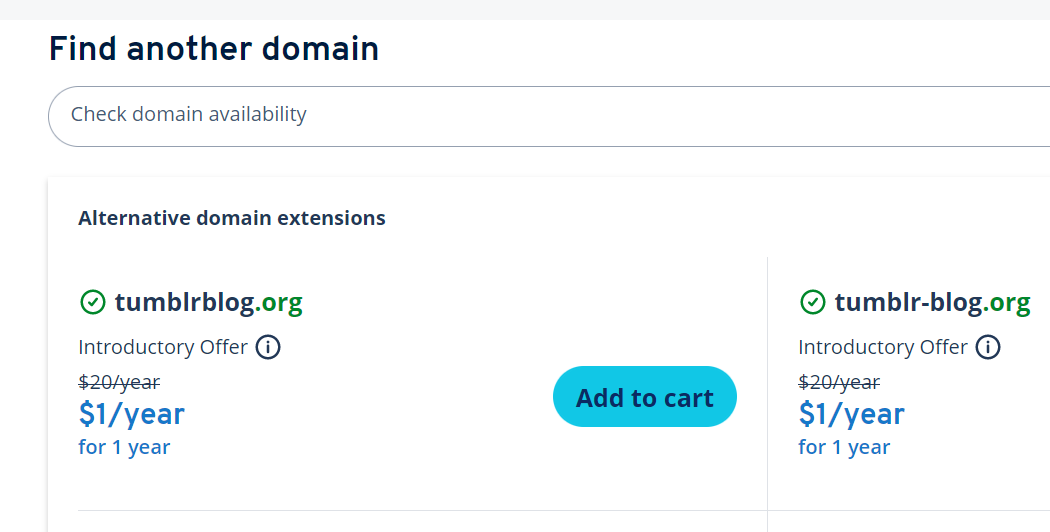
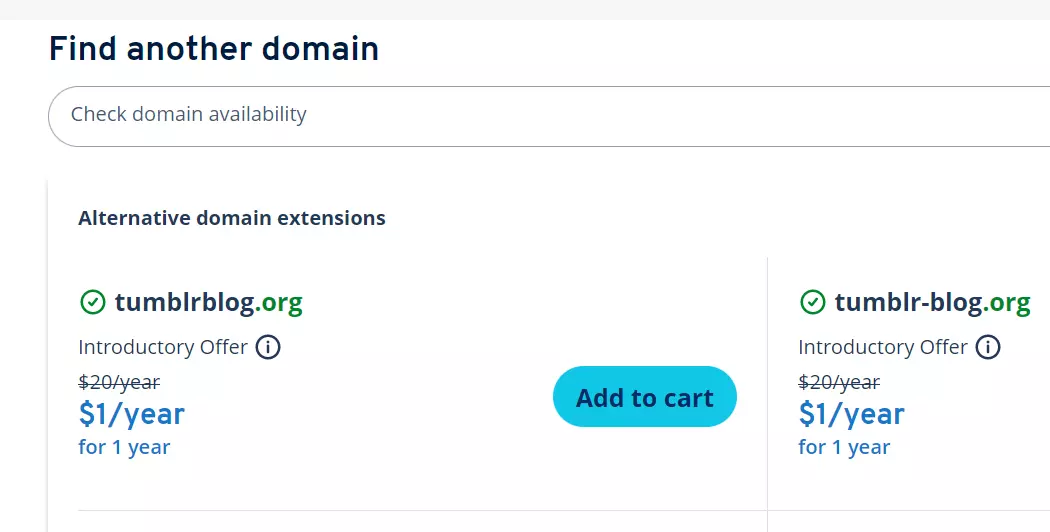
If you opt for an alternative suggestion, click Add to cart. You can also explore other options with the Domain Checker until you find a suitable custom domain for your Tumblr blog. Once you’ve made your selection, an additional menu bar will appear. Click on Continue to go to the shopping cart and follow the steps below:
- Select product: You can link the domain with another IONOS product, for example with web hosting or a professional email address. If you only want to register your custom Tumblr domain, select Domain only.
- Select contract term: In the next step, you can adjust the duration you want the domain for by clicking on the change button next to the length of time. You also have the option of adding additional domains to your shopping cart.
- Create account: Now create your IONOS customer account or log in if you already have an account. Alternatively, click on check out with PayPal to complete the payment process using PayPal.
- Complete your purchase: Complete the purchasing process by following the steps for payment. As soon as the domain has been registered by IONOS, it will be available for you to use.
Want to pay for your custom Tumblr domain via PayPal? We explain how to set up your own PayPal account with step-by-step instructions.
Step-by-step instructions for using Tumblr with a custom domain (IONOS example)
Once you have registered your custom Tumblr domain, you can link it to your blog through your profile. IONOS customers can find out how to do this below.
Step 1: Create A and CNAME records
To connect your Tumblr profile to your custom domain, you need to create two entries for the web address:
- A-Record: An A record ensures that your domain is linked to a specific IP address. In Tumblr’s case, this is the IP
66.6.44.4. - CNAME record: With CNAME records, you can assign specific subdomains to your domain. To use Tumblr with your own domain, your subdomain’s CNAME should point to
domains.tumblr.com.
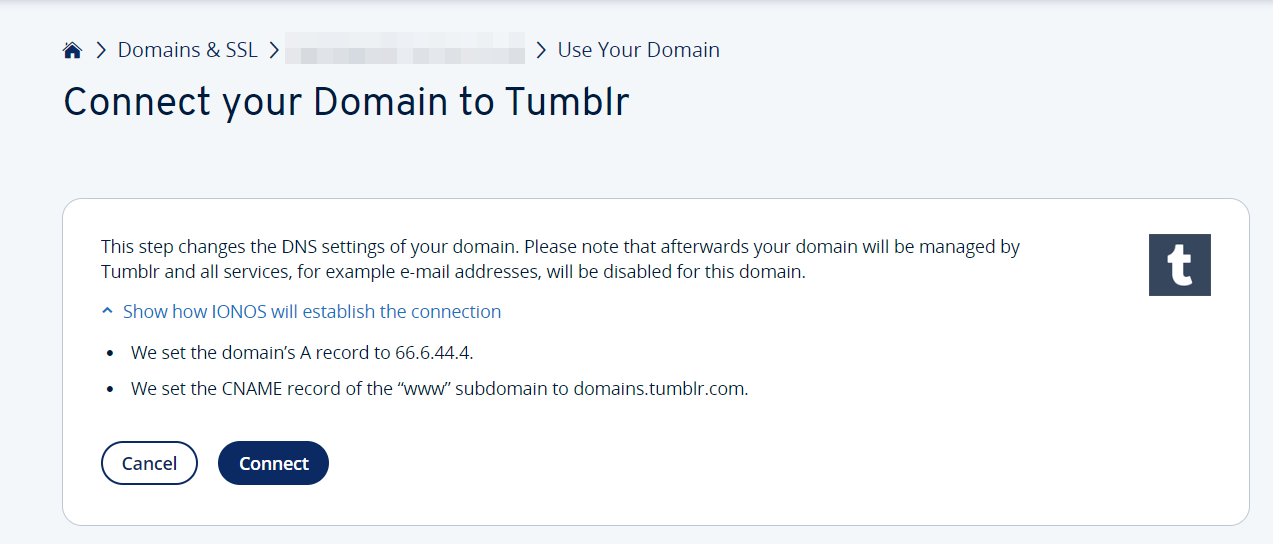
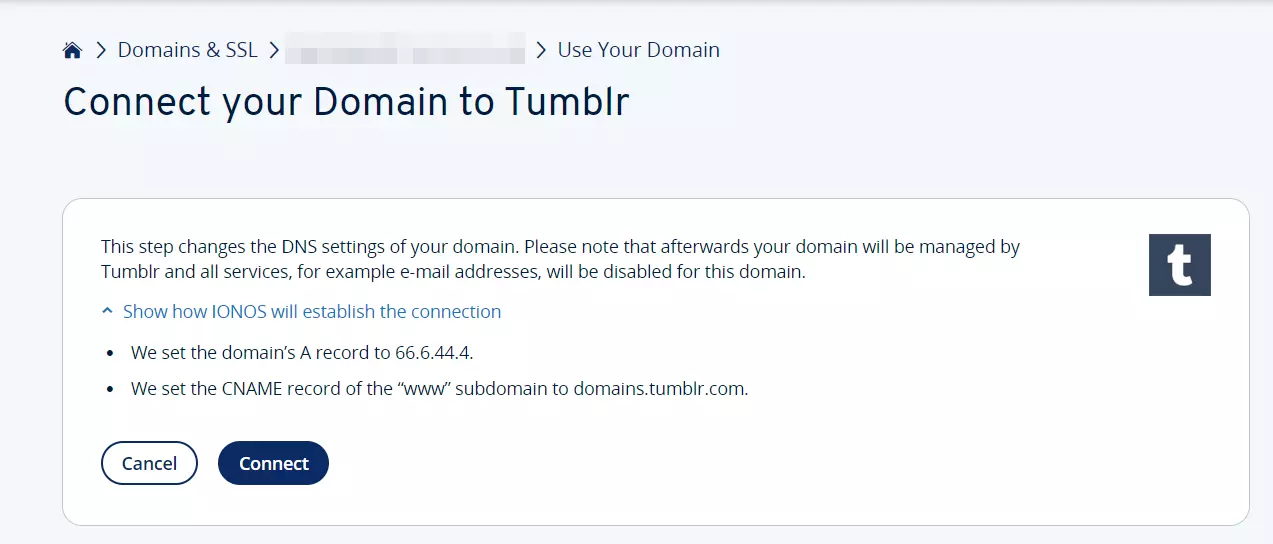
You can create these two entries manually in your IONOS customer account or use the setup assistant provided by IONOS:
- Go to the IONOS Tumblr setup assistant page.
- Click either Get Started or Connecting Your Domain to Tumblr.
- Log in with your credentials.
- Select the domain you want to link to your Tumblr blog.
- Click Connect. The setup assistant will automatically create the required A and CNAME records for your domain.
Step 2: Connect Tumblr and your custom domain
To set your registered domain as the new address for your Tumblr posts, log in to your Tumblr profile and follow the steps below:
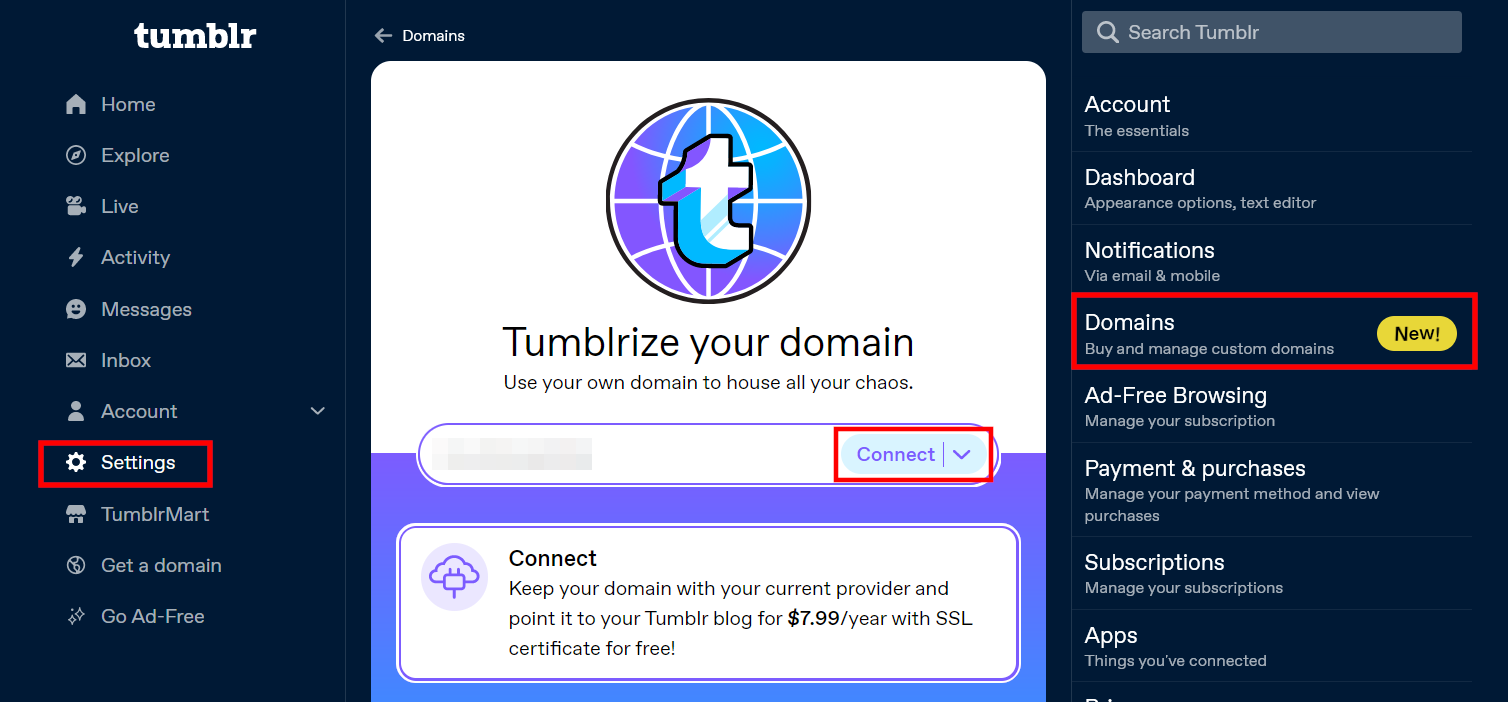
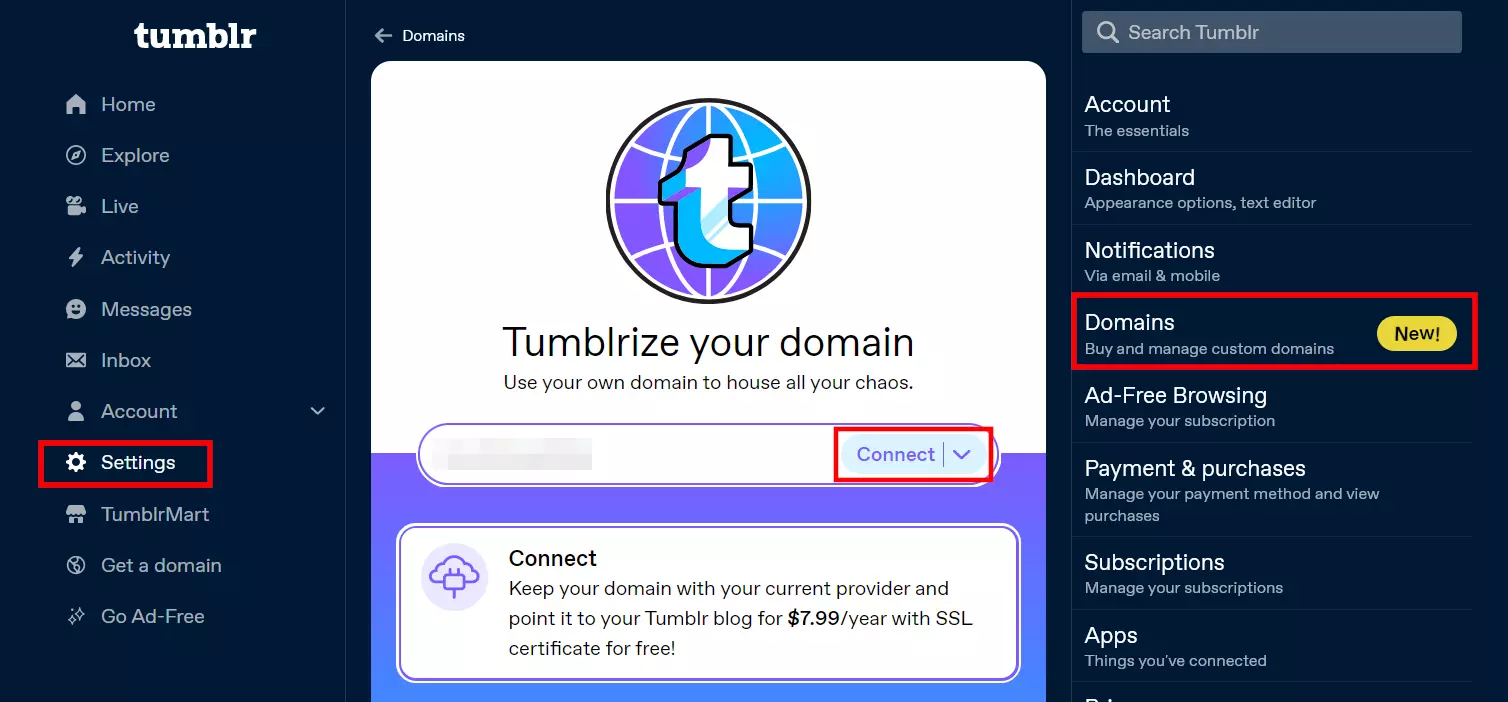
- Click on Settings in the left-side menu.
- Select Domains from the menu on the right.
- Scroll to the information box and click Connect.
- Enter the name of the Tumblr domain you have registered and click Connect again.
Complete the payment process (credit card required) to link the blog and domain. It may take up to two days for the DNS settings to be updated. If it’s not possible, an error message will be displayed for your domain.
Looking to expand your content’s reach? Explore our article on the best Tumblr alternatives and discover additional platforms to share your content on!