

What is greylisting in email and how does it work?

Greylisting is a reliable technique for reducing spam emails. It functions directly on the recipient’s mail server and requires no configuration from either the sender or the recipient.
Where is greylisting used?
In contrast to conventional spam filters, greylisting is aimed at blocking the delivery of clear-cut spam. Since it works through a straightforward mechanism, it is resource-efficient and fits seamlessly into modern security models such as Zero Trust or Defense in Depth. Greylisting is mainly used to stop the illegitimate mass distribution of spam emails. This type of spam, known as Unsolicited Bulk Email (UBE), refers to non-personalized messages sent in large volumes, often using lists of purchased or stolen email addresses.
These campaigns typically originate from compromised computers that form part of remote-controlled botnets, which are then exploited to send spam in bulk. Spoofed sender addresses are also commonly used in these spam waves to disguise the true source.
Greylisting is not suitable for tackling Unsolicited Commercial Email (UCE). This type of spam often consists of individually sent, personalized messages from seemingly legitimate businesses or individuals. To counter UCE, content-based filters and blacklisting.
- Professional data and security protection
- Secure encrypted email with SSL/TLS
- Email protection on any device thanks to firewalls and spam filters
- Daily backups, daily protection
How does greylisting work?
The idea of greylisting is based on sorting out potential spam emails during the delivery process. Let’s take a look at how the email sending process works.
Email transmission simplified
To send an email, the Simple Mail Transfer Protocol (SMTP) is used. Essentially, an email sent over the internet follows this path:
-
The sender writes an email using their Mail User Agent (MUA). This can be a locally installed mail program or a webmail interface.
-
To send the email, the Mail User Agent establishes an SMTP connection to the sender’s Mail Transfer Agent (MTA). This is software on the SMTP server that receives and forwards emails.
-
The sender’s Mail Transfer Agent forwards the email to the recipient’s Mail Transfer Agent. If this agent accepts the email, it is deposited in the recipient’s inbox.
-
When the recipient synchronizes their local inbox via IMAP or POP3, the email appears as a new message.
When greylisting intervenes
Greylisting takes effect during the third step of email delivery — when the recipient’s Mail Transfer Agent (MTA) receives the message. At this stage, the receiving MTA already knows three key pieces of information before accepting the full email:
- The IP address of the sending mail server
- The sender’s email address, obtained via the SMTP
MAIL FROMcommand - The recipient’s email address(es), obtained via the SMTP
RCPT TOcommand
Because these details are transmitted before the message body itself, they are referred to as envelope data. The Mail Transfer Agent logs the envelope data of each incoming email in a list known as the greylist. Here’s an example of a greylist entry:
| IP Address | Sender | Recipient |
|---|---|---|
| 192.0.2.3 | anne@example.com
|
fred@example.net
|


First and second delivery attempt
If a combination of envelope data appears for the first time, the Mail Transfer Agent (MTA) initially rejects the email. It returns a fault code indicating a temporary technical issue. The sending MTA is then prompted to retry delivery after a specified waiting period.
A legitimate, standards-compliant Mail Transfer Agent will follow this request and attempt to resend the email later. During the second delivery attempt, the envelope data is already stored in the greylist, allowing the message to be accepted and delivered.
By contrast, illegitimate MTAs used by spammers typically don’t retry. This is where the strength of greylisting lies: because no second attempt is made, the spam email is never delivered. The recipient remains unaware of this process, making greylisting a discreet and highly effective method of filtering out unwanted messages.
The greylisting process in detail
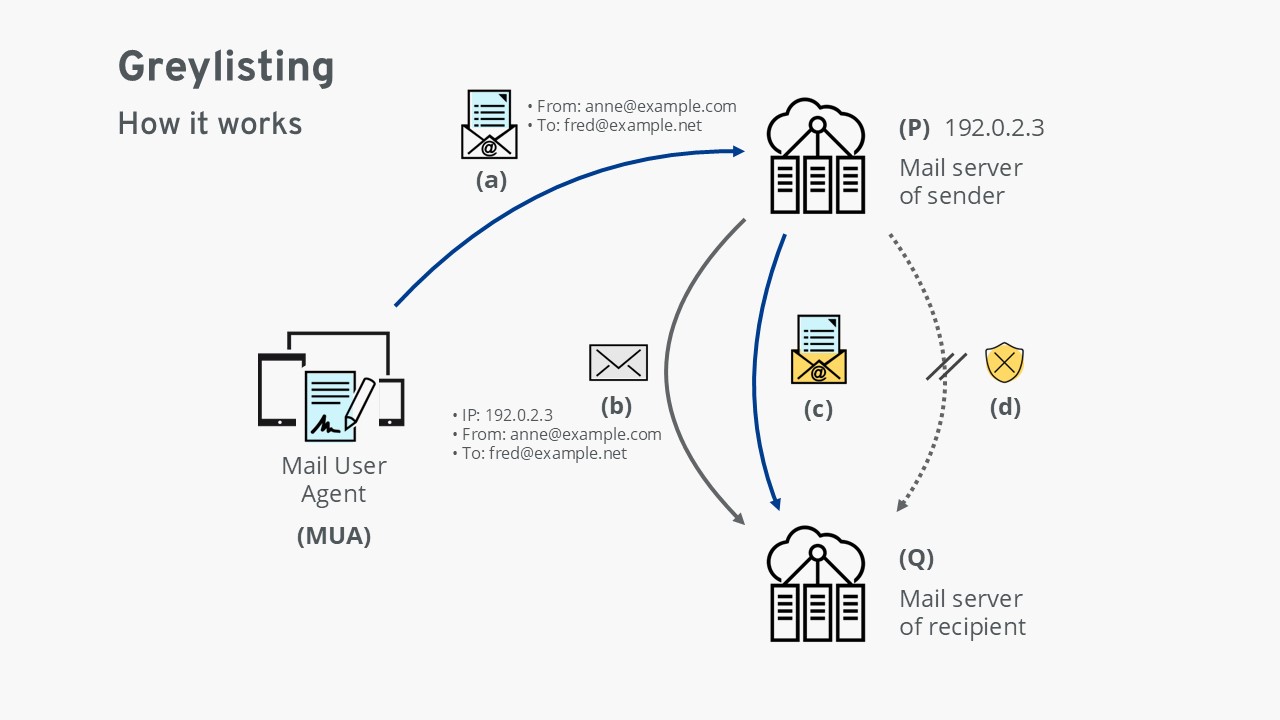
(a) The Mail User Agent (MUA) hands over an email to the sender’s mail server (P).
(b) The sender’s mail server (P) forwards the email to the recipient’s mail server (Q). At this stage, server Q checks the email’s envelope data: the IP address of the sending server and the associated email addresses. If this combination is unfamiliar, server Q temporarily rejects the email with a technical error and records the envelope data in a table. The message is now “greylisted.”
(c) If the email is legitimate, the sender’s mail server (P) retries delivery after a short delay. Since the envelope data is now recognized, the recipient’s server (Q) accepts and delivers the message. Optionally, the envelope data may be added to the whitelist to ensure future emails with the same data are delivered without delay.
(d) If the email is illegitimate, the sending system usually does not attempt redelivery. In this case, greylisting succeeds as a spam protection method, and the fraudulent email is never delivered.
Greylisting as part of comprehensive spam protection
Greylisting is often used in combination with other anti-spam technologies. Mechanisms such as the Sender Policy Framework (SPF), DomainKeys Identified Mail (DKIM), and Domain-based Message Authentication, Reporting, and Conformance (DMARC) help secure email traffic and protect against common forms of abuse.
Combination of greylisting and other methods
Greylisting works particularly well in conjunction with related techniques like whitelisting and blacklisting. Let’s take a look at an example of the timeline of delivery attempts on the receiving mail server:
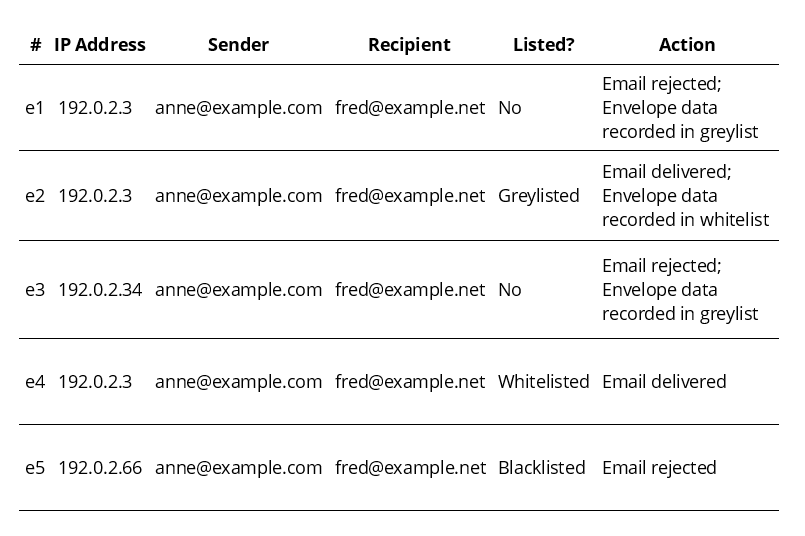
e1 An email from a sender not yet listed on the greylist (“Listed? No.”) arrives. The Mail Transfer Agent (MTA) rejects the email with a temporary error and logs the envelope data in the greylist.
e2 Later, another email from the same sender to the same recipient arrives. Since the envelope data is now in the greylist, the message is delivered. The envelope data is also added to the whitelist.
e3 After the last correspondence between Anne and Fred, the IP address of Anne’s SMTP server changes from 192.0.2.3 to 192.0.2.34. Because this is a new combination, Anne is treated as an unknown sender and placed on the greylist.
e4 Anne writes to Fred again, this time via the original SMTP server 192.0.2.3. Since this envelope data already exists in the whitelist, the email is delivered immediately without delay.
e5 A delivery attempt is made from server 192.0.2.66. As this server is flagged as malicious in the blacklist, the email is rejected outright. This suggests that the sender address anne@example.com was spoofed.
What are the advantages and disadvantages of greylisting?
| Advantage | Disadvantage |
|---|---|
| ✓ No configuration required by the user | ✗ Users may not be aware that greylisting is active |
| ✓ Normally does not lead to loss of emails | ✗ In rare cases, legitimate emails may be lost |
| ✓ Delay in acceptance can help blacklist malicious senders | ✗ Delay may cause users to question the functionality of the mail server: “Sometimes emails don’t arrive.” |
| ✓ Delay can protect against new, not yet identified malware | ✗ May be too slow for time-sensitive emails such as password reset links |
| ✓ Resource-efficient compared to most spam filters | |
| ✓ Highly effective technique, providing major relief for mail servers worldwide |
What are the potential problems with greylisting?
Although greylisting offers clear advantages, the technique also comes with certain drawbacks:
- Dependence on a stable IP address: If the sending SMTP server’s IP address changes, the recipient’s server treats the email as unknown and places it on the greylist.
- Possible delivery failures due to configuration issues: If the sender’s Mail Transfer Agent does not follow the request to retry delivery, the message will never be delivered.
- Potential to be bypassed with enough resources: In theory, spammers could resend emails multiple times to circumvent greylisting. However, the effort required is currently so high that it’s rarely attempted.
- Delays can disrupt time-sensitive messages: Emails such as password reset links or login codes may expire if they are delayed by greylisting. By the time the resend occurs, the content may no longer be valid.
- Limited transparency in cloud-based solutions: In many modern cloud email services, greylisting is integrated by default, without direct access for administrators or users. This can lead to unexplained delivery delays.
- Professional data and security protection
- Secure encrypted email with SSL/TLS
- Email protection on any device thanks to firewalls and spam filters
- Daily backups, daily protection