

What is RAID 10?

While cost is no longer the deciding factor, RAIDs are still frequently used in server environments. RAIDs are designed to optimize data security and performance. In the case of RAID 10, individual levels are merged with one another in order to combine their strengths.
But which levels make up RAID 10? What are its pros and cons and how does a RAID 10 system actually work?
What is RAID 10?
A RAID 10 is a combination of RAID levels 1 and 0, whereby multiple RAID 1 systems are combined with a RAID 0 setup. That’s why RAID 10 is also frequently referred to as “RAID 1 + 0”. RAID 10 always consists of at least four hard disks.
Following the basic principle of RAID 1, in a RAID 10, the files are mirrored too. That means, data is duplicated to at least two disks in order to guarantee redundancy. At the same time, data is striped which means that data blocks are broken down into individual stripes and stored on the disks in a RAID 10. Storage media within a subordinate RAID 1 group always have the same data status, which in turn differs from the data status of all other subordinate RAID 1 clusters. Each group manages separate parts of the information, but that’s of no consequence to applications accessing the system.
Both methods can be used in reverse. Stripes can be generated first and then all data is mirrored – a RAID 1 from several RAID 0 instances. In that case, the label RAID 0 + 1 or RAID 01 is used. In theory, however, mirroring data blocks that have already been divided into strips is more error-prone than the striping of a mirrored data structure.
The failure of hard drive in a RAID 10 system is compensated for via sub-arrays, i.e. via RAID 1 because a mirror with the same data is available at all times. However, that means the maximum storage capacity of individual drives is half that of the individual drives. Because data is evenly distributed, users benefit from higher read speeds when accessing them.
A RAID (Redundant Array of Independent Disks) is a combination of at least two different storage media to form a single large logical drive. The specific function is determined by the respective RAID levels which can be combined as in the case with RAID 10 (1+0). Its key advantages are enhanced reliability and increased performance of the hard disks used.
How does RAID 10 work?
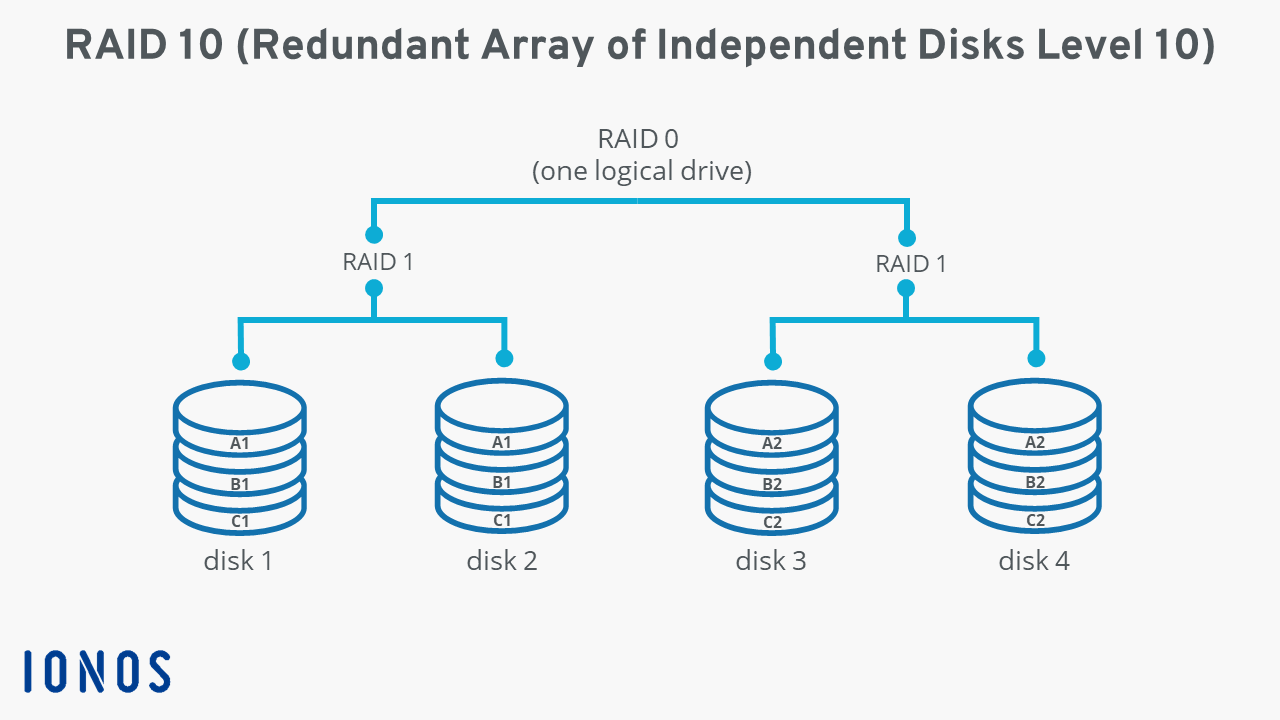
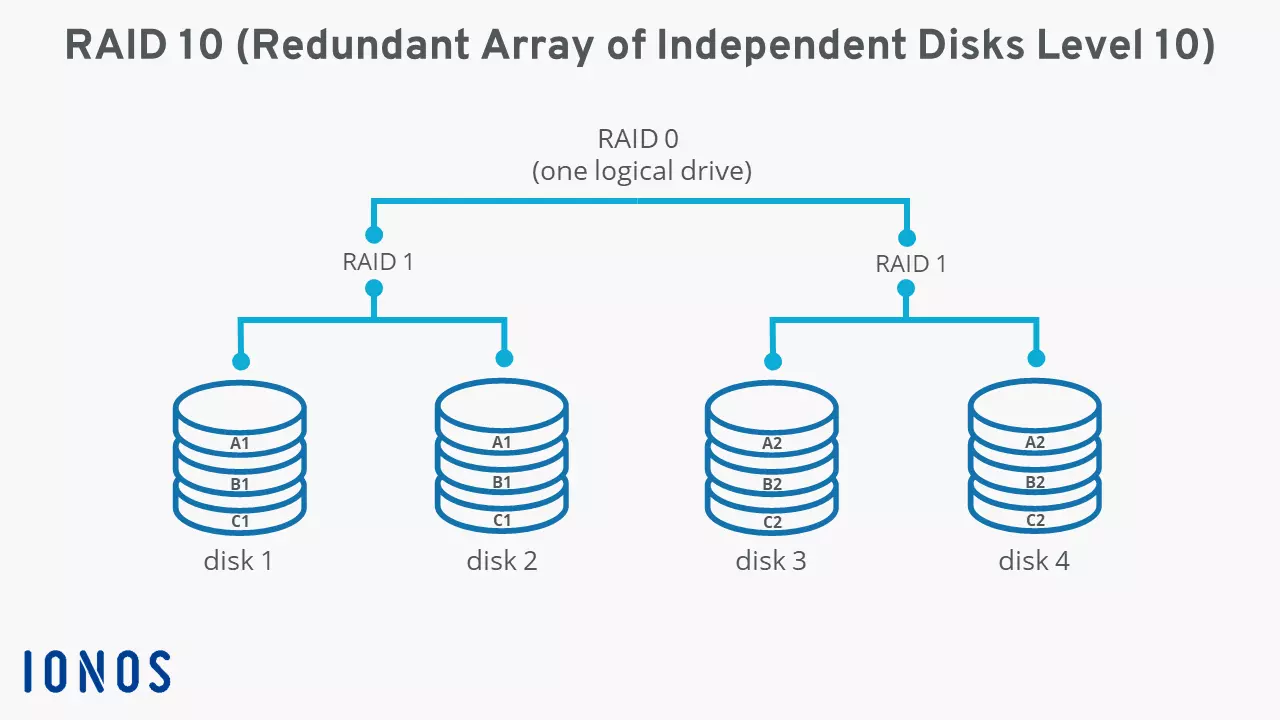
In a hard disk assembly according to RAID 10, all data always exists in duplicate. For each gigabyte of actual user data, one gigabyte is set aside to mirror user data. Typically, you choose a number of four hard disks, each of which is combined into pairs of 2 according to the RAID 1 concept, which in turn are combined into a single RAID 0 system.
The following graphic exemplifies the structure and data storage of a RAID 10 system with four storage media.
The pros and cons of RAID 10
RAID 10 stores all data in duplicate. As long as one disk of a mirror pair is still running, the information stored is therefore safe – even if a data carrier fails. Data is only lost if all storage media in a subordinate RAID 1 fail due to a defect or another reason. This is one of the main advantages of a RAID 1 + 0 system compared to RAID 0 + 1 where damage cannot be assigned to any specific disk of a RAID 0 subunit. That all means reconstructing data in a RAID 10 system is more straightforward and faster.
One of the great strengths of RAID 10 is the output rate of the system. By striping the data, the individual sub-blocks are available in parallel. If an application accesses the system, it can read from two or more disks at the same time and always receives several data from a single strip. Compared to a single hard disk which doesn’t have that option, read speed in RAID 10 is always optimized.
In theory, RAID 10 does offer higher write speeds, since new data can be written to the hard drives in parallel. However, because the system needs to generate an exact copy of this data, the improved input rate doesn’t have any practical effect.
Combining striping and mirroring is fairly expensive. But there are a few other disadvantages. For one, the approach restricts the maximum storage capacity available, since for each gigabyte of user data one gigabyte must be set aside for a copy of the data. Secondly, RAID 10 risks data loss if both data carriers in a mirrored pair fail at the same time. In this case, the failure of two hard disks cannot be compensated for by striping (unlike the failure of two disks from different sub-arrays).
| Advantages of RAID 10 | Disadvantages of RAID 10 |
|---|---|
| Increased read speed compared to single drives | Maximum available storage capacity limited |
| Increased fail-safety of the integrated hard drives | Failure of two disks in a sub-array leads to whole system crashing |
When is a RAID 10 typically used?
Security and speed are among the greatest strengths of hard drive connections according to RAID 10. Because costs of the setup are high, usage should be considered carefully. However, if the budget allows it, a RAID 10 is always a sensible solution if you want to store data that:
- Needs to be accessed regularly;
- Needs to be read quickly;
- Needs to provide a high level of security.
Typical areas of application for RAID 10 are therefore database and application servers, which depend on a high level of reliability and a good output rate.
While RAIDs like RAID 10 provide high reliability, they are not an alternative to a backup solution. Backups store data temporally and spatially separated from where the original data is stored. The latter isn’t a feature of RAID concepts.
What are other common RAID levels?
Alternative RAID levels 0 (striping) and 1 (mirroring) each offer only one of the properties of RAID 10, i.e. either optimized performance or increased reliability. However, RAID 5 and RAID 6 also provide redundancy and increased performance but do not consist of a combination of other RAID levels. Find out more about the different levels in our extensive RAID level comparison.
Private and sensitive data should always be backed up to guarantee maximum security. Cloud Backup from IONOS is the perfect solution!