

Nibble meaning – what is it?

Computing technologies are constantly evolving and as the demand on systems increases, companies and users require ever greater capacities for data storage and transmission. Standard storage media have grown so much in capacity that information units such as the megabyte and gigabyte have become commonplace. When transmitting data, we encounter information such as Mbit/s which corresponds to a transmission rate of 1,000,000 bits per second.
To understand the amount of data behind these terms, it is a good idea to get to know their smallest building blocks. While many users are already familiar with bits and bytes, the nibble is still fairly unknown. In the 1970s, the unit marked the beginning of faster data processing developments. We introduce the nibble and its meaning and explain how converting information between individual units works.
What is a Nibble?
A “nibble” (also “nybble” and “nyble” when referring to a “byte”) is the second smallest unit of information for data transmission and storage. The term is a play on the word “bite” and alludes to being a fraction of a byte. More precisely, a nibble corresponds to half of a byte and thus four bits.
The nibble unit was developed in collaboration with the BCD code (Binary Coded Decimal), in which four bits each represent a digit between 0 and 9. These four bits correspond to one nibble. By putting multiple bits together, computers and processors work faster. So-called 4-bit microprocessors were already in use at the beginning of the 1970s. Here, the amount of data that the processor processes in a single step consists of four bits or a nibble. This system laid the foundation for the development of more powerful processors. Later, they were summarized as 8, then 32 and finally 128 bits.
- Write perfect emails with optional AI features
- Add credibility to your brand
- Includes domain, spam filter and email forwarding
Bit, nibble and byte – what’s the difference?
One bit is the smallest binary information unit and represents the status 0 or 1. This measure cannot be further subdivided. There are many other units that represent multiples of a bit. One of the best-known representatives is the byte, which consists of eight bits. Since a bit can have two different states (0 and 1), there are some 28 possibilities for one byte. A byte corresponds to the smallest possible amount of data, making it an important measure to indicate memory size.
A nibble corresponds to exactly half of a byte and therefore consists of four bits. This also results in the alternative designation “half-byte”. However, the nibble didn’t always consist of four bits. For example, Apple software first combined five and later six bits into a nibble. Nowadays, the term exclusively refers to four bits. To make things fool-proof, some in the industry use unmistakable terms such as “semi-octet”, “quadbit” or “quartet”.
A nibble can have 16 (24) different values from 0 to 15. In binary numbers, this corresponds to the values 0000 and 1111 and all their possible combinations. This unit of information is primarily used in microcontrollers, communication protocols, or assembly languages.
Information units like nibble and kilobyte primarily indicate the amount of data that they stand for. By comparing them to physical capacities, it becomes a little easier to understand them for the average user: One megabyte (MB) corresponds to two million nibbles and approximately covers the data volume of a book of 400 pages.
What are the multiples of nibbles?
Nowadays, small units of information such as bit, nibble, and byte are no longer suitable to legibly represent the amount of data and storage capacities. Therefore, different units exist to represent the multiples of a bit. The following table gives an overview of common data volumes and their conversion factors.
| Data quantity | Conversion factor | In nibble |
| 1 Bit | ¼ | 0,25 |
| 1 Byte (B) | 2 | 2 |
| 1 Kilobyte (KB) | = 1,024 * 2 | 2,048 |
| 1 Megabyte (MB) | = 1,024 KB = 1,0242 * 2 | 2,097,125 |
| 1 Gigabyte (GB) | = 1,024 MB = 1,0243 * 2 | 2,147,483,648 |
| 1 Terabyte (TB) | = 1,024 GB = 1,0244 * 2 | 2,199,023,255,552 |
| 1 Petabyte (PB) | = 1,024 TB = 1,0245 * 2 | 2,251,799,813,685,248 |
| 1 Exabyte (EB) | = 1,024 PB = 1,0246 * 2 | 2,305,843,009,213,693,952 |
| 1 Zettabyte (ZB) | = 1,024 EB = 1,0247 * 2 | 2,361,183,241,434,822,606,848 |
| 1 Yottabyte (YB) | = 1,024 ZB = 1,0248 * 2 | 2,417,851,639,229,258,349,412,352 |
| 1 Brontobyte (BB) | = 1,024 YB = 1,0249 * 2 | 2,475,880,078,570,760,549,798,248,448 |
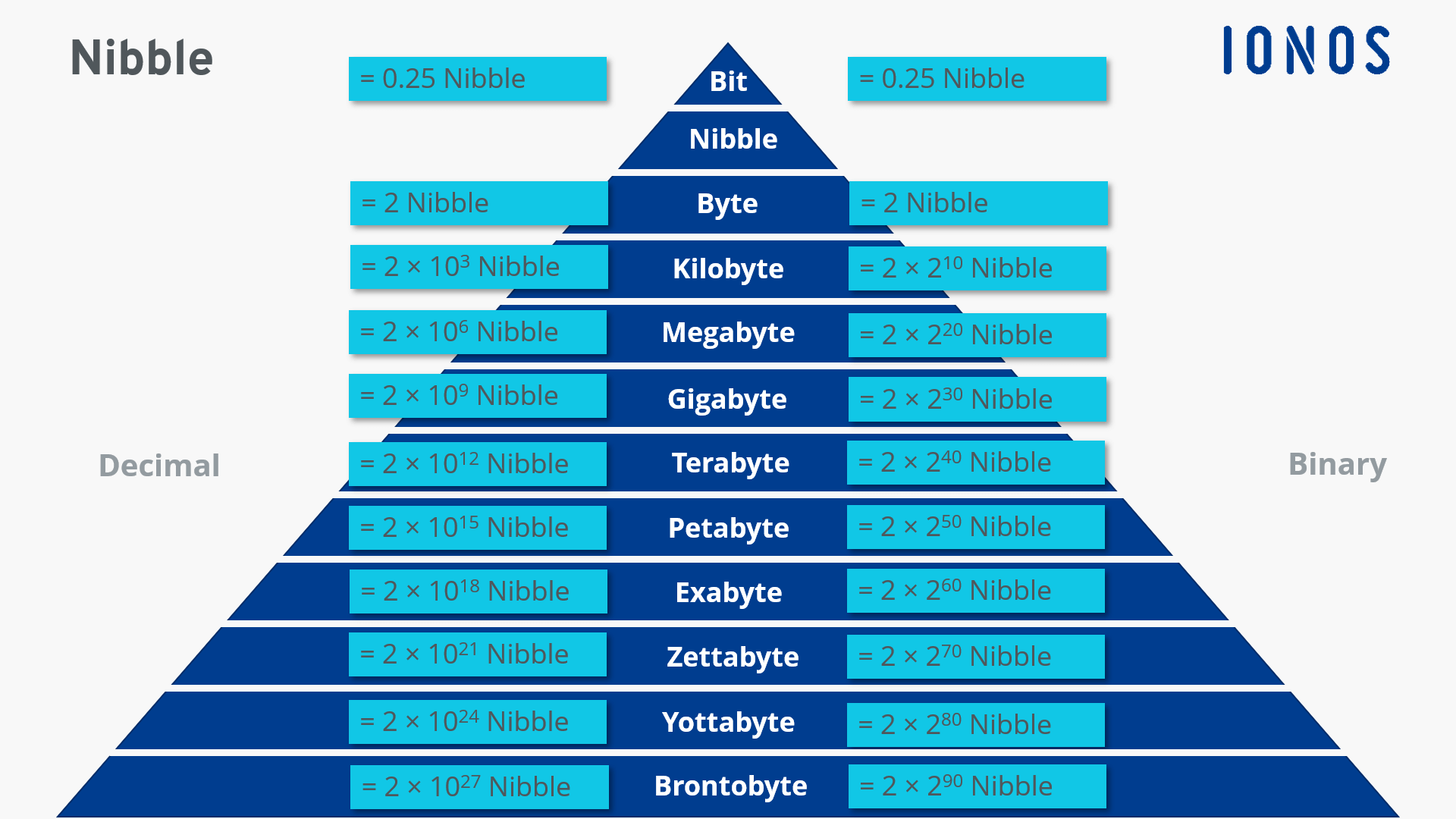
The units of measurement for data are usually named after the decimal system. However, bytes and nibbles are binary quantities. Therefore, a conversion into powers of two is imperative.
How long have nibbles been in use?
The term “nibble” emerged in 1958 through a joke remark by the late Professor David B. Benson. When speaking to a programmer from the Los Alamos Scientific Laboratory, Benson referred to “taking half a bite”. The professor remembered the statement when he named the representation of a digit by four bits and thus introduced the nibble.
Digital data determines much of our daily life. From customer data to passwords to documents – we now store most of our information digitally. Loss of data can become a serious problem. That’s why it’s all the more important to protect your data from undesirable access from third parties. The IONOS HiDrive cloud storage provides maximum security and unlimited flexibility.