

Selling on Facebook

Facebook is best known as a platform to keep in touch with people online and get a glimpse of friends’ daily lives. However it is not only an excellent network for maintaining social contacts, but also offers inexpensive ways for businesspeople to sell their products via F-commerce (short for Facebook commerce). If you have a business, there are three ways that you can sell products on Facebook:
- the Facebook Marketplace
- your own Facebook shop, which presents a product portfolio in pictures, text, and video
- via buy buttons, which lead customers to your business’ website, e-shop or isntant checkout
Selling on Facebook: The possibilities at a glance
Integrating a buy-button is the fastest way to increase awareness of your brand on Facebook profitably. When you’ve placed a link you’ll also be able to track and evaluate the user traffic generated from this link. In addition to a button in your own profile, it is also a good idea to link to this button in posts that you choose to publish on your business’ channel.
The Facebook Marketplace offers a platform to discover, buy, and sell items. In Marketplace, you can haggle within the normal framework of the sale. This feature is not to be neglected as it significantly increases the chance of a successful purchase and is something that makes the F-commerce platform so interesting.
However, the interface and structure of a Facebook store is not really the best option for experienced e-commerce businesses. The platform for selling on Facebook is comparatively new, and functions in the same way as Amazon, for example. The platform will display images of a product, as well as videos, and text descriptions and, of course, customer reviews. These reviews, however, can only be submitted on Facebook for the shop itself and not for the individual products, which is a limitation for more advanced e-commerce businesses.

Promising analyses for anyone who wants to sell on Facebook
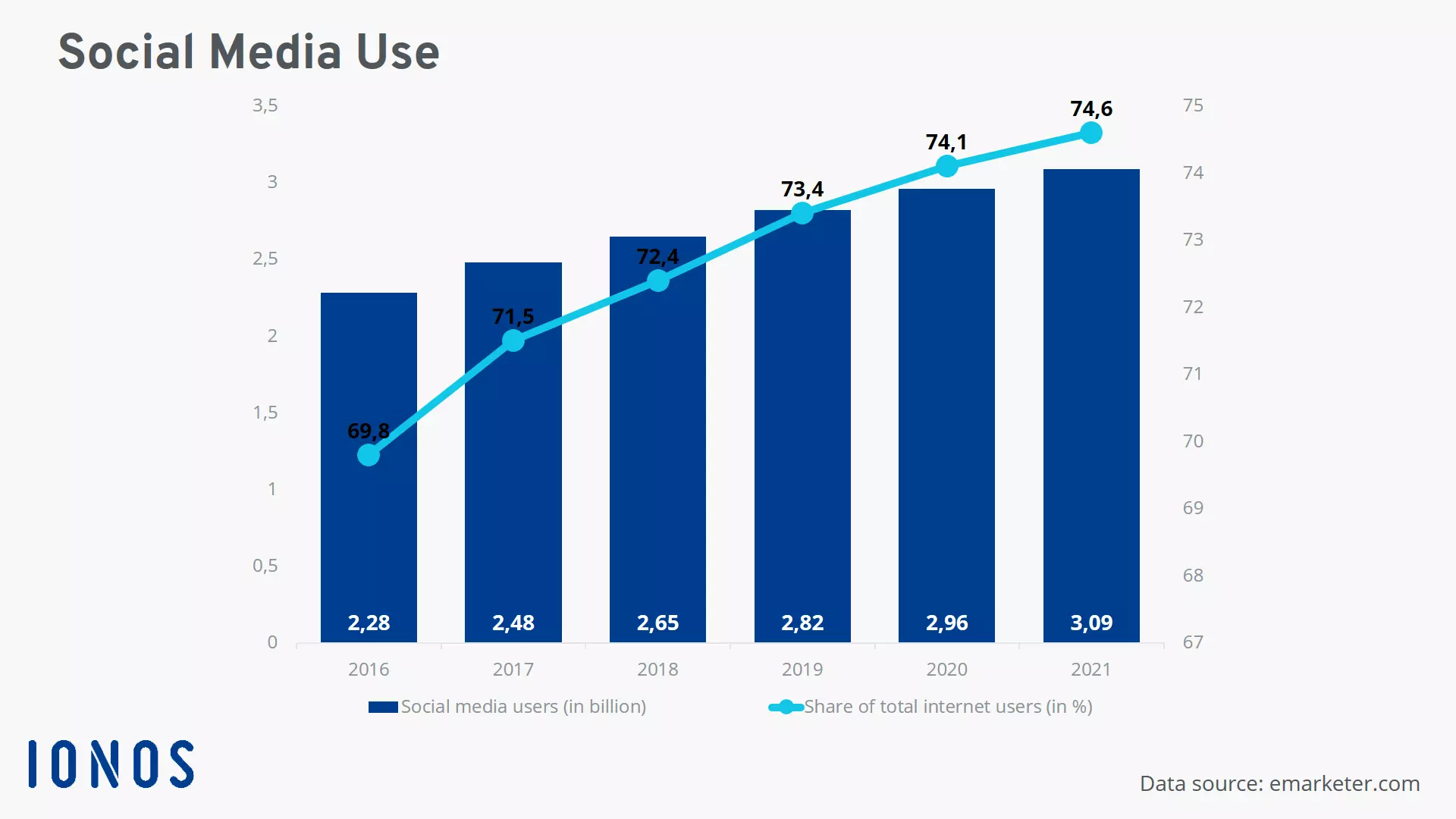
According to data from eMarketer.com, by 2021 over three billion people will be using a social network at least once a month, in some form or other (desktop, cell phone, tablet etc.). Over 70 percent of all people in the world are already active on at least one social media platform. Even among the most popular social media platforms, Facebook is still the biggest. The advantage for businesses who want to sell on Facebook? The platform offers the best chances of reaching your target market. Forecasts for 2020 and 2021 continue to project an increase in how often and how many social media platforms will be used.
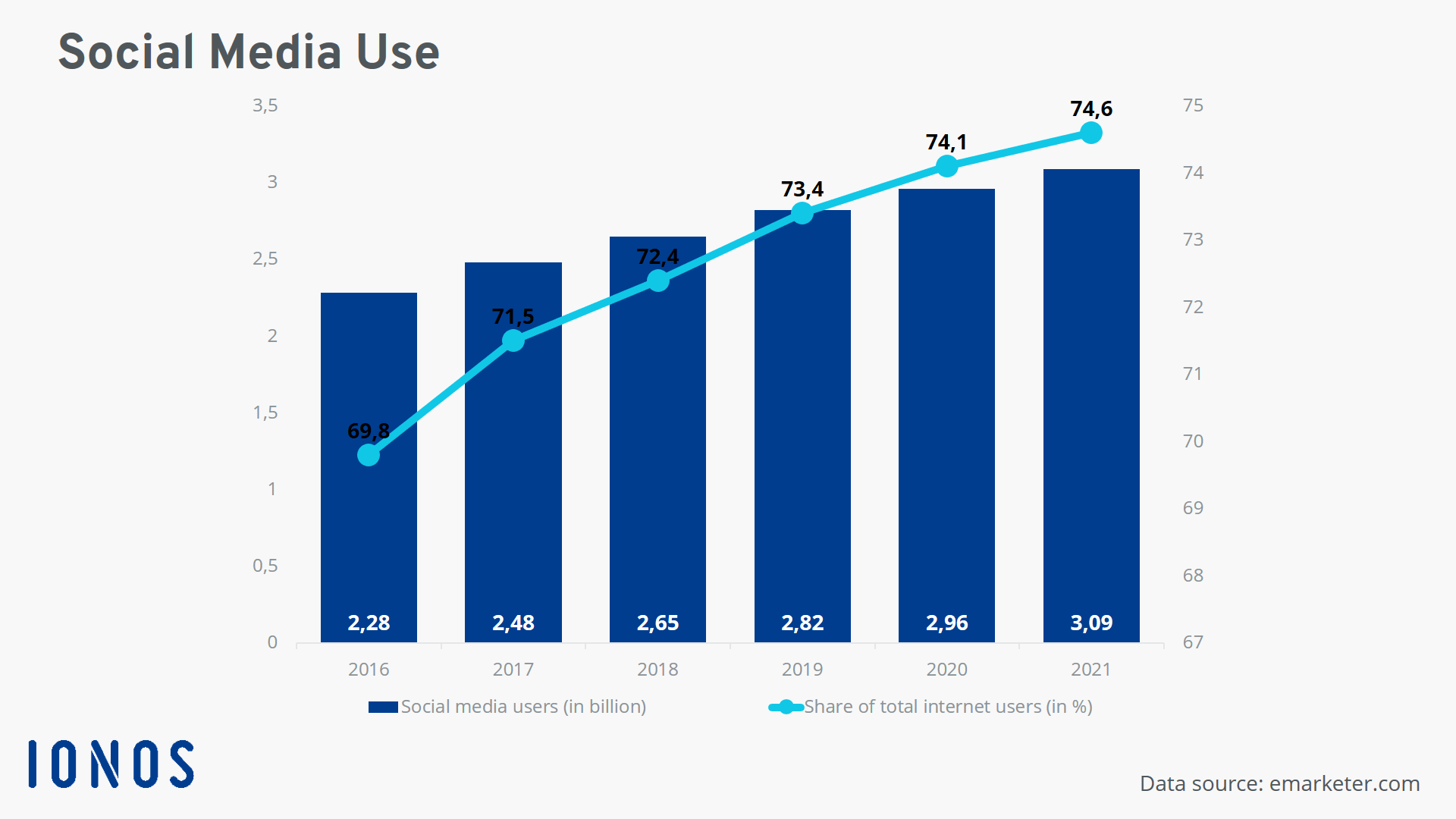
Clearly, then, companies can reach a wide variety of target markets on Facebook, as well as through other social media channels. Businesses can address their target market successfully and achieve the ultimate goal of selling products and services via this channel. Our article on social commerce provides further insight into the intersection between social media and e-commerce and online stores. The role that selling on Facebook and other platforms plays for businesses is further explained in our article on how companies are using social selling successfully.
Certain target groups can be better reached via Instagram than via Facebook. This is true particularly for younger target audiences. Find out more on how to promote your products on Instagram in our useful article on selling on Instagram.
- Sell on social media in minutes
- Manage it all from one platform
- Works with any product or service
Selling on Facebook: creating your own Facebook shop
Selling on Facebook Marketplace can theoretically be done with your own Facebook profile. However, for the more professional F-commerce functions – such as the buy button or your own Facebook store – you need to set up a company page on Facebook. This kind of a company site can be set up via your personal profile. Further down the line, you can change the settings so that the page can be managed by several users. How this works is explained in our step-by-step instructions on creating Facebook pages for companies.
Once you have created your official company page, you can link it to a store – either on Facebook itself or to an external e-commerce store. In the following tutorial, we will show you how to successfully set up a Facebook store. Here’s how to sell on Facebook!
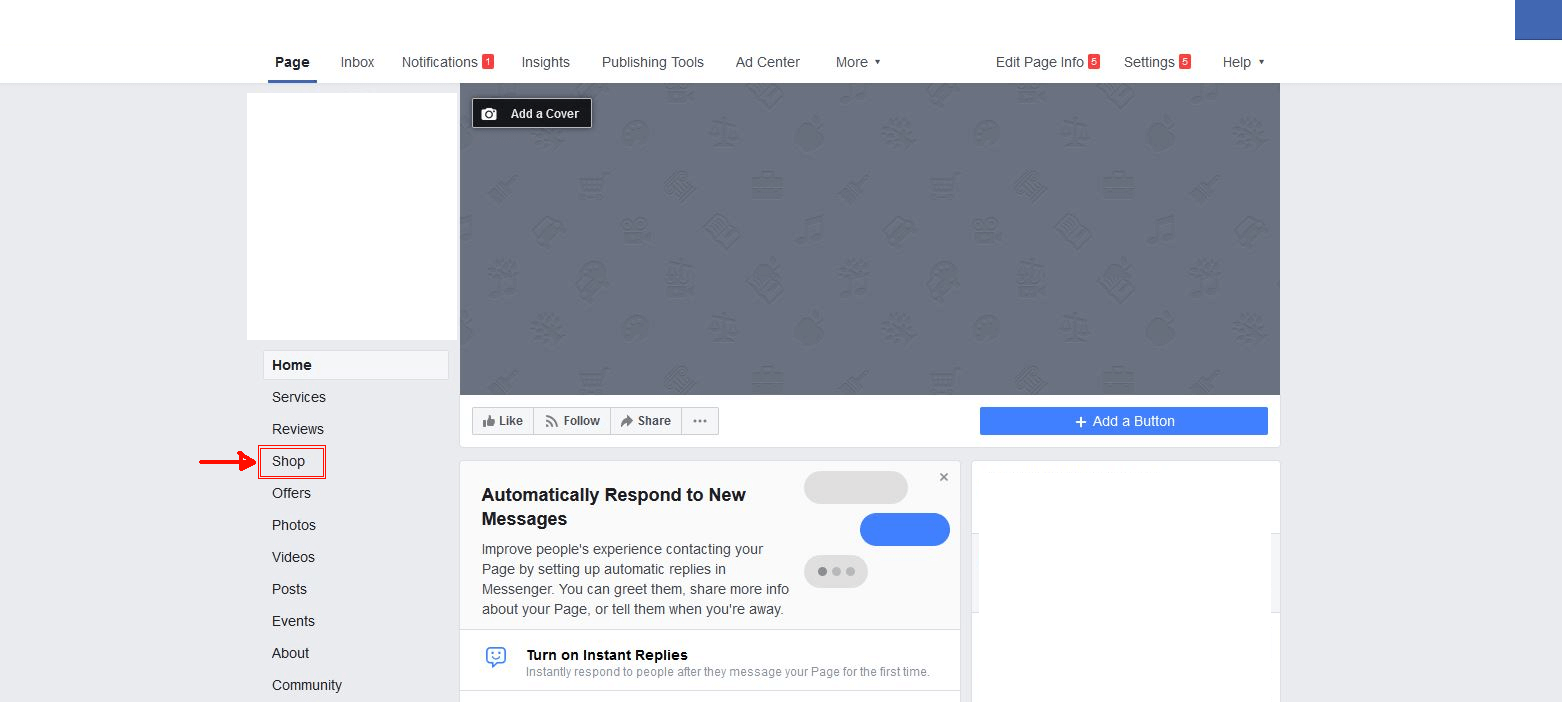
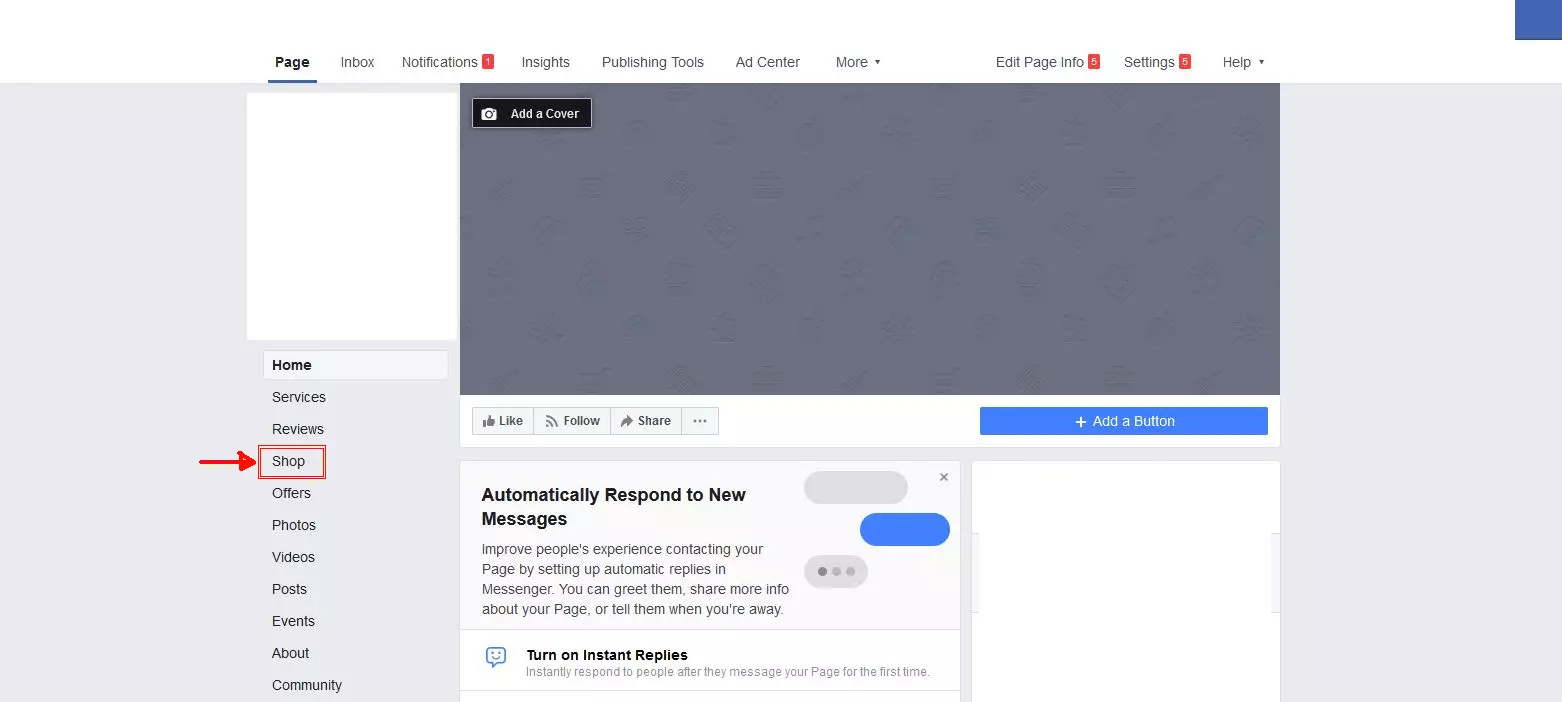
Step 1: Open the “Shop” tab
Even if you have not yet created or activated your shop, you can still open the “Shop” tab on your profile. Click on “Shop” to kick off the process:
Step 2: Agree to the terms and conditions
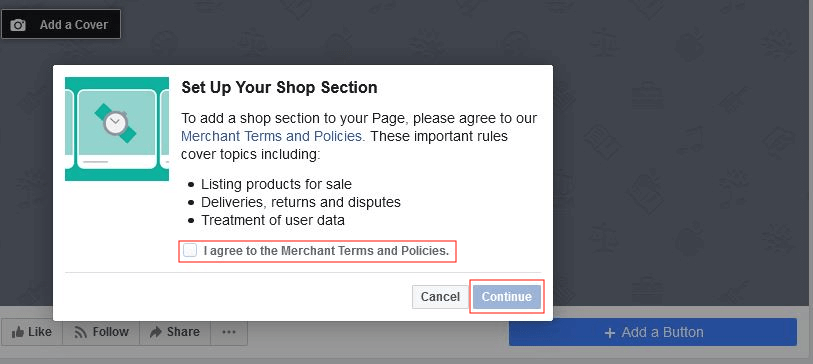
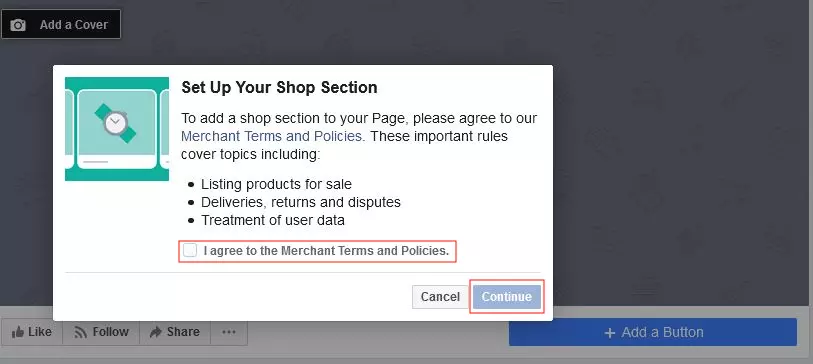
Before you can set up your new store for your future F-commerce activities, you first have to agree to the terms of use and merchant guidelines by checking the box and clicking "Continue":
Step 3: Choose your checkout method
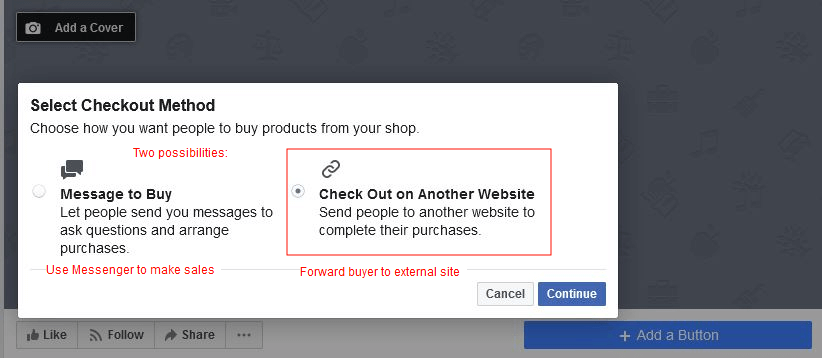
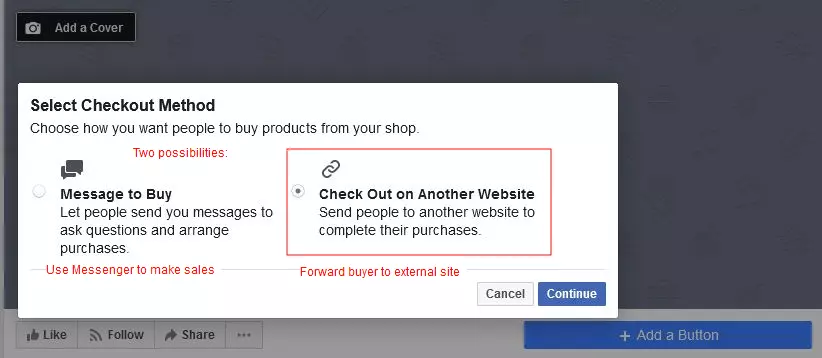
Depending on the type of products or services you want to sell on Facebook, you’ll have to choose which strategy is best for you: “Message to Buy” or “Check Out on Another Website.” In many cases, checking out on another website is the best solution. For products and services that require explanation, both can be combined. For example, after setting up a redirect to a website or to an e-shop, an automated chat plug-in can be used there.
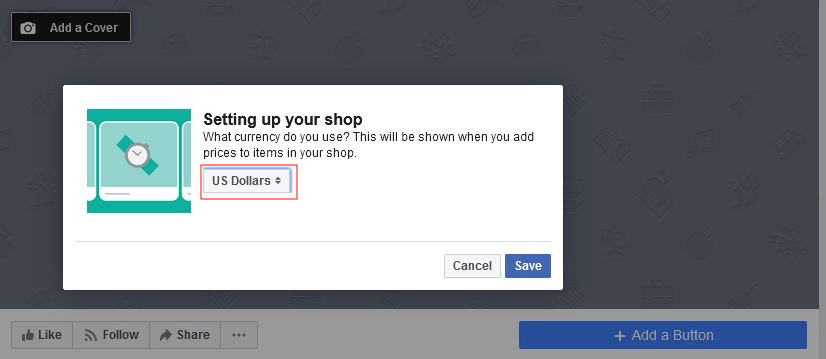
Step 4: Choose your currency
The currency in which you want to sell your services or products on Facebook is usually correctly preselected, but make sure you double-check.
Step 5: Upload your first product
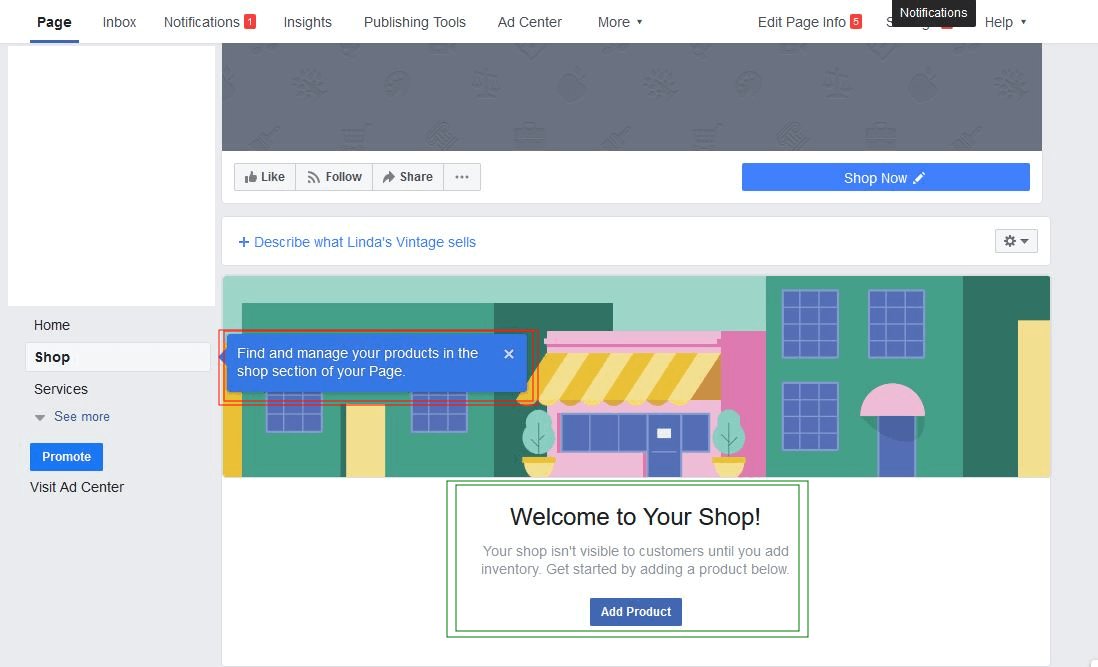
Congratulations on opening your store on Facebook! Using the "Shop" tab, you can now easily upload the first product you want to sell. Simply click on "Add Product":
Accelerate sales with social media buy buttons
Tools or extensions that enable you to connect social media to your own store are very helpful for the development and management of F-Commerce. Outside the USA, a solution like this is currently more or less indispensable, since up to now, the only way to sell directly via Facebook stores was in Facebook's home country i.e. the US. In the US, at least one additional click is always required – to the web store or website.
Integration can be achieved more easily with the right tools. These tools enable sellers to create their own small web store so they can sell their products on Facebook with just a few clicks. Customers see the product on the platform and by clicking on it, they get taken to a special landing page. The seller has created this landing page with the help of the practical software. Potential customers can therefore reach their destination quickly:
- Customers place the desired product (or several) in a shopping cart.
- Another click takes them to the checkout process.
- Integrating payment systems such as PayPal also makes selling very easy.
The advantage for sellers: There’s no need to create and manage an extra website, since this enables you to reach customers much faster and still have full control over your range and the sales you make. You don't even need a PC to use these tools. Everything can be done via smartphone.
- Sell on social media in minutes
- Manage it all from one platform
- Works with any product or service
Four tips for successfully selling on Facebook
Selling on Facebook is particularly effective if you can reach your target group organically. This way, you can maximize your sales without too much effort. To conclude this guide, we’ve prepared four tips for managing your shop and site that will help you to achieve long-term F-commerce success.
Use lead ads
Only leads with a real interest end up being a reliable sale. However, if a company misses the opportunity to generate these contacts, there is often no second chance. This is particularly true for social media on mobile devices. Lead ads are a recommended solution for collecting user data from potential customers who are interested in additional information from a company. These can be used to collect legally compliant, meaningful user data on Facebook, which is later decisive for successful sales. Further information on this display format can be found in our detailed article about Facebook lead ads.
Use video content
People are generally very visually oriented. This is another reason why videos are a promising tool for targeted marketing and selling products successfully on Facebook. Two other channels that are well suited for video content are Instagram and Pinterest. Although additional channels also mean additional effort, they can be used very well with similar content – meaning you don’t need to do the same work thrice over. In the following article on Pinterest ads you’ll find practical tips to help you perfectly align a strategy across Facebook and Pinterest.
Implement retargeting
In order to cleverly use your budget, you should be familiar and work with retargeting. It is also helpful to familiarize yourself with Facebook Custom Audiences as soon as you get started – this is especially the case for videos. In order to see and measure results, however, it is necessary that enough users have seen as much of the video as possible. This is the only way to re-target users who have showed interest online.
Take search engine marketing into account
With an SEA campaign of Google and Facebook ads running in parallel, as well as lead ads, you’ll reach your sales target in no time – but a certain budget is required to make this happen.
SEO, on the other hand, is particularly recommended when you need to save your budget for the long-run. Visitors may come to your Facebook store, web store, or website via search results in search engines. SEO can also be an excellent choice in combination with Instagram marketing, because many Instagram hashtags are often relevant as search terms or Google keywords at the same time. We’ll dive deeper into the topic of search engine marketing in our article on getting your own website out there.
- Get started with stunning designs
- Grow with advanced marketing and admin tools
- Sell on social and online marketplaces