

What is spoofing?

The word “spoofing” means deception or falsification. In other words, it involves the pretense of false facts. The verb “to spoof (something)” is also used and refers to the falsification of an identifier – i.e. deceiving a victim and concealing one’s actual identity.
Generally, spoofing attacks aim to convince the victim to perform an action, accept certain information as true, or recognize the authority of a source. If this sounds a little abstract, here are two examples that are well-known in the “offline” world:
- The “marriage swindler”: To access the victim’s finances through marriage, the fraudster acts like a loving partner.
- The “grandchild trick”: A caller claims to be an older person’s grandchild. By pretending to be in emergency, they convince the victim to make a bank transfer.
In both cases, the “trick” takes place at the level of information. Digital systems offer even more opportunities for this kind of fraud.
The internet allows a high number of messages to be sent with little effort. At the same time, it’s relatively easy to falsify identifiers in messages. Many spoofing attacks are therefore possible, since the internet was designed as an open system. For this reason, efforts to increase online security continue to this day.
How to protect yourself from spoofing attacks
Spoofing attacks encompass a wide range of potential attack scenarios. It’s therefore not possible to take a single action that provides absolute protection. Fortunately, there are several general practices that – when combined – minimize the risk of falling victim to a spoofing attack.
Recognizing and preventing attacks
You can only prevent an attack by recognizing it as such. If a spoofing attack occurs on the level of the smallest data packages exchanged over the network, you’ll typically be none the wiser. As a result, you are not usually able to prevent attacks on the network level yourself. But security vulnerabilities on this level can be resolved with security updates from the software manufacturers.
Spoofing attacks aimed directly at people are far more common – and indeed more lucrative. Here, the attacker contacts the victim directly, i.e. by email or over the phone. The intention is normally to convince the victim to do something. If the spoofing attack is intended to extract information (such as passwords or bank data), this is called a phishing attack.
Spear phishing is a particularly dangerous type of attack, since it is aimed at a certain person or institution. A spear phishing attack uses specific information that appears credible in a message. Once the victim is convinced by the credibility of the message, they are then hit hard and unexpected by the fraudulent attack “like a spear.”
Minimizing your vulnerability to attacks
To make their work as easy as possible, attackers often go for the weakest link in a chain. It is therefore a good idea to minimize your vulnerability to attack by applying some simple, general practices. You will then be less attractive as a target. What’s more, many attacks only succeed when the attacker combines information from different sources. If little information about you is available, this will be much harder.
You should therefore internalize the following practices:
Limit the amount of publicly accessible information about you
A phishing attack seems more credible the more detailed information is available to the attacker. You should therefore limit the amount of publicly accessible information about you, where possible. Never publish your date of birth, for example! This private information is often used by support staff, for instance, in order to verify the identity of a caller. Although it’s by no means secure, this practice is common.
Restraint is likewise important when it comes to disclosing professional details, like your position in a company. Consider updating your profiles on LinkedIn, Xing, Facebook and other platforms only after a six-month delay.
Don’t carelessly accept friendship requests
When only limited public information about your identity is available, attackers often try another trick: They create an account on social media, e.g. Facebook, and send you a friendship request. If you accept the invitation, you open yourself up to the attacker who can then access more, non-public information. This information is frequently used for subsequent fraud attempts.
With this type of attack, it’s especially common for the attacker to create an account in the name of someone you know. If this isn’t possible, a revealing photo of an attractive person is often used for the account’s profile picture. Many victims are unable to resist temptation and fall for the deceit.
Use good security routines
To protect yourself from attack, you should follow standard recommendations for IT security: Keep your system and software continuously updated. Use a firewall and spam filter and create regular backups of your data.
Also be aware that these measures do not provide absolute protection. Instead, this collection of measures is intended to prevent you from easily falling victim to attacks.
Adjust default settings
Default settings refer to the pre-existing settings of a device, software program, or online service. If a setting is the same for every device or user, this can be exploited by attackers. It’s therefore advisable to adjust the default settings. This will allow you to slip below the radar of attackers more easily.
For example, in the past routers with open admin access were occasionally delivered to customers. For a while, even every Windows computer was supplied with open ports as standard, completely exposing them to the internet. In both cases, the risk could be reduced by changing the pre-existing settings, although most users weren’t aware of this.
However, default settings are not only a potential vulnerability at the technical level. Privacy settings in social networks can also be far too relaxed as standard. Unfortunately, many companies benefit from making their users “transparent” by default. Therefore, it’s up to you to adjust your settings. Follow the principle of data minimization: Start off by making all the settings for each account as restrictive as possible and only gradually ease these restrictions afterwards for good reason.
Use a secure device
For particularly security-critical applications, such as online banking and encrypted communication, it is a good idea to use a secure device. This could be a small laptop running an operating system specially tailored to security. Examples include the freely available Linux distributions Subgraph and Tails.
Using a secure device when necessary may render attacks ineffective: The attacker will be expecting you to use your normal computer. If their attack is based on this assumption, using another device may thwart the attack.
Fending off spoofing attacks
What should you do if you think you’re the target of a spoofing attack? Let’s imagine the following situation: You receive an email claiming to be about something important. For instance, a bank transfer has failed, your account has been hacked, or your domain registration is expiring. You are prompted to act fast to prevent something bad from happening.
Although the message appears plausible at first glance, there seems to be something odd about it. Perhaps the information presented to you doesn’t quite fit together. Or you feel overly pressured to perform a certain action.
You’re unsure whether it’s an attack. How should you proceed?
First of all: Stay calm and don’t act too hastily. If it’s an email message, you must not click on any links it contains.
Use a second communication channel to confirm the authenticity of the message. Here, it’s imperative to limit the risk of potential attacks. If possible, use a separate device and a secure app that isn’t among your most frequently used standard applications.
Two specific examples below:
Let’s assume you have received a presumably spoofed email on your work computer. Use an end-to-end encrypted messenger application on your smartphone as a second communication channel.
You have received a suspicious call or text message on your phone. Consider your phone compromised and instead use your coworker’s telephone to contact a trusted party.
Spoofing attacks targeted at users
These spoofing attacks aim to fool users. This special form of phishing often involves a deceptively real imitation of a website to extract confidential data.
URL spoofing
URL spoofing attacks aim to deceive users with a manipulated URL. The trick is to lead the user to believe that the URL is familiar or credible. However, if an unsuspecting user opens the URL, they are redirected to a malicious website. For these URL spoofing attacks to work, the attacker needs control over the corresponding domain.
Misleading title of a clickable link
You may have encountered this practice before: You are shown a link in an email, but clicking on it takes you to a completely different domain. The trick works because the HTML title and the link destination do not have to have anything to do with each other. If an attacker chooses a link title that indicates a credible URL, the illusion is perfect: The link title conceals the actual destination URL.
Consider the following model. A link comprises a title and destination URL:
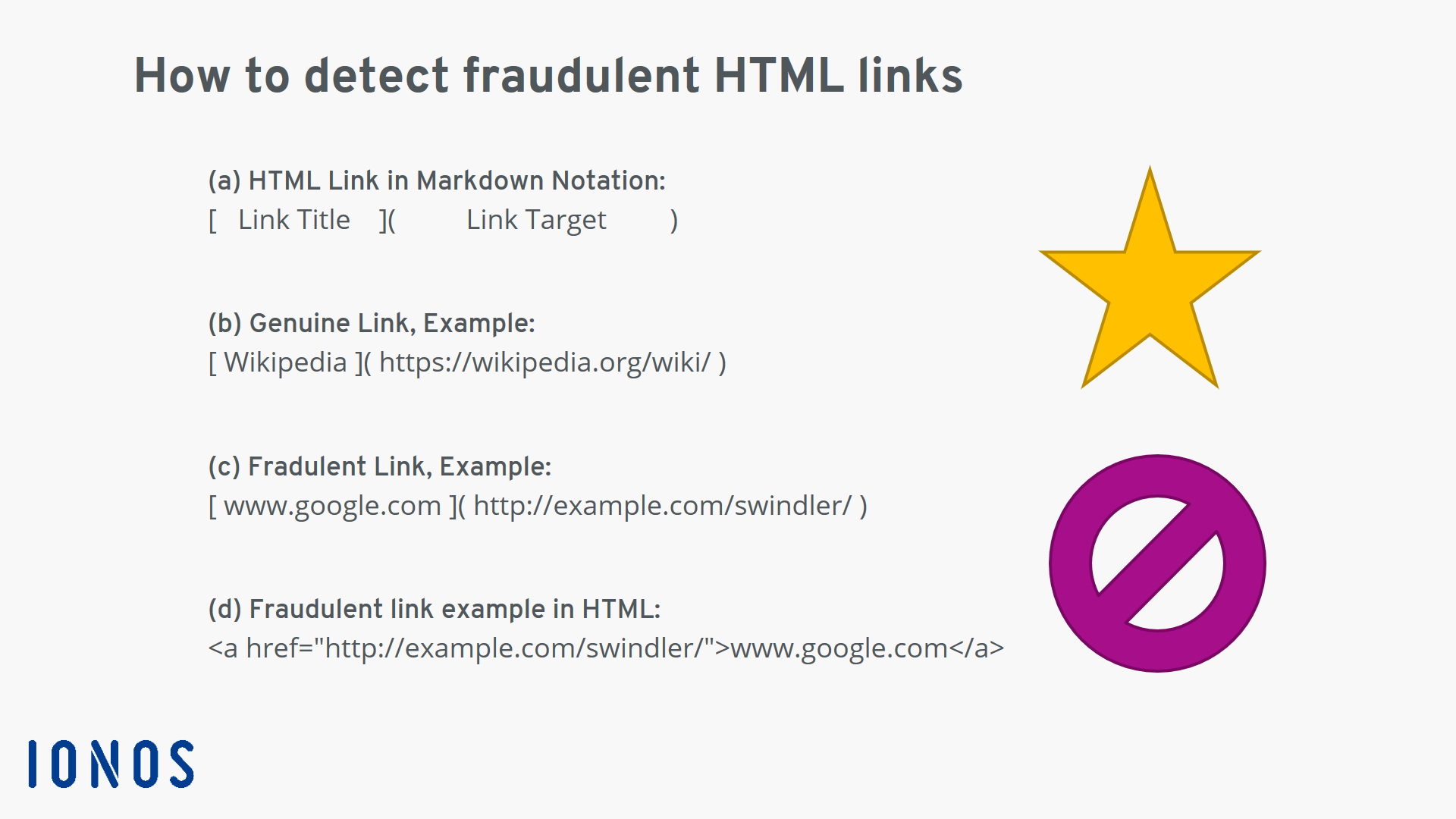
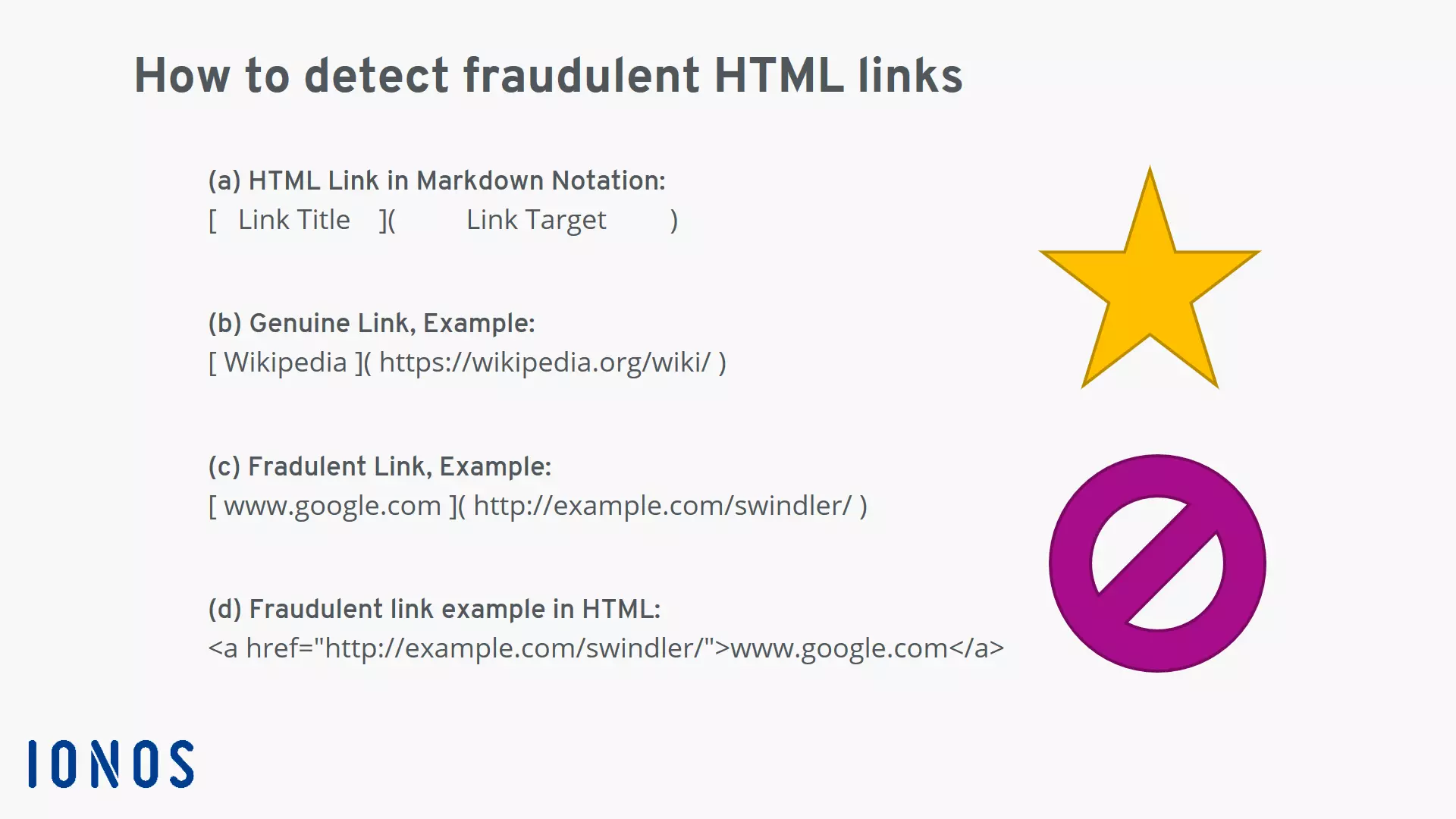
- The schema of an HTML link in simple markdown notation.
- Example of a genuine link: The link title reflects the actual website linked.
- Example of a fraudulent link: The link title suggests a harmless site and conceals the actual link destination.
- View of the fraudulent link example in HTML.
To protect yourself, you can check the destination URL of the link. Hold the mouse cursor over the link and you’ll see the actual destination URL. Even better advice is never to click on links in emails. Instead, copy the target address of the link by right-clicking. Next, review the link in an incognito browser window. This helpful trick also works on mobile devices. You can copy the link address and then insert it into a text field before inspecting it.
Misleading URL in the address bar or email header
URLs that are not part of a clickable link are also used for spoofing attacks. Here, attackers often exploit the similarity of various letters to fool their victims. Known as homographic attacks, they can be difficult to detect in certain circumstances.
In simple cases, the attacker may use a URL or domain with letters which – when combined – look like another letter. Here’s a couple of examples:
- Email from “support@lacebook.com”: Instead of a lower-case “f” a small “l” is used.
- Link with destination “https://secure.arnazon.com”: The combination of the letters “rn” appears like the letter “m.” The “secure” subdomain and “https” divert the user’s attention and distract them from the spoofed domain.
The success of the deception is strongly determined by the font used. If the email content sufficiently gets the recipient worked up, however, such a minor detail can often be overlooked.
Another form of homographic attack can be harder to uncover: the internationalized domain name (IDN). With this variant, the attacker sends a URL that contains letters from a different alphabet. If the letter is visually similar to a Latin letter, the illusion can be effectively deceptive. Attackers thereby exploit Punycode addresses. The trick here, for example, is the original URL may not contain a Latin “a”, but the Cyrillic version. Both letters are confusingly similar. Some browsers do not display non-Latin URLs as Punycode. The user therefore is unaware that they have opened a fraudulent a website.
To prevent homographic attacks, you should ensure that your browser always displays domains with non-Latin letters as Punycode. Moreover, you should never click on security-relevant URLs – like your online banking homepage – but save them as bookmarks.
If you find yourself on a website of questionable authenticity, take the following steps:
- Check whether the site was opened via HTTPS encryption: Most modern websites support HTTPS encryption. Nowadays, every webpage that obtains data from you – e.g. a password or a form – should always and only be loaded via HTTPS. If this isn’t the case, there is a heightened risk that the website is a fake.
- Check the SSL certificate: If the website was loaded via HTTPS encryption, you can view the SSL certificate of the server. Make sure that the certificate refers to the organization allegedly behind the website. If it doesn’t, you may have ended up on a falsified website.
- If your doubts seem substantiated, close the browser window.
Digital access is a serious matter. Once confidential data is stolen, it can often be difficult to limit the damage. So, it’s better to be overcautious than careless.
Mail spoofing
Besides the text of the actual message, an email contains meta information in the mail header. The header includes various fields like “From,” “To,” “Reply to,” etc. Using the right software, it’s easily possible to overwrite the contents of the header fields with any arbitrary values. If your boss’s email address appears in the “From” field, this doesn’t necessarily mean the email actually came from this person. An attacker can place their own address in the “Reply to” field. The victim will then believe they are replying to the purportedly legitimate “From” address, when they are actually writing to the “Reply to” address of the attacker.
On the user’s side, there is a range of security measures in the mail software that can help counter mail spoofing attacks. They all aim to detect, mark and filter out spoofed emails:
- Activate the spam filter: The spam filter of your mail program or email server applies heuristics to sort out potentially fake emails. The process is completely automatic and offers an essential degree of protection.
- Use content encryption: Content encryption ensures that the email comes from the sender indicated and that the message has not been altered. Unfortunately, setting up the common procedures PGP and S/MIME takes some effort. While effective, content encryption is still relatively under-utilized outside of certain professional groups. Alternatively, use end-to-end encryption messenger applications. They offer the same advantages in terms of security and can be used immediately.
- Show and inspect the mail header: Better suited to advanced users, it’s possible to display the complete mail header. This approach allows a thorough analysis. The actual origin of the email can be determined with the right know-how.
Plus, there are multiple server-side technologies that aim to prevent the sending of spoofed emails. The most frequently used server-side protections include SPF, DKIM and DMARC.
If you run your own email addresses on your server, you should make sure that at least SPF and DKIM are correctly configured. Otherwise, your legitimate emails may end up caught in the addressee’s spam filter.
Spoofing at the network level
These spoofing attacks attempt to manipulate communication in networks. In this case, the “victim” is not a person, but a network, hardware or software. Since these attacks take place at the level of data packages, they are hardly noticeable to normal users.
DNS spoofing
The Domain Name System, shortened to DNS, is a globally distributed system for translating internet domains into IP addresses. The DNS provides an IP address for a domain name. Already answered queries to the DNS are temporarily stored on the server in the DNS cache. With DNS spoofing, a malicious entry is placed in the DNS cache. Subsequent requests then return a fake IP address for the manipulated entry. Data transmission is redirected to another server. DNS spoofing is used by criminals to carry out phishing and man-in-the-middle attacks.
At the user level, you can protect yourself from DNS spoofing by using encryption technology. Make sure that visited websites are HTTPS-encrypted. The use of a Virtual Private Network (VPN) can also provide protection from DNS spoofing in some instances.
If you run your own domain, you should consider using the protective technology Domain Name System Security Extensions (DNSSEC). DNSSEC uses cryptographic authentication to guarantee the integrity of DNS requests. DNS spoofing is thereby stopped for DNSSEC-protected domains.
Use Domain Guard by IONOS to protect your domains from manipulation.
MAC spoofing
MAC spoofing has nothing to do with a certain famous company from California. Instead, the eponymous MAC address refers to the physical address of a network device. The MAC address is a unique number assigned once to any network device worldwide. Although every network device has a fixed address, it can be easily spoofed at the software level. The ability to spoof a MAC address is often exploited by users to circumvent restrictions.
ARP spoofing
In local networks (LANs), the Address Resolution Protocol (ARP) is used to read out IP addresses belonging to MAC addresses from a table. ARP spoofing attacks seek to manipulate these table entries in order to direct IP data traffic to a malicious MAC address. This allows an attacker to spy on and falsify data communication. These attacks represent a serious threat to security.
IP spoofing
IP spoofing involves sending TCP/IP or UDP/IP data packages with a fake sender address. In most cases, this type of attack is used as part of DoS and DDoS attacks.